
Stop Brute-Force Attacks with fail2ban — SSH, Nginx and WordPress Jails
Put a new VPS on the internet and within minutes its logs fill with failed SSH logins for root, admin and ubuntu. A WordPress site gets the same treatment on wp-login.php and xmlrpc.php. Most of these attempts fail, but they waste CPU, fill your logs and sooner or later one of them guesses a weak password.
fail2ban reads your log files, notices addresses that keep failing, and blocks them in the firewall for a while. This guide goes beyond "install it and enable SSH": you will write a clean jail.local, add jails for SSH, Nginx and WordPress, test every filter before trusting it, and learn how to unban and whitelist addresses — including your own.
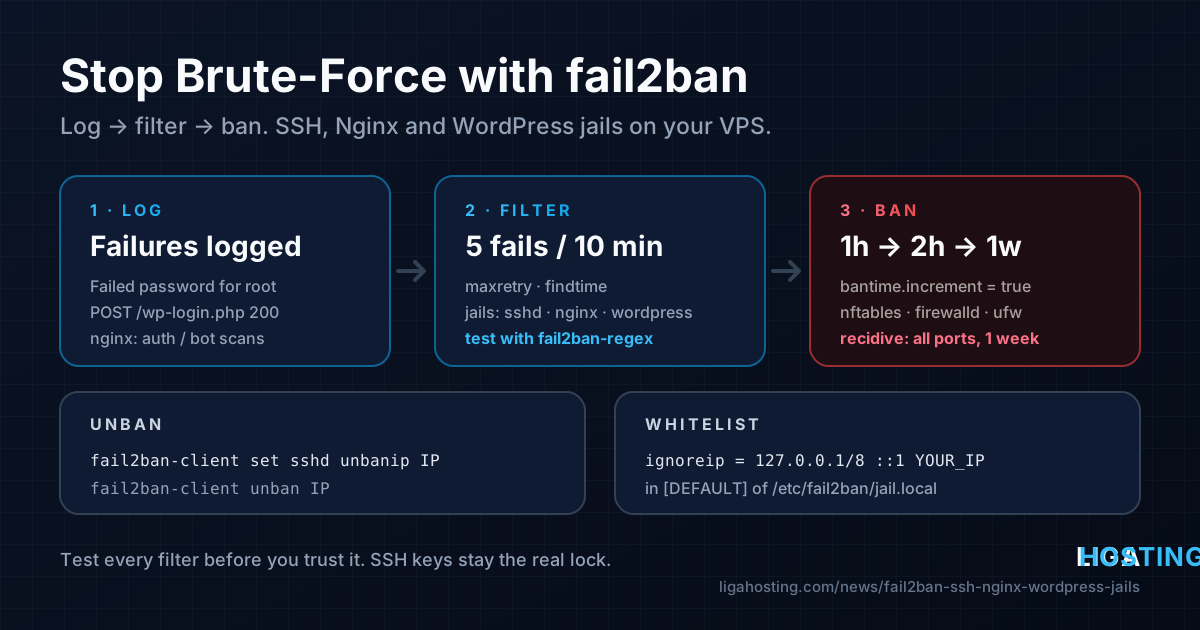
How fail2ban works in one minute
fail2ban is built from three pieces:
- Filter — a set of regular expressions that recognise a "failure" in a log line (a wrong SSH password, a 401 from Nginx, a POST to
wp-login.php). Filters live in/etc/fail2ban/filter.d/. - Action — what to do with an offending IP, usually adding it to an nftables, iptables or firewalld block list. Actions live in
/etc/fail2ban/action.d/. - Jail — ties a filter, a log source and an action together, with three numbers:
maxretryfailures withinfindtimelead to a ban lastingbantime.
Never edit jail.conf: package updates overwrite it. Put your settings in /etc/fail2ban/jail.local (or in files under /etc/fail2ban/jail.d/), which override the defaults.
Install fail2ban
Ubuntu and Debian:
sudo apt update
sudo apt install -y fail2ban python3-systemd
sudo systemctl enable --now fail2ban
AlmaLinux / Rocky Linux (the package comes from EPEL; fail2ban-firewalld makes it ban through firewalld):
sudo dnf install -y epel-release
sudo dnf install -y fail2ban fail2ban-firewalld python3-systemd
sudo systemctl enable --now fail2ban
Check that the service is running and see what the distribution already enabled:
sudo systemctl status fail2ban --no-pager
sudo fail2ban-client status
ls /etc/fail2ban/jail.d/
Debian and Ubuntu ship a small file in jail.d/ that enables the sshd jail. That is a start, but the defaults (10-minute bans, no whitelist) are weak, so we replace them with our own configuration.
A clean jail.local
Create /etc/fail2ban/jail.local with sudo nano /etc/fail2ban/jail.local:
[DEFAULT]
# Never ban these: localhost and your own static IP(s)
ignoreip = 127.0.0.1/8 ::1 198.51.100.25

# 5 failures within 10 minutes = banned for 1 hour
findtime = 10m
maxretry = 5
bantime  = 1h

# Repeat offenders get longer bans: 1h, 2h, 4h ... up to 1 week
bantime.increment = true
bantime.factor    = 2
bantime.maxtime   = 1w

[sshd]
enabled  = true
port     = ssh
backend  = systemd
maxretry = 4
What the important lines do:
ignoreip— addresses that are never banned. Replace198.51.100.25with the static IP of your office or home connection (find it withcurl -4 ifconfig.mefrom that network). If your IP changes often, leave it out rather than whitelisting a whole provider range.bantime.increment— each new ban of the same IP doubles in length. Bots that return every hour quickly end up blocked for a week.backend = systemd— reads SSH failures from the systemd journal. Recent Debian releases no longer write/var/log/auth.logby default, and the journal works the same way on Ubuntu, Debian and AlmaLinux.port = ssh— if you moved SSH to another port, write the number, for exampleport = 2222. Otherwise the ban blocks the wrong port and attackers keep trying.
Validate the configuration and apply it:
sudo fail2ban-client -t          # syntax check, prints "OK: configuration test is successful"
sudo systemctl restart fail2ban
sudo fail2ban-client status sshd
On AlmaLinux, fail2ban-firewalld already sets banaction = firewallcmd-rich-rules. On Ubuntu and Debian the default action works together with UFW without extra settings. If you use UFW and want bans to appear in ufw status, you can add banaction = ufw under [DEFAULT]; our first 30 minutes security checklist covers the rest of the basic hardening.
A repeat-offender jail: recidive
The recidive jail watches fail2ban's own log. An IP that gets banned five times in a day by any jail is then blocked on all ports for a week. Add it to jail.local:
[recidive]
enabled   = true
logpath   = /var/log/fail2ban.log
banaction = %(banaction_allports)s
findtime  = 1d
maxretry  = 5
bantime   = 1w
Together with bantime.increment, this removes most persistent bots from your logs entirely.
Nginx jails
fail2ban ships ready-made filters for Nginx. Three are useful on most servers:
| Jail | What it catches | Log it reads |
|---|---|---|
nginx-http-auth | Wrong passwords on pages protected with auth_basic | error log |
nginx-botsearch | Scanners requesting phpMyAdmin, admin panels and other paths that do not exist | error log |
nginx-limit-req | Clients that keep hitting your limit_req rate limits | error log |
Enable them in jail.local:
[nginx-http-auth]
enabled = true

[nginx-botsearch]
enabled = true

[nginx-limit-req]
enabled  = true
maxretry = 10
The port (http,https) and log path (/var/log/nginx/error.log) come from the defaults in jail.conf. nginx-limit-req only makes sense if you have configured limit_req_zone and limit_req in Nginx; without them it never matches anything.
Behind Cloudflare or another proxy? Then every request reaches Nginx from a proxy address, and fail2ban would ban the proxy instead of the attacker. Configure Nginx to log the real visitor IP first — the steps are in our article on Cloudflare error 522, which also explains why such bans cause intermittent outages. Even then, a firewall ban does not stop proxied traffic, because packets still arrive from the proxy; for proxied sites, blocking at the proxy (for example Cloudflare's firewall rules) is more effective.
A WordPress jail with a custom filter
WordPress has no built-in filter, but its login is easy to recognise in the Nginx access log. A failed login on wp-login.php returns 200 (the form is shown again with an error), a successful one returns 302 (redirect to the dashboard). Calls to xmlrpc.php are a favourite of brute-force tools because one request can try many passwords.
Create /etc/fail2ban/filter.d/wordpress-login.conf:
[Definition]
failregex = ^<HOST> \S+ \S+ \[[^\]]+\] "POST /(?:wp-login\.php|xmlrpc\.php)[^"]*" (?:200|403|429)
ignoreregex =
Then the jail in jail.local:
[wordpress-login]
enabled  = true
port     = http,https
filter   = wordpress-login
logpath  = /var/log/nginx/access.log
maxretry = 5
findtime = 10m
bantime  = 2h
If each site has its own access log, use a pattern such as logpath = /var/log/nginx/*access.log. If you use Jetpack, the WordPress mobile app or another service that really needs XML-RPC, remove |xmlrpc\.php from the filter; otherwise it is safer to block xmlrpc.php in Nginx entirely.
Apache users can use the same filter with logpath = /var/log/apache2/access.log (Debian/Ubuntu) or /var/log/httpd/access_log (AlmaLinux), since both use the same "combined" log format by default.
Test a jail before you trust it
A filter that matches nothing gives you a false sense of security. A filter that matches too much bans real visitors. Test both with fail2ban-regex, which runs a filter against a log without banning anyone:
# Custom WordPress filter against the real access log
sudo fail2ban-regex /var/log/nginx/access.log /etc/fail2ban/filter.d/wordpress-login.conf

# Built-in SSH filter against the journal
sudo fail2ban-regex systemd-journal sshd
Look at the summary at the end: Lines: 12500 lines, 0 ignored, 37 matched means the filter recognised 37 failures. Add --print-all-matched to see exactly which lines matched and make sure no normal traffic is among them.
You can also write a test line yourself:
sudo fail2ban-regex '192.0.2.44 - - [22/Oct/2026:10:15:02 +0000] "POST /wp-login.php HTTP/1.1" 200 4521 "-" "Mozilla/5.0"' \
  /etc/fail2ban/filter.d/wordpress-login.conf
Finally, test the action — the actual firewall block — with a manual ban on a documentation address:
sudo fail2ban-client set wordpress-login banip 192.0.2.44
sudo fail2ban-client status wordpress-login     # shows the IP under "Banned IP list"
sudo nft list ruleset | grep 192.0.2.44         # Ubuntu/Debian with nftables
sudo firewall-cmd --list-rich-rules             # AlmaLinux with firewalld
sudo fail2ban-client set wordpress-login unbanip 192.0.2.44
To test end to end, try a few wrong SSH passwords from a different connection (a phone hotspot works well) and watch the ban appear live with sudo tail -f /var/log/fail2ban.log.
Unbanning an IP
Sooner or later a colleague mistypes a password too often, or you ban yourself. The commands:
# Which IPs are banned, in which jails
sudo fail2ban-client banned

# Remove one IP from one jail
sudo fail2ban-client set sshd unbanip 198.51.100.25

# Remove one IP from every jail at once
sudo fail2ban-client unban 198.51.100.25

# Remove all bans (for example after a wrong filter banned real visitors)
sudo fail2ban-client unban --all
If you are locked out of SSH yourself, connect from another IP address (again, a mobile hotspot is the quickest option), unban your address and add it to ignoreip. Or simply wait: with bantime = 1h the ban expires on its own. Note that bans are stored in fail2ban's database and are restored after a restart, so restarting the service does not unban anyone.
Whitelisting addresses the right way
The permanent whitelist is ignoreip in the [DEFAULT] section, so it applies to every jail. It accepts single IPs, CIDR ranges and hostnames, separated by spaces:
ignoreip = 127.0.0.1/8 ::1 198.51.100.25 192.0.2.0/28Be careful with one detail: if you set ignoreip inside a jail section, it replaces the default list for that jail instead of adding to it. Keep the whitelist in [DEFAULT] unless you have a reason not to.
To whitelist an address immediately, without editing files or restarting:
sudo fail2ban-client set sshd addignoreip 198.51.100.25
sudo fail2ban-client get sshd ignoreip
This change lasts until the next restart, so add the address to jail.local as well. Things worth whitelisting: your office IP, monitoring services that log in over SSH, and your own backup server. Things not to whitelist: entire hosting or mobile provider ranges — attackers use them too.
Everyday commands and what fail2ban does not do
sudo fail2ban-client status                 # list of active jails
sudo fail2ban-client status sshd            # failures and bans for one jail
sudo fail2ban-client reload                 # apply jail.local changes
sudo journalctl -u fail2ban -n 50           # service errors, e.g. a missing log file
fail2ban is a useful layer, not a complete defence:
- It does not replace SSH keys. With
PasswordAuthentication no, a brute-force attack on SSH cannot succeed at all; fail2ban just keeps the noise down. - It reacts after failures appear in a log, so it does not stop large distributed attacks where every IP tries only once or twice. Network-level DDoS protection handles traffic floods; fail2ban handles patient password guessing.
- It only knows what is in the logs. If a jail points to a log file that does not exist or is empty, it silently protects nothing — that is why testing matters.
Frequently Asked Questions
Does fail2ban use a lot of resources?
No. On a typical VPS it uses a few tens of megabytes of RAM and very little CPU. Even the smallest VPS plan runs it without problems. Very large, busy access logs cost more to parse, so only enable the jails you need.
Is changing the SSH port better than fail2ban?
Moving SSH to another port reduces the number of automated attempts, but it is not security on its own. Use SSH keys, disable password logins and keep fail2ban running. If you change the port, update port = in the sshd jail.
Why does fail2ban-client status show failures but no bans?
Usually the failures have not reached maxretry within findtime, or the IP is in ignoreip. Check /var/log/fail2ban.log for "Ignore" or "Found" lines, and confirm with fail2ban-client get <jail> ignoreip.
Do bans survive a reboot?
Yes. fail2ban stores bans in its SQLite database (/var/lib/fail2ban/fail2ban.sqlite3) and restores those that have not yet expired when the service starts.
Does fail2ban work with IPv6?
Yes, current versions ban IPv6 addresses with the nftables, iptables and firewalld actions. Add your own IPv6 address or prefix to ignoreip if you connect over IPv6.
At Liga Hosting, our Standard VPS and Performance VPS plans come with full root access, NVMe storage and DDoS protection, so you can install fail2ban and configure every jail in this guide yourself. If you prefer not to administer a server, our cPanel web hosting is a simpler starting point for WordPress.