
When Do You Need an Extra IPv4 Address on Your Server?
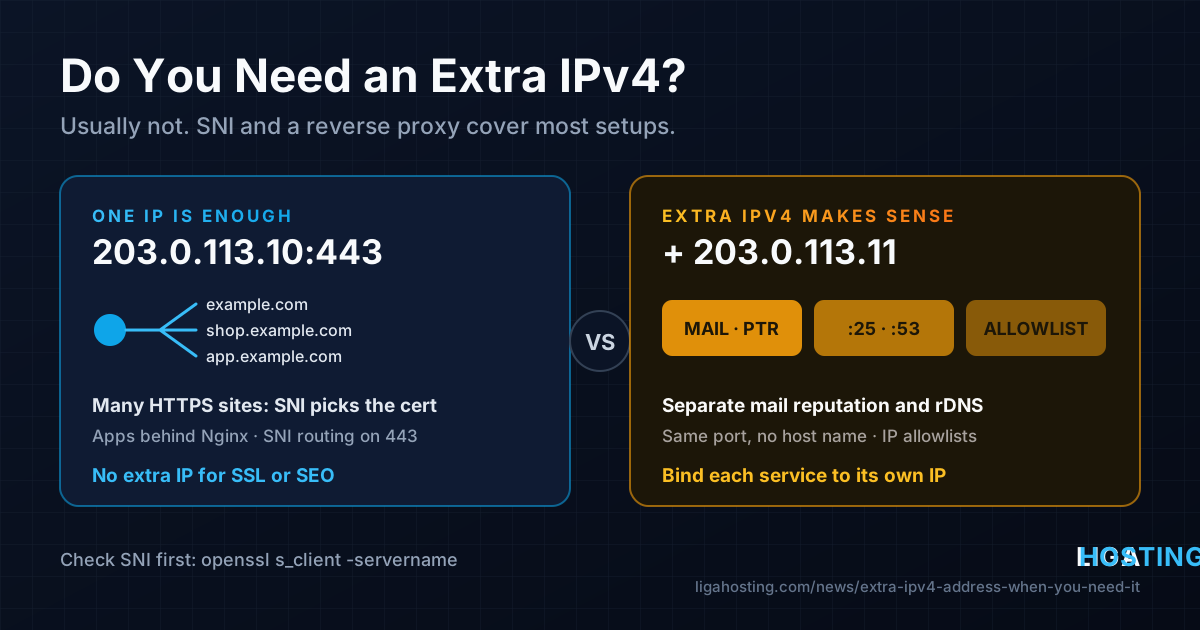
Sooner or later someone tells you that you "need a dedicated IP" — for SSL, for SEO, for a second website or for email. Some of that advice is twenty years old. IPv4 addresses are scarce, so before you ask for another one it is worth knowing which problems a second address really solves and which ones you can solve on the single IP your server already has.
This guide gives you the short answer first, then the cases where an extra IPv4 is the right tool, the alternatives that work for everything else, and the exact commands to add a second address and bind services to it on Ubuntu, Debian and AlmaLinux.
The short answer
| Situation | Extra IPv4 needed? | What to use instead |
|---|---|---|
| Several websites with HTTPS on one server | No | Name-based virtual hosts + SNI |
| Several web apps (Node.js, Docker, PHP) on port 443 | No | Reverse proxy by host name |
| A non-HTTP TLS service that must also use port 443 | Usually no | SNI routing with Nginx stream + ssl_preread |
| Better SEO | No | Search engines do not rank by dedicated IP |
| Separating newsletter mail from transactional mail | Yes | Or an external sending service |
| Two different services that both need the same port and carry no host name (SMTP on 25, DNS on 53, raw TCP) | Yes | Or a different port, if clients allow it |
| A partner or bank allowlists you by IP, per project or per client | Often | One IP per allowlisted identity |
The rest of the article explains each line.
Why one IP is usually enough: Host header and SNI
The "one IP per SSL site" rule comes from the time when the server had to choose a certificate before it knew which site the visitor wanted. That changed with SNI (Server Name Indication): the browser sends the host name in the very first TLS message, so the server can pick the right certificate for shop.example.com or blog.example.com on the same IP and port. Plain HTTP has always done the same with the Host header.
Every browser, curl, mobile OS and programming language in normal use today sends SNI. The clients that do not are things like Windows XP-era browsers, very old Android versions and some outdated embedded devices. If you do not have to support those, one IP serves as many HTTPS sites as your server can handle.
You can see SNI at work by asking the same IP for two different names and comparing the certificates you get back:
# Replace the IP and names with your own
for name in example.com shop.example.com; do
  echo "== $name"
  openssl s_client -connect 203.0.113.10:443 -servername "$name" </dev/null 2>/dev/null \
    | openssl x509 -noout -subject -ext subjectAltName
done
If each name returns its own certificate, SNI is working and adding an IP for "SSL" would change nothing. Free Let's Encrypt certificates work exactly the same way; see our guide to HTTPS with Certbot for issuing one per site.
Many apps on the same port: reverse proxy and SNI routing
"Only one program can listen on port 443" is true, but that one program can be a reverse proxy that forwards each request to the right backend by host name. Nginx, Apache, Caddy or HAProxy on port 443, with your apps on local ports such as 127.0.0.1:3000 and 127.0.0.1:8080, covers almost every web setup. We explain that configuration step by step in Host Several Websites and Apps on One VPS with an Nginx Reverse Proxy.
For services that speak TLS but are not HTTP (a TLS-based VPN, an MQTT broker over TLS, a mail client port you want to expose on 443), Nginx can route on the SNI name without decrypting the traffic. This uses the stream module, which lives at the top level of /etc/nginx/nginx.conf, outside the http { } block:
# /etc/nginx/nginx.conf  (top level, next to http { })
stream {
    map $ssl_preread_server_name $backend {
        vpn.example.com    127.0.0.1:8443;   # the non-HTTP TLS service
        default            127.0.0.1:4443;   # your normal Nginx HTTPS sites
    }
    server {
        listen 443;
        ssl_preread on;
        proxy_pass $backend;
    }
}
Then change your HTTPS server blocks to listen 127.0.0.1:4443 ssl; so they no longer compete for port 443. Check that the module is available and the configuration is valid:
nginx -V 2>&1 | grep -o with-stream      # built in, or:
ls /usr/share/nginx/modules-available/ 2>/dev/null | grep stream   # Debian/Ubuntu: libnginx-mod-stream
sudo nginx -t && sudo systemctl reload nginx
sudo ss -ltnp | grep -E ':(443|4443|8443)\s'
One side effect: behind the stream proxy, your backends see every connection as coming from 127.0.0.1. If you need the real visitor IP, add proxy_protocol on; to the stream server and proxy_protocol to the backend listen lines — but only if every backend understands it. The module is described in the official ssl_preread documentation.
When an extra IPv4 really is the right answer
1. Mail reputation you want to keep separate
Receiving mail servers judge you largely by the sending IP: its history, its complaint rate, whether it appears on blocklists, and whether its reverse DNS (PTR) matches the name the server announces. Everything that leaves from one IP shares one reputation.
That is a problem when you mix very different kinds of mail. A newsletter that triggers spam complaints can push password resets and invoices from the same IP into the spam folder. Sending bulk mail from a second IP, with its own PTR record and its own HELO name, keeps the damage contained. It is also the reason a single IP can only carry one PTR record: if two unrelated domains send from one server, only one of them can have matching reverse DNS. The basics of PTR, SPF, DKIM and DMARC are in our mail server guide.
A separate IP is not a fix for bad mailing practices: a new IP with no history has to be warmed up gradually, and it will be blocklisted just as quickly if the list is bad.
2. Two services that need the same port and carry no host name
SNI and the Host header only help when the protocol tells the server which name the client wants. Many protocols do not:
- SMTP on port 25 — other mail servers connect to your MX by IP, and there is no way to route two independent mail systems on one IP and port.
- Authoritative DNS on port 53 — two separate DNS servers (for example two isolated containers) cannot both bind
:53on the same address. - Raw TCP/UDP applications with a fixed port that clients cannot change, such as some VoIP, industrial or legacy software.
If clients can use another port, that is the cheaper solution. If they cannot, a second IP lets each service own the port on its own address.
3. IP-based allowlists and isolation
Payment gateways, banks, B2B APIs and corporate firewalls often allow access only from listed IPs. If you run integrations for several clients or projects and each one must be allowlisted independently — so that removing one does not affect the others — a dedicated outgoing IP per project keeps that clean. The same applies if you want a project to have an address that is never shared with anything else you host.
Myths: when you do not need one
- "Google ranks sites on a dedicated IP higher." It does not. Speed, content and HTTPS matter; who else shares your IP does not.
- "An SSL certificate requires a dedicated IP." Not since SNI, as shown above.
- "I need it to hide my server behind Cloudflare." Proxying hides the web IP, but mail sent from the same server reveals its address in the headers. An extra IP on the same machine changes little; sending mail through a separate host or service does more.
- "Bad neighbours on a shared IP." On a VPS your IPv4 is already dedicated to you. This concern applies to shared hosting, where many accounts usually share one address.
How to add a second IPv4 on Linux
Once your provider has routed an additional address to your server, you have to configure it in the operating system. Use the exact address, prefix length and gateway your provider gives you; the values below are examples. Find your interface name first:
ip -br addr        # e.g. eth0 or ens3, with the current address
ip route           # the default gateway
Ubuntu (netplan): edit the file in /etc/netplan/ and add the new address to the existing addresses list. Do not touch the existing gateway or routes.
network:
  version: 2
  ethernets:
    eth0:
      addresses:
        - 203.0.113.10/24
        - 203.0.113.11/24      # the new address
      # keep your existing routes / nameservers lines unchanged
sudo netplan try # applies the change and rolls back after 120 s if you lose access
# press Enter to keep it once you confirm SSH still worksDebian (ifupdown): add a second stanza for the same interface in /etc/network/interfaces, then bring the address up without restarting the whole network:
# /etc/network/interfaces  (below the existing iface eth0 block)
iface eth0 inet static
    address 203.0.113.11/24
sudo ip addr add 203.0.113.11/24 dev eth0 # active now; the file makes it persistentAlmaLinux (NetworkManager):
nmcli -t -f NAME,DEVICE con show --active          # find the connection name
sudo nmcli con mod "System eth0" +ipv4.addresses 203.0.113.11/24
sudo nmcli con up "System eth0"
Verify the address is present and reachable:
ip -4 addr show dev eth0
ping -c 3 -I 203.0.113.11 1.1.1.1
curl -4 --interface 203.0.113.11 https://ifconfig.me ; echo   # should print the new IP
Finally, allow the services you plan to run on the new IP in your firewall. UFW rules without a destination apply to all addresses; with to 203.0.113.11 you can open a port on one IP only.
Binding services to a specific IP
An extra address is only useful once each service knows which one to use. Two rules matter: a service listening on 0.0.0.0 takes the port on every IP, and outgoing connections use the primary address unless you say otherwise.
Nginx — listen on one IP:
server {
    listen 203.0.113.11:443 ssl;
    server_name legacy.example.com;
    # ...
}
A second program on the same port: change the first one from 0.0.0.0:53 (or :25) to 203.0.113.10:53, then bind the second to 203.0.113.11:53. If you skip the first step, the second fails with "Address already in use". For Docker, publish ports with the IP: -p 203.0.113.11:53:53/udp.
Postfix — send from the second IP: in /etc/postfix/main.cf:
smtp_bind_address = 203.0.113.11
smtp_helo_name = mail2.example.com
sudo postfix check && sudo systemctl reload postfix
sudo ss -tnp state established '( dport = :25 )' # local address should be .11 while mail is sentFor two streams (transactional on one IP, newsletters on the other), define a second transport in master.cf with -o smtp_bind_address=... and -o smtp_helo_name=..., and route the bulk sender to it with sender_dependent_default_transport_maps. See the Postfix parameter reference.
Check every listener at the end:
sudo ss -ltnup | awk 'NR==1 || /203\.0\.113\./'Reverse DNS and final checks
Each IP has its own PTR record, set by whoever owns the address range — on a VPS, that is your provider. For a mail IP, the PTR name should resolve back to the same IP (forward-confirmed reverse DNS):
dig +short -x 203.0.113.11          # should print mail2.example.com.
dig +short A mail2.example.com      # should print 203.0.113.11
Also update SPF to include the new address (ip4:203.0.113.11) before the first message leaves from it, and confirm the new IP is not already on public blocklists, since a reassigned address may have history.
Frequently Asked Questions
Do I need a dedicated IP for an SSL certificate?
No. With SNI, which every modern browser and client supports, any number of certificates can be served from one IP on port 443. A dedicated IP only matters if you must support very old clients that do not send SNI.
Does a dedicated IP help SEO?
No. Search engines do not rank sites higher for having their own IP. Response time, content and correct HTTPS are what count.
Can two websites share one IP and still have different certificates?
Yes. Each site gets its own server block and certificate, and the web server picks the right one from the SNI name. You can confirm it with openssl s_client -servername as shown above.
Should my mail server have its own IP?
If the server also hosts busy websites or sends bulk mail, separating mail onto its own IP with a matching PTR record protects deliverability. For a small server sending only a few transactional messages, one IP with correct rDNS, SPF, DKIM and DMARC is enough.
Is IPv6 an alternative to buying more IPv4?
Partly. IPv6 gives you plenty of addresses, but many visitors, mail servers and corporate networks still reach you over IPv4 only. Use IPv6 in addition, not as a replacement for a public IPv4 service.
Every Standard VPS and Performance VPS from Liga Hosting comes with a dedicated IPv4, DDoS protection and full root access, so you can run SNI, reverse proxies and your own mail exactly as described here. On shared hosting, the Web Business plan includes a dedicated IP. If you need an additional address or a reverse DNS change, contact our support team.