
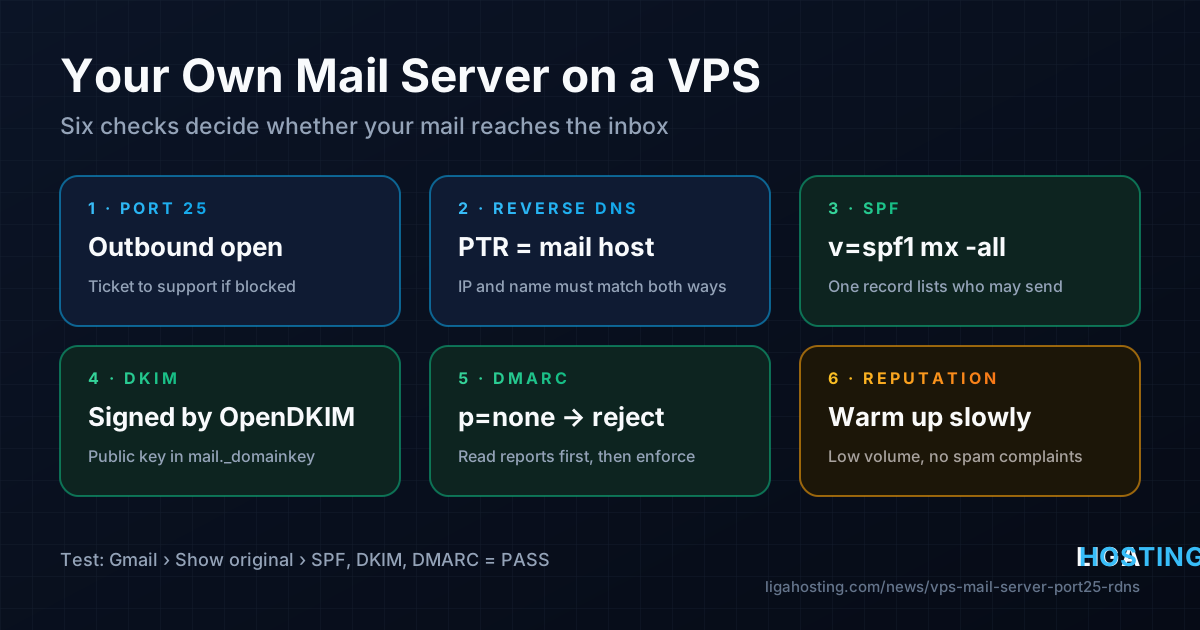
Running Your Own Mail Server on a VPS — Port 25, rDNS, SPF, DKIM and DMARC
You installed Postfix on your VPS, sent a test message to Gmail, and it either never arrived or landed in spam. That is normal for a mail server that has been installed but is not yet trusted: receiving servers check a short list of technical signals first, and a fresh server usually fails several of them.
This guide goes through those signals in order — outbound port 25, reverse DNS, hostname, SPF, DKIM and DMARC — with commands for Ubuntu/Debian (and AlmaLinux where it differs) and a way to verify each step. At the end: when you should not run your own mail server at all.
Why mail from a new server lands in spam
When your server connects to Gmail, Outlook or any other provider, the receiving side checks who you are before it accepts the message. These are the checks that decide most cases:
| Check | What the receiver asks | Typical failure on a new VPS |
|---|---|---|
| Reverse DNS (PTR) | Does the IP resolve to a real host name, and does that name resolve back to the same IP? | Generic or missing PTR record |
| HELO / EHLO name | Does the server introduce itself with a proper name that matches? | Hostname is localhost or a random VPS name |
| SPF | Is this IP allowed to send for the domain in the envelope sender? | No SPF record, or it lists only the old host |
| DKIM | Is the message signed with a key published in the domain's DNS? | No signing configured |
| DMARC | Does SPF or DKIM pass for the same domain as the visible From address? | No DMARC record, or nothing aligned |
| IP reputation | Has this IP sent spam before, or does it send suddenly in large volume? | Listed on a blocklist, or no sending history |
Gmail and Yahoo require SPF or DKIM and valid forward and reverse DNS from every sender, and Gmail, Yahoo and Microsoft require SPF, DKIM and DMARC from bulk senders. If any of the first five rows is missing, expect spam folders or rejections.
Step 1 — Check outbound port 25
Servers deliver mail to each other on TCP port 25. Many providers restrict outbound port 25 on new servers, because one compromised VPS sending spam damages the reputation of the whole IP range. Test it from the VPS:
# Find a Gmail MX host and try to open port 25 (5-second timeout)
dig +short MX gmail.com
nc -vz -w5 gmail-smtp-in.l.google.com 25- "succeeded" / "open": outbound SMTP works, continue.
- Timeout: port 25 is filtered somewhere. Check your own firewall first (
sudo ufw status,sudo iptables -S OUTPUT); if nothing blocks it there, it is restricted at the network level.
At Liga Hosting, outbound port 25 and reverse DNS are handled by support. Open a ticket from the client area or the contact page with the VPS IP, the host name you want as reverse DNS (for example mail.example.com) and briefly what you will send. Create the A record from step 2 before you ask, so the reverse record can be checked right away.
Ports 587 and 465 are for mail clients talking to your server; they cannot replace port 25 for server-to-server delivery.
Step 2 — Hostname, A record and reverse DNS
Pick one name for the mail server, usually mail.example.com, and make three things agree: the A record, the PTR record and the name Postfix uses in its greeting. This match is called forward-confirmed reverse DNS (FCrDNS).
# 1. Set the system hostname
sudo hostnamectl set-hostname mail.example.com

# 2. In your DNS zone, create:
#    mail.example.com.   A    203.0.113.10
#    example.com.        MX   10 mail.example.com.

# 3. After support sets the PTR record, verify both directions
dig +short A mail.example.com      # should print 203.0.113.10
dig +short -x 203.0.113.10         # should print mail.example.com.
If your VPS also has IPv6 and your DNS has an AAAA record for the mail host, Postfix will try IPv6 first towards Gmail and others — and IPv6 without its own reverse DNS is rejected quickly. Either get IPv6 reverse DNS too, or make Postfix use IPv4 only with inet_protocols = ipv4 (step 3).
Step 3 — Install and configure Postfix
Postfix is the standard mail transfer agent on Linux and is a sensible default.
# Ubuntu / Debian — choose "Internet Site" and enter example.com as mail name
sudo apt update
sudo apt install -y postfix

# AlmaLinux
sudo dnf install -y postfix s-nail
sudo systemctl enable --now postfix
Then set the important options in /etc/postfix/main.cf. postconf -e edits the file safely:
sudo postconf -e 'myhostname = mail.example.com'
sudo postconf -e 'mydomain = example.com'
sudo postconf -e 'myorigin = $mydomain'
sudo postconf -e 'inet_interfaces = all'
sudo postconf -e 'inet_protocols = ipv4'
sudo postconf -e 'mydestination = $myhostname, localhost.$mydomain, localhost, $mydomain'
sudo postconf -e 'mynetworks = 127.0.0.0/8 [::1]/128'
sudo postconf -e 'smtpd_relay_restrictions = permit_mynetworks, permit_sasl_authenticated, reject_unauth_destination'

# TLS with a Let's Encrypt certificate for mail.example.com
sudo postconf -e 'smtpd_tls_cert_file = /etc/letsencrypt/live/mail.example.com/fullchain.pem'
sudo postconf -e 'smtpd_tls_key_file = /etc/letsencrypt/live/mail.example.com/privkey.pem'
sudo postconf -e 'smtpd_tls_security_level = may'
sudo postconf -e 'smtp_tls_security_level = may'

sudo postfix check && sudo systemctl restart postfix
The most important line is reject_unauth_destination: only local programs and authenticated users may send to outside domains. Without it you run an open relay and your IP will be blocklisted within hours. Get the certificate with Certbot, for example sudo certbot certonly --standalone -d mail.example.com while port 80 is free (see the Certbot documentation).
Open the mail ports in the firewall. Port 25 inbound is needed only if this server also receives mail:
sudo ufw allow 25/tcp
sudo ufw allow 587/tcp     # only if mail clients will send through this server
# AlmaLinux: sudo firewall-cmd --permanent --add-service=smtp && sudo firewall-cmd --reload
Harden the server first — mail servers attract brute-force attempts. Our first 30 minutes security checklist covers SSH keys, UFW and fail2ban.
Step 4 — SPF: say which servers may send for your domain
SPF is a single TXT record on the domain that lists who is allowed to send mail for it. For a server that is also the MX:
example.com. TXT "v=spf1 mx a:mail.example.com -all"mxanda:mail.example.comallow your mail server's IP. You can also writeip4:203.0.113.10.-alltells receivers to fail everything else. Use~all(soft fail) while you are still finding all the places that send for your domain.- A domain may have only one SPF record. If you also send through another service (a newsletter tool, your office mail), add its
include:to the same record instead of creating a second one.
dig +short TXT example.com | grep spf1Step 5 — DKIM: sign every outgoing message
DKIM signs each message. The private key stays on your server; the public key goes into DNS so receivers can verify the message came from your domain unchanged. OpenDKIM does the signing and plugs into Postfix as a milter.
# Ubuntu / Debian
sudo apt install -y opendkim opendkim-tools

# AlmaLinux (OpenDKIM is in EPEL)
sudo dnf install -y epel-release
sudo dnf install -y opendkim opendkim-tools

# Generate a 2048-bit key with the selector "mail"
sudo mkdir -p /etc/opendkim/keys/example.com
sudo opendkim-genkey -b 2048 -d example.com -s mail -D /etc/opendkim/keys/example.com
sudo chown -R opendkim:opendkim /etc/opendkim/keys
sudo chmod 600 /etc/opendkim/keys/example.com/mail.private
Set these lines in /etc/opendkim.conf (change existing ones rather than duplicating them):
Mode            sv
Domain          example.com
Selector        mail
KeyFile         /etc/opendkim/keys/example.com/mail.private
Socket          inet:8891@localhost
Canonicalization relaxed/simple
Then connect Postfix to it and restart both services:
sudo postconf -e 'milter_default_action = accept'
sudo postconf -e 'smtpd_milters = inet:localhost:8891'
sudo postconf -e 'non_smtpd_milters = $smtpd_milters'
sudo systemctl enable --now opendkim
sudo systemctl restart opendkim postfix
Publish the public key. The file mail.txt contains the record, already formatted for a BIND zone; in a web DNS panel create a TXT record named mail._domainkey and paste the value from v=DKIM1 onwards, joining the quoted pieces into one string:
sudo cat /etc/opendkim/keys/example.com/mail.txt

# After DNS has updated, test the key
sudo opendkim-testkey -d example.com -s mail -vvv    # should end with "key OK"
"key not secure" in that output only means your DNS zone is not signed with DNSSEC; it does not stop DKIM from working.
Step 6 — DMARC: tie it together and get reports
DMARC tells receivers what to do when a message claims to be from your domain but fails SPF and DKIM alignment — meaning the domain that passed is not the domain in the visible From address. It also asks them to send you daily reports.
_dmarc.example.com. TXT "v=DMARC1; p=none; rua=mailto:dmarc@example.com; adkim=r; aspf=r"- Start with
p=none: nothing is blocked, you only collect reports. - Read the reports for two to four weeks. They show every IP that sent mail using your domain and whether it passed. Fix any legitimate sender that fails.
- Move to
p=quarantine(failures go to spam), thenp=rejectonce you are confident. This is what stops others from forging your domain.
The full specification is published as RFC 7489.
Step 7 — Test the result
Send a real message to an outside mailbox and read the headers:
echo "Test body" | mail -s "Delivery test" -r admin@example.com you@gmail.com

# Watch what Postfix does with it
sudo tail -f /var/log/mail.log          # Ubuntu / Debian
sudo journalctl -u postfix -f           # AlmaLinux and newer Debian

# Messages waiting in the queue, and why
mailq
On Ubuntu/Debian the mail command comes from the mailutils package. In Gmail, open the message, choose Show original, and look for SPF: PASS, DKIM: PASS and DMARC: PASS. In the log, status=sent (250 ...) means the remote server accepted the message. A 5xx response explains in its text what was wrong — a missing PTR, a listed IP or a failed check are usually named directly.
Also check that your IP is not on a blocklist at check.spamhaus.org; if it is listed, the page explains why and how to request removal.
Reputation: why it still goes to spam after everything passes
Passing SPF, DKIM and DMARC proves who you are, not that you are worth reading. A new IP has no history, so providers are cautious:
- Warm up slowly. Start with normal personal and transactional volume, not a newsletter to thousands.
- Send only expected mail. "Report spam" clicks hurt most. Watch them in Google Postmaster Tools and Microsoft SNDS.
- Keep the server clean. A hacked contact form or weak SMTP password will send spam through you. A suddenly large
mailqis the first sign. - Keep the IP. Reputation belongs to the IP and domain; changing servers often means starting again.
When an external mail service is the better choice
A mail server is a long-term commitment: updates, spam filtering, mailbox backups, blocklist monitoring. A VPS fits some cases and not others:
| Situation | Better choice |
|---|---|
| App sends password resets, invoices, notifications | Own Postfix with SPF/DKIM works well; a transactional relay is easier if you send a lot |
| Newsletters and marketing to large lists | A dedicated email marketing service: it handles unsubscribe, bounces and reputation |
| Team mailboxes with webmail, calendars, phones | A hosted mailbox provider, or cPanel email on web hosting for small sites |
| You want full control, privacy and learn the stack | Own mail server on a VPS — following every step in this guide |
A common middle way: keep mailboxes with a hosted provider and let the VPS send only application mail, or make Postfix relay outgoing mail through an external SMTP service with relayhost — then add that service's include: to SPF and enable its DKIM signing.
Frequently Asked Questions
Why is outbound port 25 restricted on many VPS?
Because a single compromised server sending spam can get a whole IP range blocklisted, which affects every customer on it. Providers therefore restrict port 25 or enable it on request. At Liga Hosting you ask for it through a support ticket.
Can I set reverse DNS myself?
No. The PTR record belongs to the owner of the IP address, not to your domain's DNS zone. Create the A record for your mail host first, then ask support to set the matching reverse DNS on your VPS IP.
Do I need all three: SPF, DKIM and DMARC?
Yes, for reliable delivery today. SPF and DKIM each prove part of the story, and DMARC connects them to the From address that people actually see. Large providers expect all three, especially from new IPs.
Everything passes but Gmail still uses the spam folder. What now?
That is a reputation issue, not a configuration issue. Keep volume low and consistent, make sure recipients want the mail, check the IP on blocklists and watch Google Postmaster Tools. Reputation improves over weeks of clean sending.
Which VPS size does a mail server need?
Postfix and OpenDKIM alone use very little memory. Add more RAM if you also run spam filtering for incoming mail (for example Rspamd or SpamAssassin), an IMAP server and webmail. Start small; upgrades within the same VPS line can be done from the client area.
At Liga Hosting, our Standard VPS and Performance VPS plans come with a dedicated IPv4 address and full root access, so you control Postfix, DNS signing and every setting in this guide. For mailboxes without running a server, look at our web hosting. Contact us to set reverse DNS or open port 25 on your VPS.