
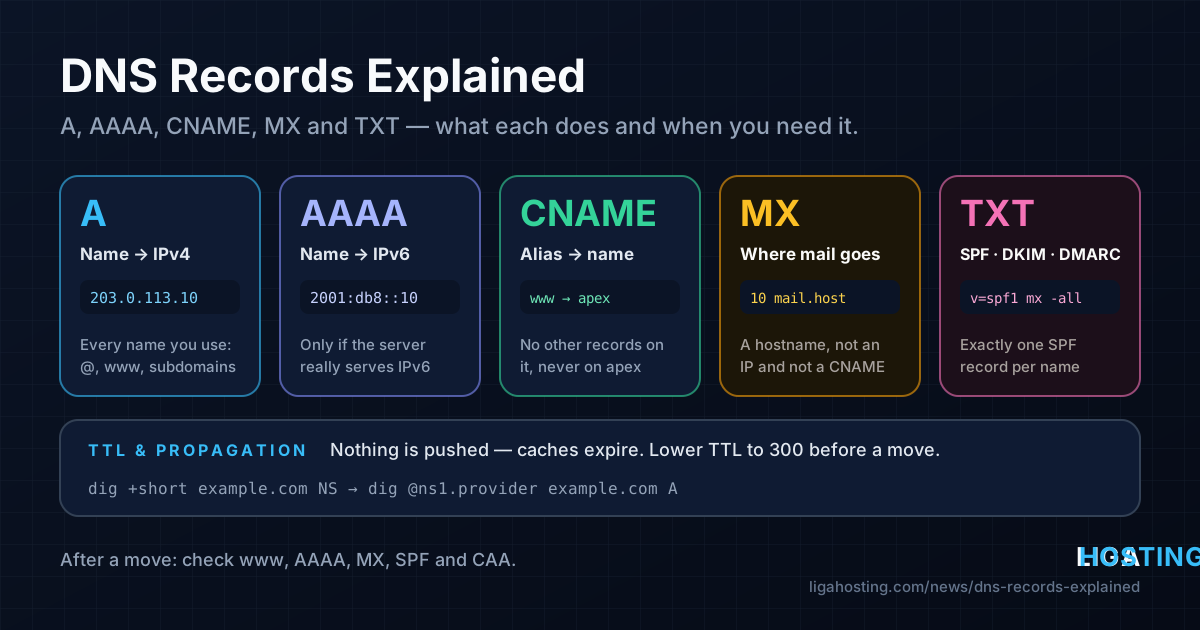
DNS Records Explained — A, AAAA, CNAME, MX, TXT and When You Need Each
You bought a domain, you have a server, and now a control panel asks you to "add a record". Type? Name? Value? TTL? Most DNS problems are not exotic: a record points to the old server, the www name was forgotten, or mail still goes to the previous host a week after the move.
This guide explains the five record types you will use 95% of the time, when you need each one, how TTL and "propagation" actually work, and the mistakes that show up most often after moving to a new host. Every section ends with a dig command, so you can check what the world really sees instead of guessing.
How a DNS lookup works in one minute
Three parties are involved, and knowing which one you are talking to explains almost every "but I changed it already" moment:
- The registrar — where you bought the domain. Its only DNS job is to tell the TLD (
.com,.ro…) which nameservers are responsible for your domain. - The authoritative nameservers — where your records (the zone) actually live. This can be the registrar, your hosting control panel, Cloudflare or another DNS provider. Only the zone on the nameservers listed at the registrar counts; records you edit anywhere else are ignored.
- Resolvers — the DNS servers of your ISP, your office, or public ones like 1.1.1.1 and 8.8.8.8. They ask the authoritative servers and cache the answer for as long as the record's TTL says.
So "DNS changed but my site still shows the old server" almost always means one of two things: you edited a zone that is not authoritative, or a resolver is still serving a cached answer.
The main record types at a glance
| Type | What it does | Typical value | You need it when |
|---|---|---|---|
| A | Name → IPv4 address | 203.0.113.10 | Any name that should reach a server over IPv4 |
| AAAA | Name → IPv6 address | 2001:db8::10 | Only if the server really serves that name over IPv6 |
| CNAME | Name → another name (alias) | example.com. | Subdomains that should follow another hostname |
| MX | Where email for the domain is delivered | 10 mail.example.com. | The domain receives email |
| TXT | Free text: SPF, DKIM, DMARC, verification | "v=spf1 mx -all" | Email authentication, proving domain ownership |
| NS | Which servers are authoritative | ns1.dns-provider.example. | Set by the DNS provider; change only when moving DNS |
| CAA | Which certificate authorities may issue for you | 0 issue "letsencrypt.org" | Optional hardening for SSL certificates |
| PTR | IP → name (reverse DNS) | mail.example.com. | Mail servers; set by whoever owns the IP |
Here is a small, complete zone for a site and a mail server on one VPS, in the standard BIND notation most panels import and export:
$TTL 3600
example.com.                 IN  A      203.0.113.10
www.example.com.             IN  CNAME  example.com.
mail.example.com.            IN  A      203.0.113.10
example.com.                 IN  MX     10 mail.example.com.
example.com.                 IN  TXT    "v=spf1 mx -all"
_dmarc.example.com.          IN  TXT    "v=DMARC1; p=none; rua=mailto:dmarc@example.com"
example.com.                 IN  CAA    0 issue "letsencrypt.org"
Note the trailing dot in example.com.: it means "this name is complete". In a raw zone file, a name without the dot gets the domain appended, so mail.example.com becomes mail.example.com.example.com.. Most web panels add the dot for you; zone files and some APIs do not.
A and AAAA — pointing a name at a server
An A record connects a name to an IPv4 address. You usually need at least two: the bare domain (often shown as @ in panels) and www. Every subdomain you use — api, shop, mail — needs its own record, unless you add a wildcard (*.example.com), which matches any name that has no record of its own.
An AAAA record does the same for IPv6. The rule that saves the most trouble: only publish AAAA if the server answers on that IPv6 address — web server listening on IPv6, firewall allowing it, certificate covering the name. Browsers and mail servers prefer IPv6 when an AAAA record exists. A stale or half-configured AAAA record produces errors for only some visitors, which is the hardest kind of problem to diagnose.
Check what is published:
# On Ubuntu/Debian: sudo apt install bind9-dnsutils
# On AlmaLinux:     sudo dnf install bind-utils
dig +short example.com A
dig +short example.com AAAA
dig +short www.example.com

# On the server: which IPs does it actually have?
ip -4 addr show scope global
ip -6 addr show scope global
The two lists should match. If dig returns an address that is not on your server, that is your problem.
CNAME — aliases, and where you cannot use them
A CNAME says "this name is the same as that name; go and look that one up instead". It is useful when the target IP is managed by someone else (a CDN, a SaaS shop, a status page) or when several subdomains should always follow one main name. Change the A record of example.com and www follows automatically.
CNAME has strict rules, and breaking them is a classic mistake:
- A name with a CNAME can have no other records. You cannot have a CNAME and an MX or TXT on the same name. Many panels refuse; some accept it silently and things break in strange ways.
- No CNAME on the bare domain. The apex (
example.com) always has NS and SOA records, so by the rule above it cannot be a CNAME. Use an A record there. Some providers offer ALIAS, ANAME or "CNAME flattening", which resolve the target on their side and answer with an A record — fine to use, but it is a provider feature, not a standard record type. - MX and NS must not point to a CNAME. They must point to a name that has its own A/AAAA record.
- The target is a name, never an IP.
www CNAME 203.0.113.10is invalid.
dig +short www.example.com CNAME     # shows the alias target
dig www.example.com                  # full answer: CNAME line, then the A record it leads to
MX — where your email goes
An MX record tells other mail servers where to deliver mail for @example.com. It has a priority number and a hostname: lower numbers are tried first, and records with equal numbers share the load.
example.com.  IN  MX  10 mail.example.com.
example.com. IN MX 20 backup-mx.example.net.- The MX value is a hostname with its own A record — not an IP address and not a CNAME.
- If you use an external mail service (Google Workspace, Microsoft 365 and similar), copy their MX values exactly and delete the old MX records. A forgotten old MX with a lower priority keeps taking your mail.
- A domain that never receives mail can say so with a "null MX":
example.com. MX 0 . - Web hosting and mail can live in different places. Moving the website to a new server does not require touching MX — unless the mail was hosted on the old server too.
dig +short example.com MX
dig +short mail.example.com A
TXT — SPF, DKIM, DMARC and verification
A TXT record holds text. DNS itself does not interpret it; other systems read it. The common uses:
- SPF (on the domain itself): which servers may send mail for the domain, for example
"v=spf1 mx ip4:203.0.113.10 include:_spf.mailprovider.example -all". Keep exactly onev=spf1record per name — two SPF records make SPF fail. SPF is also limited to 10 DNS lookups (eachinclude,a,mxcounts). - DKIM (on
selector._domainkey.example.com): the public key that verifies your mail signatures. The selector name comes from your mail server or provider. - DMARC (on
_dmarc.example.com): what receivers should do when SPF/DKIM fail, and where to send reports. - Verification: search consoles, certificate authorities and SaaS tools ask you to add a TXT value to prove you control the domain.
Long values such as DKIM keys exceed the 255-character limit of a single TXT string. They are stored as several quoted strings in one record, which receivers join together. Most panels split them for you; if you paste into a zone file, split them yourself: "v=DKIM1; k=rsa; p=MIIB..." "...rest of key".
dig +short example.com TXT
dig +short _dmarc.example.com TXT
dig +short default._domainkey.example.com TXT
If you run your own mail on a VPS, our guide to running a mail server with rDNS, SPF, DKIM and DMARC covers these records in depth.
Other records you will meet: NS, SOA, CAA, PTR, SRV
- NS lists the authoritative nameservers. The ones at the registrar decide where your zone lives; the NS records inside the zone should match them.
- SOA holds administrative data for the zone. One field, the last number, also controls how long resolvers cache a "this name does not exist" answer.
- CAA limits which certificate authorities may issue certificates for your domain. If you add one, remember to include every CA you use — otherwise renewals from a CA not on the list will fail.
- PTR (reverse DNS) maps an IP back to a name. It does not live in your domain's zone: it is set by whoever owns the IP block. On a Liga Hosting VPS, ask support to set reverse DNS for your IP.
- SRV points a service (for example SIP or XMPP) to a host and port:
_service._proto.example.com SRV priority weight port target.
TTL and "propagation" — what actually happens
DNS changes are not pushed anywhere. Your authoritative server has the new value immediately. What takes time is that resolvers which already asked keep their cached copy until its TTL (time to live, in seconds) runs out. "Propagation" is simply caches expiring one by one.
- TTL 3600 (1 hour) is a good everyday value. 300 (5 minutes) is good before a planned change.
- The TTL that matters is the one that was in place before your change. Lowering it at the moment of the switch does not help resolvers that cached the old record with a TTL of 86400. Lower it at least one old TTL in advance (24–48 hours before a move is a safe habit), then raise it again once everything is stable.
- Nameserver changes are slower. The NS records at the TLD often have a TTL of up to 48 hours, which you cannot change.
- Negative answers are cached too. If someone looked up
shop.example.combefore you created it, resolvers remember "does not exist" for the SOA negative TTL.
Compare the authoritative answer with what public resolvers have cached:
# 1. Which nameservers are authoritative?
dig +short example.com NS

# 2. Ask one of them directly — this is the "truth" right now
dig @ns1.dns-provider.example example.com A +noall +answer

# 3. Ask public resolvers — the number before IN is the remaining cache time
dig @1.1.1.1 example.com A +noall +answer
dig @8.8.8.8 example.com A +noall +answer

# 4. Follow the whole chain from the root servers, bypassing caches
dig +trace example.com A
If step 2 shows the new value, your change is done and the rest is waiting. If step 2 still shows the old value, you edited the wrong zone or did not save it.
Your own computer has caches too. Flush them before deciding the change "did not work": sudo resolvectl flush-caches on Linux with systemd-resolved, ipconfig /flushdns on Windows, sudo dscacheutil -flushcache; sudo killall -HUP mDNSResponder on macOS. Browsers keep their own short cache, so also try a private window.
Common DNS mistakes after moving to a new host
- Only the bare domain was updated.
example.compoints to the new VPS, butwwwstill has its own A record to the old IP. Check every name:@,www, and each subdomain. - An old AAAA record was left behind. The A record is new, the AAAA still points to the old provider's IPv6. Visitors with IPv6 get the old site or an error. Remove it or update it.
- Nameservers were changed, but the zone was not copied. Switching nameservers to a new provider replaces the entire zone. MX, TXT (SPF, DKIM, verification) and subdomains that existed only at the old provider disappear. Export or write down the old zone before you switch.
- Mail broke after a "website-only" move. The MX pointed to
mail.example.com, which was an A record to the old server. Moving the A record took mail with it. Decide deliberately where mail lives before changing anything. - SPF still lists the old IP. If the new server sends mail (contact forms, notifications), add its IP to the SPF record, or messages start landing in spam.
- The change was made in the wrong place. Records edited in the registrar's panel while the domain uses the hosting or Cloudflare nameservers have no effect. Run
dig +short example.com NSto see where the real zone is. - DNSSEC was left on during a DNS provider change. If the registrar still publishes a DS record for the old provider's key, validating resolvers return
SERVFAILand the domain disappears for many users. Disable DNSSEC (remove the DS) before moving, and re-enable it with the new provider afterwards. - CAA blocks the new certificate. An old CAA record that allows only one CA stops the new server from getting a Let's Encrypt certificate. Check with
dig +short example.com CAA. - A hosts-file entry from testing was forgotten. If you tested the new server via
/etc/hostsorC:\Windows\System32\drivers\etc\hosts, remove the line, or your own computer will keep showing a different server than everyone else. - Cloudflare proxy hides the real IP. With the orange cloud on,
digreturns Cloudflare addresses, not your VPS. That is expected; check the origin IP in the Cloudflare dashboard instead. If you see errors there, our article on Cloudflare error 522 helps.
A short checklist for switching a site to a new server
- Save the current zone: export it from the DNS panel, or query each record type and subdomain with
dig(ANYqueries are usually refused). - Lower the TTL of the records you will change to 300, and wait at least the old TTL.
- Test the new server before switching, without touching DNS:
curl -sI --resolve example.com:443:203.0.113.10 https://example.com/. - Change the A (and AAAA, if used) records for every name. Leave MX alone unless mail is moving too.
- Verify against the authoritative server, then against 1.1.1.1 and 8.8.8.8.
- Keep the old server running until the old TTL has passed and the access logs on it go quiet.
- Raise the TTL back to 3600 or more.
Frequently Asked Questions
How long does DNS propagation really take?
For an ordinary record change, as long as the old TTL: if it was 3600, almost every resolver has the new value within an hour. Nameserver changes can take up to 48 hours because of the TTL at the TLD. Claims of "always 72 hours" are outdated rules of thumb.
Should www be a CNAME or an A record?
Both work. A CNAME to the bare domain means you only update one record when the IP changes. An A record saves one lookup and is required if www also needs other records, such as TXT. Pick one and make sure it points to the same server as the bare domain.
Do I need an AAAA record?
Only if your server is reachable over IPv6 and your web server, firewall and certificates are set up for it. No AAAA record is far better than a wrong one: IPv6-capable visitors simply use IPv4.
Can I point my domain to an IP and port, like 203.0.113.10:8080?
No. A and AAAA records hold only the address; browsers use port 80 or 443. To serve an app running on another port, put a reverse proxy such as Nginx in front of it on 80/443.
Where do I set reverse DNS (PTR) for my VPS?
Not in your domain's zone. The PTR record belongs to the owner of the IP address. For a Liga Hosting VPS, open a ticket and ask support to set the reverse DNS for your IP to the hostname you use, for example mail.example.com, which should have a matching A record.
At Liga Hosting, every Standard VPS and Performance VPS comes with a dedicated IPv4 address, NVMe storage, DDoS protection and full root access — point your A records at it and you control everything behind them. Prefer a cPanel account instead? Our web hosting plans include free SSL and email accounts. Contact us for reverse DNS on your VPS IP.