
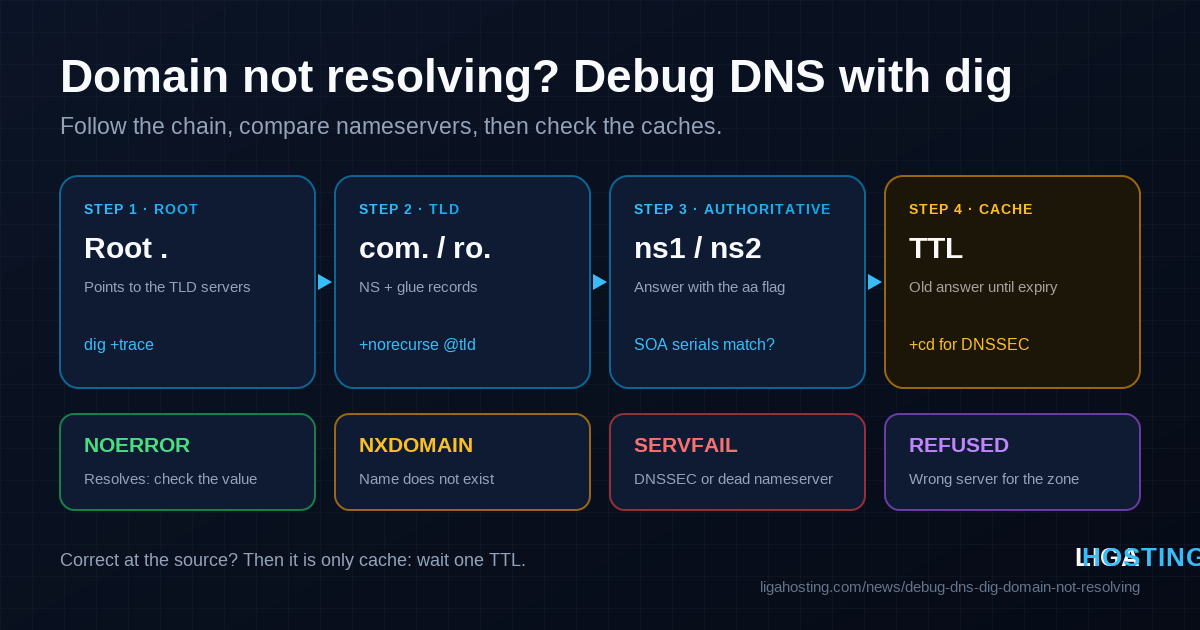
Domain Not Resolving? Debug DNS with dig — Delegation, Caching and Propagation
You changed an A record, pointed a new domain at your VPS or switched nameservers, and the site still does not open. Some people see the new server, some see the old one, and your browser says "DNS_PROBE_FINISHED_NXDOMAIN". The usual advice is "wait for propagation" — but waiting is only the right answer when you know the records are correct.
This guide shows how to find out exactly what is happening with one tool, dig: read its output, follow the delegation, compare nameservers, recognise DNSSEC failures and understand caching. For the record types themselves, see DNS Records Explained.
Install dig and run your first query
dig ships with the BIND utilities. Install it on your VPS or on any Linux machine:
# Ubuntu / Debian
sudo apt update && sudo apt install -y dnsutils

# AlmaLinux / Rocky / RHEL
sudo dnf install -y bind-utils

# Check
dig -v
On macOS dig is already installed. A first query asks your configured resolver for the A record of a name:
dig example.com AThe output looks noisy, but only a few parts matter:
;; ->>HEADER<<- opcode: QUERY, status: NOERROR, id: 41872
;; flags: qr rd ra ad; QUERY: 1, ANSWER: 1, AUTHORITY: 0, ADDITIONAL: 1

;; ANSWER SECTION:
example.com.        3600    IN    A    203.0.113.10

;; Query time: 12 msec
;; SERVER: 127.0.0.53#53(127.0.0.53) (UDP)- status — the result code (see the table below).
- flags —
aa: authoritative answer;ad: validated with DNSSEC. - ANSWER SECTION — the record, with its TTL in seconds before the value.
- SERVER — who answered;
127.0.0.53is the local systemd-resolved stub on Ubuntu.
Add +short to print only the values.
Read the status code first
Most DNS problems can be classified in seconds from the status line alone:
| Status | What it means | Where to look |
|---|---|---|
| NOERROR with an answer | The name resolves; check the value is the one you expect | Wrong IP = wrong record or an old cached answer |
| NOERROR, ANSWER: 0 | The name exists, but has no record of this type (often called NODATA) | You created www as AAAA only, or the A record is missing |
| NXDOMAIN | The name does not exist in the zone that answered | Typo, missing record, wrong zone, or the domain is not delegated |
| SERVFAIL | The resolver tried and failed | Broken DNSSEC, nameservers not answering, lame delegation |
| REFUSED | The server will not answer this question | You asked a nameserver that does not host the zone, or recursion is disabled |
"timed out; no servers could be reached" means nothing answered: port 53 is blocked or the server is down.
Ask different resolvers and the authoritative servers
Your local result can be stale. Ask several public resolvers directly with @:
for r in 1.1.1.1 8.8.8.8 9.9.9.9; do
  echo -n "$r: "; dig +short @"$r" example.com A
done
Then ask the source of truth — the domain's own nameservers. First find them, then query each one:
dig +short NS example.com
# ns1.dns-provider.example.
# ns2.dns-provider.example.

for ns in $(dig +short NS example.com); do
  echo "== $ns"; dig +norecurse @"$ns" example.com A | grep -E 'status|flags|IN\s+A'
done
How to interpret it:
- Authoritative servers return the new IP (with
aa), public resolvers the old one: your change is correct; resolvers still have the old answer cached until its TTL runs out. - Authoritative servers return the old IP: you edited the record in the wrong place — often a panel of a provider whose nameservers the domain does not use.
- The nameservers disagree: the zones are out of sync (see the SOA check below).
Follow the delegation with +trace
When a domain gives NXDOMAIN or SERVFAIL everywhere, the problem is often the delegation: the chain that tells the world which nameservers are responsible for your domain. +trace walks that chain itself, starting at the root, without using any cache:
dig +trace example.com AYou will see the root servers (.), then the TLD servers (such as com. or ro.) returning NS records for your domain, then your nameservers returning the A record. Look at where the chain breaks:
- No NS records from the TLD: the domain is not registered, has expired or is on hold. Check
whois example.comforserverHoldorclientHold. - Unexpected nameservers: the change at the registrar was not saved.
- Timeout at your nameservers: they are down or unreachable.
To see exactly what the registry publishes, ask a TLD server directly. +norecurse makes it answer only from its own data:
# Find the TLD servers, then ask one of them about your domain
dig +short NS com.
dig +norecurse @a.gtld-servers.net example.com NS
The answer appears in the AUTHORITY SECTION, because the TLD only points onwards. It should match dig +short NS example.com; if not, fix the nameservers at the registrar.
Glue records for your own nameservers
If your domain uses nameservers inside itself, such as ns1.example.com, the registry must store their IP addresses as glue records, otherwise nobody can reach them. Glue appears in the ADDITIONAL SECTION of the TLD query above. If it is missing or shows an old IP, update the "child nameservers" in your registrar's panel.
Compare nameservers with the SOA serial
Every zone has an SOA record with a serial number that increases on each change. If your nameservers show different serials, some of them are still serving an old copy of the zone:
for ns in $(dig +short NS example.com); do
  echo -n "$ns  "; dig +short @"$ns" example.com SOA | awk '{print $3}'
done
Different serials on your own BIND or PowerDNS servers mean zone transfers (AXFR/IXFR) or NOTIFY are not working, or you forgot to increase the serial after editing the zone file.
If one server answers REFUSED or without the aa flag, it is listed but does not host the zone — a lame delegation that causes random, hard-to-reproduce failures. Remove it from the NS list or add the zone to it.
SERVFAIL everywhere? Check DNSSEC
SERVFAIL from every validating resolver while the authoritative servers answer normally almost always means a DNSSEC problem. Typical cause: the domain moved to a new DNS provider, but the old DS record is still at the registrar, so resolvers reject every answer.
Test it with +cd (checking disabled), which asks the resolver to skip validation:
dig @1.1.1.1 example.com A          # status: SERVFAIL
dig @1.1.1.1 example.com A +cd      # status: NOERROR -> DNSSEC is broken

# What the registry publishes vs. what your zone signs with
dig +short DS example.com
dig +short DNSKEY example.com- DS exists, but DNSKEY is empty: the parent says the zone is signed, but your new provider does not sign it. Either enable DNSSEC at the new provider and publish its DS record, or remove the DS record at the registrar.
- Both exist but SERVFAIL persists: the DS does not match the current key. Copy the DS values exactly from your DNS provider to the registrar.
Resolvers may keep the old DS cached for its TTL. DNSViz shows the whole chain of trust and the broken link.
Why old answers stick: TTL and negative caching
DNS does not "propagate" in the sense of being pushed anywhere. Each resolver keeps an answer for as long as its TTL says, then asks again. Ask the same resolver twice and you will see the TTL counting down:
dig @8.8.8.8 example.com A | grep -A1 'ANSWER SECTION'
# example.com.   2714   IN   A   198.51.100.7   <- cached, expires in ~45 minutes
Rules worth remembering:
- Lower the TTL before a change. If the TTL is 86400 (one day), set it to 300 a day before you switch IPs, as in a migration without downtime.
- "Not found" is cached too. An NXDOMAIN is cached for the shorter of the SOA record's TTL and its last field ("minimum"). Do not test names before they exist.
- Nameserver changes are slower. NS records at the TLD are often cached for one to two days, so keep the old DNS provider serving the same records for up to 48 hours.
Check what your own machine sees
dig talks directly to a DNS server, but browsers and applications use the operating system's resolver, which also reads /etc/hosts and keeps its own cache. When dig is right and the browser is wrong, look here:
# What applications on Linux will actually get (includes /etc/hosts)
getent hosts example.com

# Ubuntu and other systemd-resolved systems
resolvectl status
resolvectl query example.com
sudo resolvectl flush-caches

# A forgotten line here overrides DNS completely
grep -n example.com /etc/hosts
On Windows run ipconfig /flushdns; on macOS run sudo dscacheutil -flushcache; sudo killall -HUP mDNSResponder. Chrome has its own cache at chrome://net-internals/#dns.
Common mistakes dig will reveal
- The bare domain works,
wwwdoes not (or the opposite). They are separate names; check both:dig +short example.comanddig +short www.example.com. - A CNAME on the bare domain. The zone apex cannot be a CNAME because it already holds SOA and NS records. Use an A record, or your provider's flattening/ALIAS feature.
- A leftover AAAA record. IPv6-capable visitors connect to the old IPv6 address while others reach the new IPv4. Check with
dig +short AAAA example.com. - Proxied records. With Cloudflare's orange cloud on,
digreturns Cloudflare's addresses, not your VPS IP. That is expected.
Frequently Asked Questions
How long does DNS propagation really take?
For a changed record, at most the record's previous TTL — five minutes if it was 300, a day if it was 86400. For a change of nameservers, plan for up to 48 hours because the TLD's NS records are cached longer.
Why does dig show the new IP but my browser opens the old site?
Your browser uses the operating system's resolver, the hosts file and its own cache, and may keep an open connection to the old server. Check the hosts file, flush the caches and test in a private window.
What is the difference between NXDOMAIN and SERVFAIL?
NXDOMAIN is a clear answer: the name does not exist. SERVFAIL means the resolver could not get a trustworthy answer — usually a DNSSEC mismatch or broken nameservers.
Can I use dig to test a nameserver I run on my VPS?
Yes. Query it by IP, over UDP and TCP: dig @203.0.113.10 example.com SOA and the same with +tcp. Run the test from outside the VPS so the firewall is included, and keep port 53 open for both protocols.
Who sets the reverse DNS of my VPS IP?
The PTR record belongs to the owner of the IP block, so it is configured by the hosting provider, not in your domain's DNS zone. Point your domain's A record at the IP first, then ask the provider to set the PTR to the same hostname, and verify it with dig -x.
At Liga Hosting, every Standard VPS and Performance VPS comes with a dedicated IPv4 and full root access, so you can run dig, your own nameserver or any DNS setup you need, while our web hosting plans include cPanel for managing records without a terminal. Contact us when you need reverse DNS set for your VPS IP.