
Ubuntu, Debian or AlmaLinux — Which Linux Distribution for Your VPS?
The first decision on a new VPS is not about Nginx or databases: it is which operating system to install. Most people end up choosing between Ubuntu LTS, Debian and AlmaLinux. All three are free, stable and well documented, and any of them can run a website, an API or a database for years.
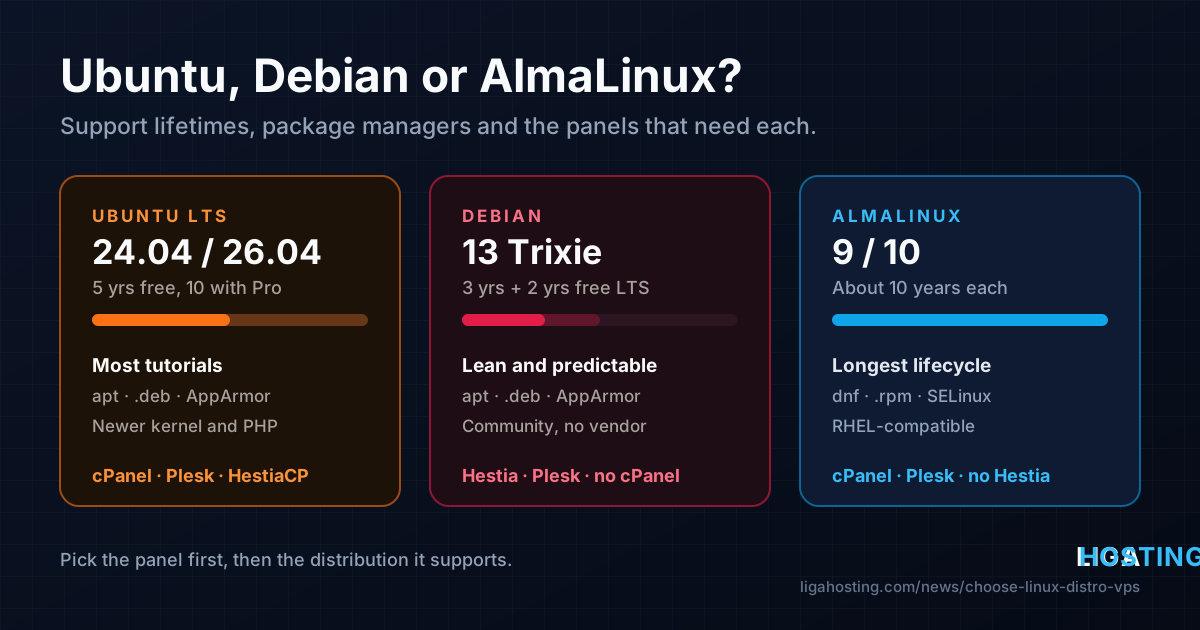
The differences that matter are few: how long each release gets security updates, which package manager you will use every day, and which control panel you plan to install, because some panels support only one family. This guide covers those points with real dates and commands, so you can decide once and not reinstall later.
The short answer
- cPanel & WHM: AlmaLinux or Ubuntu LTS. Not Debian.
- HestiaCP, CloudPanel, most Docker and developer tutorials: Ubuntu LTS or Debian.
- The leanest, most predictable server: Debian.
- Newer kernel and packages, the most tutorials: Ubuntu LTS.
- You know Red Hat / CentOS, or your software is certified for RHEL: AlmaLinux, which is binary-compatible with Red Hat Enterprise Linux.
Otherwise, pick the one you already know.
Support lifetimes: how long each release is kept safe
A server should run a release that still receives security updates. At end of life nothing breaks the next morning, but every newly found vulnerability stays open. The status in October 2026:
| Release | Released | Regular security updates until | Extended (optional) |
|---|---|---|---|
| Ubuntu 22.04 LTS | April 2022 | April 2027 | 2032 with Ubuntu Pro |
| Ubuntu 24.04 LTS | April 2024 | April 2029 | 2034 with Ubuntu Pro |
| Ubuntu 26.04 LTS | April 2026 | April 2031 | 2036 with Ubuntu Pro |
| Debian 12 "Bookworm" | June 2023 | June 2026 | June 2028 (Debian LTS, free) |
| Debian 13 "Trixie" | August 2025 | about August 2028 | June 2030 (Debian LTS, free) |
| AlmaLinux 8 | March 2021 | security fixes only, until 2029 | — |
| AlmaLinux 9 | May 2022 | May 2032 | — |
| AlmaLinux 10 | May 2025 | around 2035 | — |
- AlmaLinux has the longest lifecycle, about 10 years per major version, following Red Hat Enterprise Linux.
- Ubuntu LTS gets 5 years of free standard updates. Ubuntu Pro extends that to 10 years; it is free for personal use on a few machines and a paid subscription for business. Avoid interim releases such as 25.10 on servers: they get only 9 months.
- Debian gives about 3 years from its security team, then about 2 more years of free Debian LTS, which covers the most-used packages rather than the whole archive.
Check what a server runs and whether it is still covered:
# Every distribution
cat /etc/os-release

# Ubuntu
pro status
ubuntu-security-status

# Debian: warns about packages with limited or ended support
sudo apt install -y debian-security-support
check-support-status
The package managers: apt vs dnf
Ubuntu and Debian use apt and .deb packages. AlmaLinux uses dnf and .rpm packages. The ideas are the same; the commands differ:
| Task | Ubuntu / Debian | AlmaLinux |
|---|---|---|
| Install all updates | apt update && apt upgrade | dnf upgrade |
| Search / install | apt search nginx / apt install nginx | dnf search nginx / dnf install nginx |
| Which package owns a file | dpkg -S /usr/sbin/nginx | rpm -qf /usr/sbin/nginx |
| Undo the last transaction | no built-in equivalent | dnf history undo last |
| Automatic security updates | unattended-upgrades | dnf-automatic |
Automatic security updates are worth enabling on any of them.
# Ubuntu / Debian
sudo apt install -y unattended-upgrades
sudo dpkg-reconfigure -plow unattended-upgrades   # answer "Yes"
sudo unattended-upgrade --dry-run --debug 2>&1 | tail -n 20

# AlmaLinux: in /etc/dnf/automatic.conf set
#   upgrade_type = security
#   apply_updates = yes
sudo dnf install -y dnf-automatic
sudo systemctl enable --now dnf-automatic.timer
systemctl list-timers dnf-automatic.timer
On AlmaLinux, many common packages such as fail2ban, htop or certbot live in EPEL, an extra repository from the Fedora project. Enable it once with sudo dnf install -y epel-release and check with dnf repolist.
What ships in each release
The software versions in the official repositories decide whether you will need extra repositories later:
| Ubuntu 24.04 | Debian 13 | AlmaLinux 9 | AlmaLinux 10 | |
|---|---|---|---|---|
| Kernel | 6.8 | 6.12 | 5.14 (heavily backported) | 6.12 |
| PHP | 8.3 | 8.4 | 8.0, newer as modules | 8.3 |
| Python | 3.12 | 3.13 | 3.9, newer in parallel | 3.12 |
AlmaLinux 9 looks old on paper, but security fixes are backported into the same version numbers, and newer PHP, Node.js and database versions are offered as modules: dnf module list php, then sudo dnf module enable php:8.2 before installing. On Ubuntu and Debian, a different PHP version usually means a third-party repository (the ondrej/php PPA or packages.sury.org) — reliable, but one more source you trust with root.
For AlmaLinux 10: like RHEL 10, its main build requires the x86-64-v3 CPU level (AVX2 and related instructions); a separate x86-64-v2 build exists for older CPUs. Check what your VPS reports:
/lib64/ld-linux-x86-64.so.2 --help | grep supported
# Look for:  x86-64-v3 (supported, searched)
Control panels: which one needs which distribution
This is often where the choice is made for you. Panels are tested only on specific distributions; on an unsupported OS the installer usually fails halfway.
| Panel | Ubuntu LTS | Debian | AlmaLinux | Notes |
|---|---|---|---|---|
| cPanel & WHM | yes | no | yes | Paid license |
| Plesk | yes | yes | yes | Paid license |
| DirectAdmin | yes | yes | yes | Paid license |
| HestiaCP | yes | yes | no | Free |
| CloudPanel | yes | yes | no | Free |
| CyberPanel | yes | limited | yes | Free, OpenLiteSpeed-based |
| Virtualmin | yes | yes | yes | Free and paid editions |
Two rules save a lot of trouble:
- Read the panel's requirements page before installing, for example cPanel's system requirements. Support for a brand-new release (Ubuntu 26.04, Debian 13, AlmaLinux 10) often arrives months later. If it is not listed, install the previous release, which still has years of support.
- Install the panel on a clean, minimal system. Do not install Nginx, MySQL or PHP yourself first; the installer expects to manage them.
Without a panel, any of the three is fine.
Everyday differences you will notice
A few defaults differ, which matters when you follow a guide written for the other family:
| Ubuntu / Debian | AlmaLinux | |
|---|---|---|
| Firewall tool | ufw (install it on Debian) | firewall-cmd (firewalld) |
| Security module | AppArmor | SELinux, enforcing |
| Apache package and configs | apache2, /etc/apache2/sites-available/ | httpd, /etc/httpd/conf.d/ |
| Services start after install | usually yes | no: systemctl enable --now |
SELinux deserves a mention. When something works on Ubuntu but fails on AlmaLinux with "permission denied" although file permissions look right, SELinux is the usual reason. Do not disable it; find what was blocked and allow exactly that:
getenforce                                  # should print Enforcing
sudo ausearch -m avc -ts recent             # what was denied
# Let Nginx/PHP connect to an upstream or database over the network
sudo setsebool -P httpd_can_network_connect 1
# Serve files from a non-standard directory
sudo semanage fcontext -a -t httpd_sys_content_t '/srv/www(/.*)?'
sudo restorecon -Rv /srv/www
Whichever you choose, the first hardening steps are the same: see Your First 30 Minutes on a New VPS.
Upgrading to the next major version
- Ubuntu: in-place upgrades between LTS releases with
sudo do-release-upgrade. A new LTS is offered to existing servers only after its first point release (such as 26.04.1). - Debian: well-tested in-place upgrades: change the release name in the APT sources, then
sudo apt update && sudo apt full-upgrade, following the official release notes. - AlmaLinux: not designed for in-place major upgrades. The ELevate project makes them possible but needs testing; with a 10-year lifecycle, many administrators simply build a new server when the time comes.
Before any major upgrade, take a full backup. For production, a fresh server with the new release is often cleaner; see how to move a website without downtime.
Frequently Asked Questions
Which is the most stable: Ubuntu, Debian or AlmaLinux?
All three are stable enough for production on a supported release. Debian and AlmaLinux change less within a release; Ubuntu LTS ships newer software. Problems usually come from third-party repositories and unplanned upgrades.
Should I install Ubuntu 26.04 or 24.04 on a new VPS?
Without a panel, 26.04 LTS gives you support until 2031. If your panel or software does not list 26.04 yet, use 24.04 LTS, supported until April 2029 and still what most panels and tutorials target.
Is AlmaLinux the same as CentOS?
It fills the same role. CentOS Linux, a free rebuild of RHEL, was discontinued; AlmaLinux is a free, community-run distribution binary-compatible with RHEL, so CentOS and RHEL guides generally work on it.
Can I switch distributions later without reinstalling?
Not between families. Moving from Ubuntu or Debian to AlmaLinux, or the reverse, means reinstalling the OS and moving your data. That is why you should check your panel's requirements before the first install.
Does the hosting provider maintain the operating system for me?
Not on an unmanaged VPS. At Liga Hosting you get full root access and administer the OS yourself, including updates and upgrades. Support helps with the network, hardware, IP addresses, reverse DNS and billing.
At Liga Hosting, every Standard VPS and Performance VPS runs on KVM with NVMe storage, DDoS protection and full root access, so the distribution, the panel and every setting in this guide are your choice. Plans start at €2.5/month with daily billing, which makes it easy to try a distribution before you commit. Contact us with questions about the network or your IP addresses.