
How to Back Up a VPS Properly — The 3-2-1 Rule in Practice
Most people find out whether their backups work on the worst possible day: a deleted directory, a broken upgrade, a hacked site or a database that will not start. If the "backup" turns out to be a folder on the same disk, or a dump that has been empty for three months, there is nothing to restore.
This guide builds a backup setup for a typical Linux VPS that you can trust: databases dumped consistently, files and dumps sent encrypted to another location with restic (or borg), everything scheduled with cron, old copies cleaned up automatically, and — the part almost everyone skips — regular restore tests. Commands are for Ubuntu and Debian, with AlmaLinux differences noted.
The 3-2-1 rule, translated to a VPS
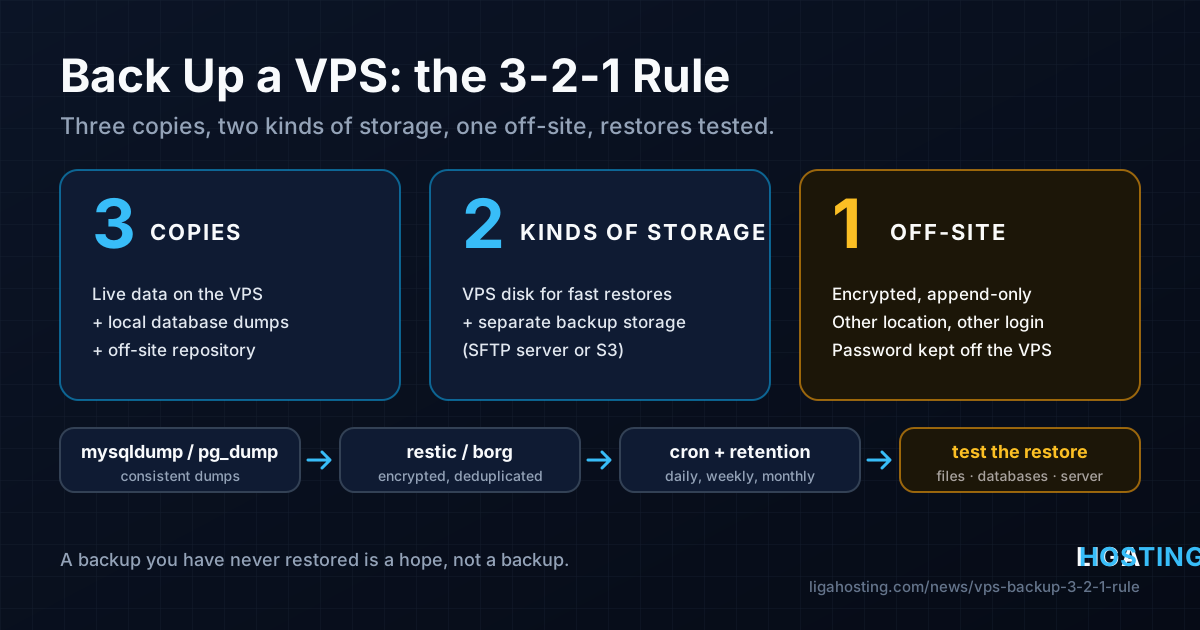
The classic rule says: keep 3 copies of your data, on 2 different kinds of storage, with 1 copy off-site. On a single VPS that looks like this:
| Copy | Where it lives | What it protects against |
|---|---|---|
| 1 — live data | The VPS disk: website files, database, configuration | Nothing — this is what you are protecting |
| 2 — local dumps | Database dumps in /var/backups/db on the VPS | Fast restore after a bad query, a broken plugin or a failed upgrade |
| 3 — off-site repository | An encrypted restic or borg repository on another server or S3-compatible storage, in another location, under different credentials | Lost server, deleted VPS, hacked root account, mistakes you notice weeks later |
Two things are not backups on their own. RAID protects against a failed drive, not against rm -rf. A snapshot stored next to the server protects against a broken upgrade, but not against losing access to the account or the machine. Treat them as a convenience, never as copy number three.
Liga Hosting VPS are unmanaged: you have full root access and you decide what is backed up, where and how often. If you are setting up a new server, do this right after the first 30 minutes security checklist.
Decide what to back up: files vs databases
A VPS has two very different kinds of data, and they need different treatment.
Files can be copied as they are. The directories that usually matter:
/etc— all configuration: web server, PHP, firewall, cron jobs in/etc/cron.d, SSL certificates in/etc/letsencrypt;/var/wwwand/home— websites, uploads, application code;/root— your scripts and notes (but see the warning about secrets below);/var/spool/cron— user crontabs created withcrontab -e;/optor/srv— if you installed applications or Docker Compose projects there.
You do not need /proc, /sys, /tmp, caches or the operating system itself — a fresh install plus your /etc rebuilds faster.
Databases must not be copied as files while they are running. Copying /var/lib/mysql or /var/lib/postgresql from a live server gives you files from different moments in time, and the result often will not start. Instead, export the data with the database's own tool — mysqldump or pg_dump — and back up the dump.
Step 1 — Dump databases consistently
Create a script that dumps every database into /var/backups/db, one file per database. Per-database files make it easy to restore a single site without touching the others.
sudo nano /usr/local/sbin/db-dump.sh#!/usr/bin/env bash
set -euo pipefail
umask 077
OUT=/var/backups/db
mkdir -p "$OUT"
cd /tmp
# MySQL / MariaDB: one plain SQL file per database
if command -v mysqldump >/dev/null; then
for db in $(mysql -N -e 'SHOW DATABASES' | grep -Ev '^(information_schema|performance_schema|mysql|sys)$'); do
mysqldump --single-transaction --routines --triggers --events "$db" > "$OUT/mysql-$db.sql"
done
fi
# PostgreSQL: custom-format dump per database, plus roles
if command -v pg_dump >/dev/null; then
for db in $(runuser -u postgres -- psql -At -c "SELECT datname FROM pg_database WHERE NOT datistemplate AND datname <> 'postgres'"); do
runuser -u postgres -- pg_dump -Fc "$db" > "$OUT/pg-$db.dump"
done
runuser -u postgres -- pg_dumpall --globals-only > "$OUT/pg-globals.sql"
fisudo chmod 700 /usr/local/sbin/db-dump.sh
sudo /usr/local/sbin/db-dump.sh && ls -lh /var/backups/dbWhat the important options do:
--single-transactiontakes a consistent snapshot of InnoDB tables without locking the site (MyISAM tables are not covered).--routines --triggers --eventsadd stored procedures and scheduled events, which a plain dump leaves out (triggers are on by default; the flag just makes it explicit).pg_dump -Fcwrites PostgreSQL's compressed custom format, whichpg_restorecan restore completely or table by table.pg_dumpall --globals-onlysaves roles and passwords, which per-database dumps do not contain.set -euo pipefailmakes the script stop with an error if any dump fails, so cron reports a failure instead of silently producing an empty file.
On Ubuntu, Debian and AlmaLinux, root can usually connect to MySQL/MariaDB through the local socket without a password. If yours asks for one, put the credentials in /root/.my.cnf ([client], user=, password=) with chmod 600. The per-database dumps do not contain MySQL users and grants: on MariaDB you can add mariadb-dump --system=users > "$OUT/mysql-users.sql"; on MySQL keep the CREATE USER and GRANT commands for your applications in your restore notes.
The dumps are deliberately not gzipped: restic and borg compress and deduplicate on their own, while a gzipped file changes completely every night and is stored again in full.
Step 2 — Send encrypted copies off-site with restic
restic is a single program that encrypts, deduplicates and compresses backups, and can store them on another server over SFTP or on any S3-compatible object storage. Install it:
# Ubuntu / Debian
sudo apt update && sudo apt install -y restic

# AlmaLinux (from EPEL)
sudo dnf install -y epel-release && sudo dnf install -y restic

restic version
Put the repository location and the password in files only root can read:
sudo mkdir -p /etc/restic
openssl rand -base64 32 | sudo tee /etc/restic/password >/dev/null
sudo nano /etc/restic/env
# /etc/restic/env — option A: another server over SFTP (SSH key login for root)
export RESTIC_REPOSITORY=sftp:backup@backup.example.com:/srv/restic/vps1
export RESTIC_PASSWORD_FILE=/etc/restic/password
# option B: S3-compatible storage
# export RESTIC_REPOSITORY=s3:https://s3.example.com/my-bucket/vps1
# export AWS_ACCESS_KEY_ID=...
# export AWS_SECRET_ACCESS_KEY=...sudo chmod 600 /etc/restic/password /etc/restic/env
sudo bash -c 'source /etc/restic/env && restic init'Copy the password to a password manager now, outside the server. The repository is encrypted with it: if the VPS is gone and the password was only on the VPS, the backup cannot be opened by anyone, including you.
Create a list of things to skip, then run the first backup by hand:
sudo tee /etc/restic/excludes <<'EOF'
/var/www/*/cache
/var/www/*/wp-content/cache
/home/*/.cache
*.tmp
EOF

sudo bash -c 'source /etc/restic/env && restic backup --one-file-system \
  --exclude-file=/etc/restic/excludes \
  /etc /home /root /var/www /var/spool/cron /var/backups/db'

sudo bash -c 'source /etc/restic/env && restic snapshots'
Remove from the list any path that does not exist on your server; restic warns about missing paths and exits with an error code. The first run uploads everything; the next ones only send changed data and are usually done in a minute or two.
The borg alternative
BorgBackup does the same job and is equally solid. It needs borg installed on the backup server too (it works over SSH, not plain storage), so it fits best when your off-site copy is another Linux server.
sudo apt install -y borgbackup        # AlmaLinux: sudo dnf install -y borgbackup (EPEL)
export BORG_REPO=ssh://backup@backup.example.com/srv/borg/vps1
borg init --encryption=repokey-blake2
borg key export "$BORG_REPO" /root/borg-key.txt   # store this file off the server
borg create --stats --one-file-system ::'{hostname}-{now}' /etc /home /root /var/www /var/backups/db
borg prune --keep-daily 7 --keep-weekly 4 --keep-monthly 6
borg compact
Protect backups from an attacker with root
Whoever gets root on your VPS can read /etc/restic/env and delete the repository with it. Make the off-site copy append-only for the VPS:
- borg over SSH: on the backup server, restrict the VPS key in
~backup/.ssh/authorized_keys:
The VPS can add archives but cannot delete them. Runcommand="borg serve --append-only --restrict-to-path /srv/borg/vps1",restrict ssh-ed25519 AAAA... root@vps1borg pruneandborg compactfrom the backup server itself. - restic: use
rest-server --append-onlyon the backup server, or S3 credentials without delete permission, and runrestic forget --prunefrom a different machine with full credentials.
Step 3 — Schedule it with cron
Combine the dump, the upload and the cleanup in one script:
sudo nano /usr/local/sbin/backup.sh#!/usr/bin/env bash
set -euo pipefail
exec 9>/run/backup.lock
flock -n 9 || { echo "backup already running"; exit 1; }
source /etc/restic/env
echo "== $(date -Is) start"
/usr/local/sbin/db-dump.sh
restic backup --one-file-system --exclude-file=/etc/restic/excludes \
/etc /home /root /var/www /var/spool/cron /var/backups/db
restic forget --keep-daily 7 --keep-weekly 4 --keep-monthly 6 --prune
echo "== $(date -Is) done"sudo chmod 700 /usr/local/sbin/backup.sh
echo '30 3 * * * root /usr/local/sbin/backup.sh >> /var/log/backup.log 2>&1' | sudo tee /etc/cron.d/backupflockprevents two runs from overlapping if one night's backup is slow.forget ... --prunekeeps 7 daily, 4 weekly and 6 monthly snapshots and frees the rest. A hacked site is often discovered weeks later, so do not keep too little.- Files in
/etc/cron.dneed the user field (root) and no dots in the file name. AlmaLinux (cronie) reads them the same way.
Run the script once by hand, then check /var/log/backup.log after the first scheduled run. Cron does not tell you when a job did not run, so end backup.sh with curl -fsS -m 10 to the ping URL of an external monitoring service that alerts you when the ping is missing. Weekly, check the repository's integrity:
sudo bash -c 'source /etc/restic/env && restic check --read-data-subset=5%'Step 4 — Test restores (the step that matters)
A backup you have never restored is a hope, not a backup. Test at three levels.
Single files — monthly, takes a minute:
sudo bash -c 'source /etc/restic/env && restic restore latest --target /tmp/restore-test --include /etc/nginx'
sudo diff -r /etc/nginx /tmp/restore-test/etc/nginx && echo "identical"
sudo rm -rf /tmp/restore-test
A database — restore into a separate test database, never over the live one:
# MySQL / MariaDB
sudo mysql -e 'CREATE DATABASE restore_test'
sudo bash -c 'source /etc/restic/env && restic dump latest /var/backups/db/mysql-shop.sql' | sudo mysql restore_test
sudo mysql -e 'SELECT COUNT(*) FROM restore_test.orders'
sudo mysql -e 'DROP DATABASE restore_test'

# PostgreSQL
sudo bash -c 'source /etc/restic/env && restic dump latest /var/backups/db/pg-shop.dump' > /tmp/shop.dump
sudo runuser -u postgres -- createdb restore_test
sudo runuser -u postgres -- pg_restore --no-owner -d restore_test /tmp/shop.dump
sudo runuser -u postgres -- psql -d restore_test -c 'SELECT COUNT(*) FROM orders'
sudo runuser -u postgres -- dropdb restore_test && rm /tmp/shop.dump
Replace shop and orders with a real database and a table that changes every day. If the newest rows are there, the dump is complete and current.
The whole server — once or twice a year. On a fresh VPS, install restic, restore /etc, the sites and the dumps, import the databases and test through your local hosts file. Write down every step you had to figure out: that list is your disaster recovery plan. With daily billing, such a test server costs only the days you keep it.
Frequently Asked Questions
How often should I back up my VPS?
At least once a day for anything with a database that changes. For busy shops, dump the database more often (every hour, for example) with a second cron line that runs only db-dump.sh and a restic backup of /var/backups/db. Ask yourself how many hours of orders or posts you can afford to lose — that is your interval.
Can I keep the backups on the same VPS?
Local dumps are useful for fast restores, but they are only copy number two. If the server, its disk or its root account is lost, local backups go with it. At least one copy must be at another location under different credentials.
Is it safe to copy /var/lib/mysql instead of using mysqldump?
Not while the database is running. The files change during the copy and the result is often inconsistent. Use mysqldump --single-transaction for normal sizes; for very large databases, look at physical backup tools such as Mariabackup or Percona XtraBackup.
restic or borg — which should I choose?
Both are reliable, encrypted and deduplicated. restic is easier with S3-compatible object storage because it needs nothing on the other side; borg is a great fit when you have your own backup server with SSH access and want append-only mode out of the box.
At Liga Hosting, our Standard VPS and Performance VPS plans run on KVM with NVMe storage and full root access, so you can install restic or borg and schedule your backups exactly as described here. Need a second VPS for an off-site repository or a restore test? Daily billing makes that easy — and if you have questions about the network or your IP, contact us.