
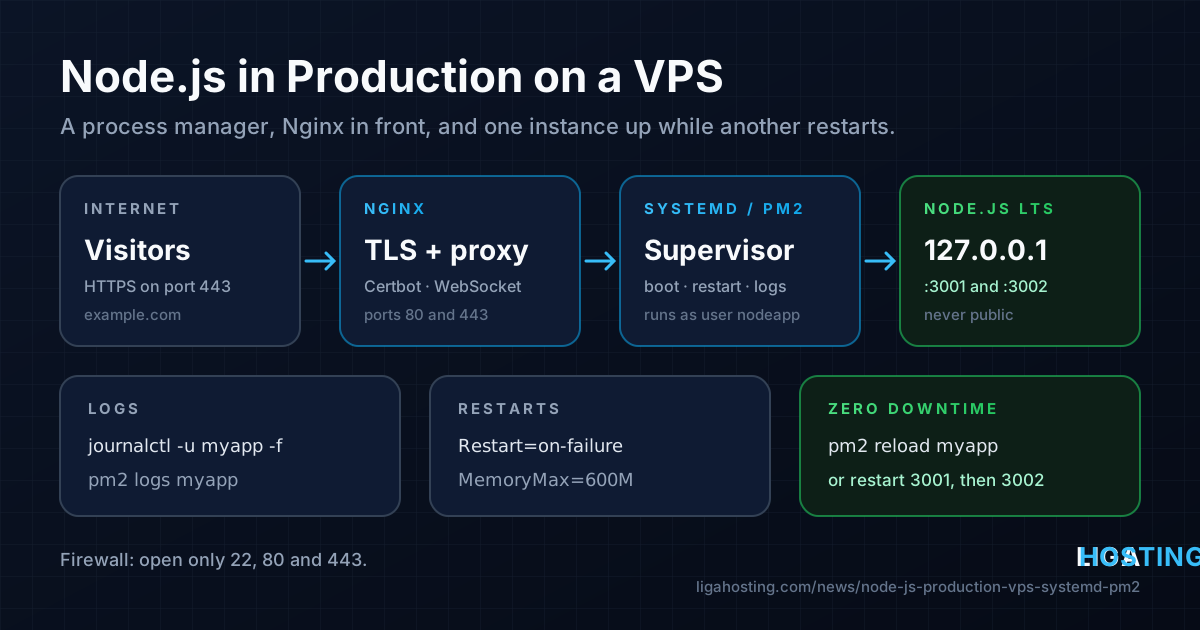
Run a Node.js App in Production on a VPS — systemd or PM2, Nginx and HTTPS
Your Node.js app works with node server.js in an SSH session. Then you close the terminal and it stops. Or it crashes at night and nobody starts it again. Or every deploy gives visitors a few seconds of "502 Bad Gateway".
Production does not need much tooling: a process manager that starts the app at boot, restarts it after a crash and keeps its logs, plus Nginx in front for HTTPS. This guide sets that up with systemd (already on every server) or PM2 (built for Node), then shows how to deploy new versions without dropping requests. Node itself never listens on a public port — only Nginx faces the internet.
Step 1 — Install Node.js LTS and create an app user
Distribution packages are often a few major versions behind. The NodeSource repository gives you current LTS builds that update with apt or dnf. Node.js 24 is the active LTS line at the time of writing; check nodejs.org for the current one.
# Ubuntu / Debian
curl -fsSL https://deb.nodesource.com/setup_24.x -o nodesource_setup.sh
sudo bash nodesource_setup.sh
sudo apt install -y nodejs git

# AlmaLinux
curl -fsSL https://rpm.nodesource.com/setup_24.x -o nodesource_setup.sh
sudo bash nodesource_setup.sh
sudo dnf install -y nodejs git

node -v
command -v node    # usually /usr/bin/node
Create a system user that owns the app and cannot log in, and put the code in its home directory:
sudo useradd --system --create-home --home-dir /srv/myapp --shell /usr/sbin/nologin nodeapp
sudo -u nodeapp -H git clone https://github.com/you/myapp.git /srv/myapp/app
cd /srv/myapp/app
sudo -u nodeapp -H npm ci --omit=dev
npm ci installs exactly what is in package-lock.json, so every deploy is reproducible. If you have a build step (TypeScript, Next.js), run npm ci, npm run build, then npm prune --omit=dev.
Step 2 — Make the app production-ready
Three small changes in the code make everything that follows work. The example uses Express; the idea is the same for any framework:
const express = require('express');
const app = express();

app.set('trust proxy', 'loopback');                 // real client IP from Nginx
app.get('/health', (req, res) => res.send('ok'));  // for deploy checks

const port = process.env.PORT || 3000;
const server = app.listen(port, '127.0.0.1', () => {
  console.log(`listening on 127.0.0.1:${port}`);
});

// Graceful shutdown: finish running requests, then exit
process.on('SIGTERM', () => {
  server.close(() => process.exit(0));
  setTimeout(() => process.exit(1), 10000).unref();
});- Listen on
127.0.0.1, so the app port is unreachable from outside even if the firewall is open. - Read the port and secrets from environment variables, never hard-code them.
- Handle
SIGTERM. systemd and PM2 send it on stop and restart; without a handler, requests in progress are cut off.
Option A — Run it with systemd
systemd is the init system on Ubuntu, Debian and AlmaLinux, so there is nothing to install. Keep the configuration in a file only root can read:
sudo tee /etc/myapp.env >/dev/null <<'EOF'
NODE_ENV=production
PORT=3000
DATABASE_URL=postgres://myapp:change-me@127.0.0.1:5432/myapp
EOF
sudo chmod 600 /etc/myapp.env
Create the service in /etc/systemd/system/myapp.service:
[Unit]
Description=myapp (Node.js)
After=network.target
StartLimitIntervalSec=60
StartLimitBurst=5

[Service]
User=nodeapp
Group=nodeapp
WorkingDirectory=/srv/myapp/app
EnvironmentFile=/etc/myapp.env
ExecStart=/usr/bin/node server.js
Restart=on-failure
RestartSec=3
TimeoutStopSec=20
MemoryMax=600M
NoNewPrivileges=true
ProtectSystem=full
PrivateTmp=true

[Install]
WantedBy=multi-user.targetRestart=on-failure— after a crash, systemd starts the app again after 3 seconds.StartLimitBurststops an endless crash loop after 5 tries in 60 seconds.TimeoutStopSec=20— time for the graceful shutdown before the process is killed.MemoryMax=600M— a memory leak kills only this service (which is then restarted), not your database. Adjust it to your app.- The last three lines are cheap hardening: the app cannot gain privileges or write to
/usrand/etc.
sudo systemctl daemon-reload
sudo systemctl enable --now myapp
systemctl status myapp
curl -s http://127.0.0.1:3000/health
sudo ss -ltnp | grep node     # must show 127.0.0.1:3000, not 0.0.0.0
Everything the app prints goes to the journal, which is rotated automatically:
journalctl -u myapp -f                      # follow live
journalctl -u myapp --since "1 hour ago"    # recent history
journalctl -u myapp -p err -b               # only errors since boot
systemctl show myapp -p NRestarts           # how many automatic restarts
Option B — Run it with PM2
PM2 is a process manager written for Node. It adds cluster mode (several copies of the app sharing one port), memory-based restarts and a live dashboard. Install it and describe the app in /srv/myapp/app/ecosystem.config.js:
sudo npm install -g pm2module.exports = {
apps: [{
name: 'myapp',
script: 'server.js',
cwd: '/srv/myapp/app',
exec_mode: 'cluster',
instances: 2,
max_memory_restart: '400M',
kill_timeout: 10000,
env: { NODE_ENV: 'production', PORT: 3000 }
}]
};Start it as the app user, save the process list and let PM2 create a systemd service so it comes back after a reboot:
sudo -u nodeapp -H pm2 start /srv/myapp/app/ecosystem.config.js
sudo -u nodeapp -H pm2 save
sudo pm2 startup systemd -u nodeapp --hp /srv/myapp
systemctl status pm2-nodeapp

sudo -u nodeapp -H pm2 ls                       # status, memory, restarts
sudo -u nodeapp -H pm2 logs myapp --lines 100
sudo -u nodeapp -H pm2 install pm2-logrotate    # rotate ~/.pm2/logs
Always run pm2 as the same user — as root you would see a different, empty process list. Do not commit secrets in ecosystem.config.js.
systemd or PM2?
| systemd | PM2 | |
|---|---|---|
| Extra software | None | npm package, updated separately |
| Logs | journald, rotation built in | Files, needs pm2-logrotate |
| Several instances | Template unit, one port each | Cluster mode, one shared port |
| Zero-downtime reload | Restart instances one by one behind Nginx | pm2 reload |
| Resource limits | cgroups (MemoryMax, CPUQuota) | max_memory_restart |
Both are good choices. For one or two apps and fewer moving parts, use systemd. For cluster mode and rolling reloads without a deploy script, use PM2. Never use both for the same app.
Nginx and HTTPS in front
Nginx itself is covered in Host Several Websites and Apps on One VPS with an Nginx Reverse Proxy. Here is a configuration for a Node app with WebSocket support and two systemd instances. Save it as /etc/nginx/sites-available/myapp and link it into sites-enabled (Ubuntu/Debian), or as /etc/nginx/conf.d/myapp.conf (AlmaLinux):
map $http_upgrade $connection_upgrade {
    default upgrade;
    ''      '';
}

upstream myapp {
    server 127.0.0.1:3001;
    server 127.0.0.1:3002;
    keepalive 16;
}

server {
    listen 80;
    server_name example.com www.example.com;

    location / {
        proxy_pass http://myapp;
        proxy_http_version 1.1;
        proxy_set_header Host $host;
        proxy_set_header X-Real-IP $remote_addr;
        proxy_set_header X-Forwarded-For $proxy_add_x_forwarded_for;
        proxy_set_header X-Forwarded-Proto $scheme;
        proxy_set_header Upgrade $http_upgrade;
        proxy_set_header Connection $connection_upgrade;
        proxy_next_upstream error timeout http_502;
    }
}
With a single instance or PM2 cluster mode, the upstream has one line: server 127.0.0.1:3000;. Then test, reload and get a certificate:
sudo nginx -t && sudo systemctl reload nginx

# AlmaLinux only: let Nginx connect to the app (SELinux)
sudo setsebool -P httpd_can_network_connect 1

# Ubuntu / Debian
sudo apt install -y certbot python3-certbot-nginx
# AlmaLinux
sudo dnf install -y epel-release && sudo dnf install -y certbot python3-certbot-nginx

sudo certbot --nginx -d example.com -d www.example.com
Certbot adds the HTTPS block and the HTTP redirect; renewal and common errors are explained in Free HTTPS on a VPS with Let's Encrypt. In the firewall, open only 22, 80 and 443 — never the Node ports.
Deploys without downtime
A plain systemctl restart myapp stops the only copy of your app, so for a moment Nginx has nowhere to send requests and visitors get 502. The fix: one instance keeps running while the other restarts.
With PM2, cluster mode does it for you — use reload, not restart:
sudo -u nodeapp -H pm2 reload myapp
sudo -u nodeapp -H pm2 reload ecosystem.config.js --update-env   # after env changes
With systemd, turn the service into a template. Copy myapp.service to /etc/systemd/system/myapp@.service, remove PORT from /etc/myapp.env (the file would override it) and add this line to [Service]:
Environment=PORT=%isudo systemctl disable --now myapp
sudo systemctl daemon-reload
sudo systemctl enable --now myapp@3001 myapp@3002
journalctl -u 'myapp@*' -fNginx balances between both ports, and proxy_next_upstream sends a request that cannot reach a restarting instance to the other one. This deploy script, run with sudo, restarts them one by one and stops if the new version fails its health check:
#!/usr/bin/env bash
# /usr/local/bin/deploy-myapp
set -euo pipefail
cd /srv/myapp/app
sudo -u nodeapp -H git pull --ff-only
sudo -u nodeapp -H npm ci --omit=dev

for port in 3001 3002; do
  systemctl restart "myapp@$port"
  ok=0
  for i in $(seq 1 20); do
    if curl -fsS "http://127.0.0.1:$port/health" >/dev/null; then ok=1; break; fi
    sleep 1
  done
  [ "$ok" -eq 1 ] || { echo "instance $port unhealthy, deploy stopped"; exit 1; }
done
echo "deploy finished"
If the first instance fails, the second still runs the old code and keeps the site up while you read journalctl -u myapp@3001. Database migrations must work with both versions during those seconds.
When the app keeps crashing or restarting
- "start request repeated too quickly": the start limit was hit. Fix the error shown by
journalctl -u myapp -n 50, then runsudo systemctl reset-failed myappand start it again. - "EADDRINUSE": another process holds the port, often a copy started by hand or by a second process manager. Find it with
sudo ss -ltnp | grep 3000. - Restarts every few hours: watch the Memory line in
systemctl status myapporpm2 ls. The limit keeps the server stable, but the leak still needs fixing. - 502 from Nginx: no instance answers. Test
curl http://127.0.0.1:3001/healthand read/var/log/nginx/error.log; on AlmaLinux, "permission denied" there means the SELinux boolean is not set.
One Node process runs your JavaScript on one CPU core, so run at most one instance per vCPU and leave room for the database. Memory is usually the real limit: measure one instance under load and multiply.
Frequently Asked Questions
Should I use systemd or PM2 for Node.js?
Both are reliable. systemd needs no extra software and gives you journald logs and cgroup limits; PM2 adds cluster mode and pm2 reload. Pick one per app.
Do I need Nginx if Node can listen on port 443 itself?
It is strongly recommended. Nginx handles TLS and renewals, serves static files, hosts several apps on one IP, lets the app run as a normal user and makes zero-downtime deploys with two instances possible.
Is pm2 restart a zero-downtime restart?
No. pm2 restart stops all workers at once. pm2 reload replaces them one at a time and avoids downtime only in cluster mode with at least two instances.
Where do I find my Node.js app's logs?
With systemd: journalctl -u myapp -f (or -u 'myapp@*' for a template). With PM2: pm2 logs as the app user; the files are in ~/.pm2/logs in that user's home.
Why does my app run in the terminal but not as a service?
The service runs as another user, in the unit's working directory, with only the environment variables set there. Missing variables, wrong paths and file permissions cause most failures; journalctl -u myapp -n 50 shows the exact error.
At Liga Hosting, our Standard VPS and Performance VPS plans include KVM virtualization, NVMe storage, DDoS protection and full root access, so you can set up Node.js, systemd or PM2 and Nginx exactly as in this guide. Daily billing lets you test your app on a plan first. Contact us with questions about network, IPs or billing.