
HTTP Redirects Done Right — 301 vs 302, www, HTTPS and Moved Pages in Nginx and Apache
Every site needs redirects sooner or later: http:// must go to https://, www.example.com and example.com should not be two separate sites, and when you rename a page, old links from Google and other websites should still land somewhere useful. Done well, nobody notices. Done badly, you get "too many redirects" errors, visitors dumped on the home page, or search engines that index the same content under four addresses.
This guide explains which status code to use, how to pick one canonical address, and how to write the rules in Nginx, in Apache and in a .htaccess file on cPanel shared hosting — with curl commands to verify every step.
The redirect status codes and when to use each
A redirect is just an HTTP response with a 3xx status code and a Location header that tells the browser where to go. The code tells browsers and search engines how to treat the move:
| Code | Meaning | Use it for |
|---|---|---|
| 301 | Moved permanently | HTTP to HTTPS, www to non-www, renamed pages, domain changes |
| 302 | Found (temporary) | Short-term moves: maintenance page, A/B tests, login redirects |
| 303 | See other | After a form POST, send the browser to a result page with GET |
| 307 | Temporary, method kept | Temporary move where a POST must stay a POST |
| 308 | Permanent, method kept | Permanent move of an API or form endpoint |
Two practical details matter more than the theory:
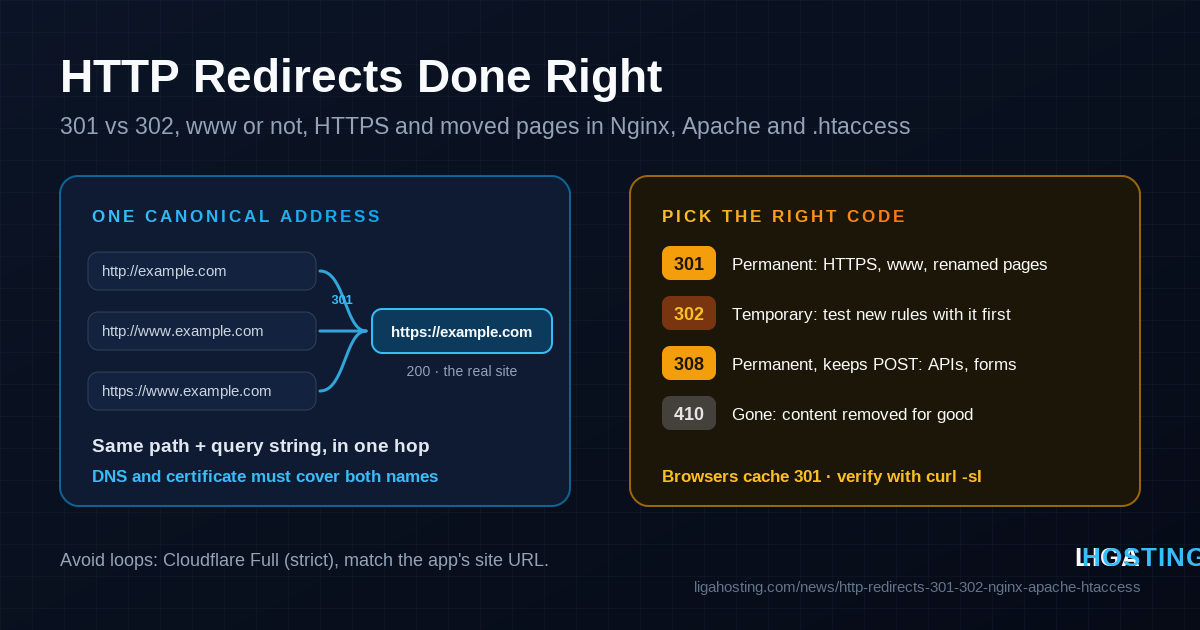
- Browsers cache 301 and 308 aggressively, often without an expiry. If you publish a wrong 301, visitors who already followed it keep being sent to the wrong place even after you fix the server. While testing a new rule, use 302, and switch to 301 once it is correct.
- With 301 and 302, browsers turn a POST into a GET. For normal pages this does not matter. For an API or a form handler that moved, use 308 (or 307) so the request body is not lost.
Pick one canonical address first
Before writing any rule, decide which single URL is "the" address of your site. There are four combinations, and three of them should redirect to the fourth:
http://example.com        → 301 → https://example.com
http://www.example.com    → 301 → https://example.com
https://www.example.com   → 301 → https://example.com
https://example.com       → 200 (the real site)
Whether you choose www or not is a matter of taste; just be consistent everywhere (application settings, sitemap, internal links). Three things must be in place before the redirects can work:
- DNS for both names. Both
example.comandwww.example.comneed records pointing to your server, otherwise the redirect is never reached. Check withdig +short example.comanddig +short www.example.com. - A certificate that covers both names. A visitor who types
https://www.example.comgets a certificate warning before any redirect happens if the certificate only listsexample.com. With Certbot:sudo certbot --nginx -d example.com -d www.example.com(or--apache). Our Let's Encrypt guide covers this in detail. - The same choice in your application. WordPress (Settings → General), Laravel (
APP_URL) and most CMSs store a site URL. If it sayswwwwhile the server redirects to non-www, the two will bounce visitors back and forth.
Test with curl before and after every change
A browser hides redirects and caches them. curl shows exactly what the server answers, with no cache:
# Only the first response: status code and Location header
curl -sI http://www.example.com/some/page?x=1

# Follow the whole chain and print every hop
curl -sIL http://www.example.com/some/page?x=1 | grep -Ei '^(HTTP|location)'

# Check all four variants in one go
for u in http://example.com http://www.example.com https://www.example.com https://example.com; do
  printf '%-28s ' "$u"
  curl -s -o /dev/null -w '%{http_code} %{redirect_url}\n' "$u/test?q=1"
done
What you want to see: each of the three non-canonical variants answers 301 with a Location of https://example.com/test?q=1 — the same path and query string, in one hop — and the canonical address answers 200 (or 404 for a test path that does not exist, which is fine).
Nginx: canonical host and HTTPS
In Nginx the cleanest way is a separate server block whose only job is to redirect, using return. It is faster and easier to read than rewrite or if. A typical site file in /etc/nginx/sites-available/example.com (Ubuntu/Debian) or /etc/nginx/conf.d/example.com.conf (AlmaLinux):
# 1) Plain HTTP, both names → HTTPS canonical
server {
    listen 80;
    listen [::]:80;
    server_name example.com www.example.com;
    return 301 https://example.com$request_uri;
}

# 2) HTTPS on www → HTTPS canonical
server {
    listen 443 ssl;
    listen [::]:443 ssl;
    server_name www.example.com;
    ssl_certificate     /etc/letsencrypt/live/example.com/fullchain.pem;
    ssl_certificate_key /etc/letsencrypt/live/example.com/privkey.pem;
    return 301 https://example.com$request_uri;
}

# 3) The real site
server {
    listen 443 ssl;
    listen [::]:443 ssl;
    server_name example.com;
    ssl_certificate     /etc/letsencrypt/live/example.com/fullchain.pem;
    ssl_certificate_key /etc/letsencrypt/live/example.com/privkey.pem;
    root /var/www/example.com;
    # ... the rest of your site configuration
}
Notes on the details:
$request_uriis the original path including the query string. Leaving it out (return 301 https://example.com;) sends every old link to the home page — a common and costly mistake.- If you serve no IPv6, remove the
[::]lines.
Apply and verify:
sudo nginx -t && sudo systemctl reload nginxThen run the curl loop from the previous section again.
Nginx: moved pages and large redirect lists
For a few individual pages, an exact-match location is enough. Put these inside the canonical server block:
# One page renamed
location = /old-page { return 301 /new-page; }

# A whole section moved: /blog/anything → /news/anything
location ~ ^/blog/(.*)$ { return 301 /news/$1$is_args$args; }

# A page that is gone for good: tell search engines to drop it
location = /discontinued-offer { return 410; }
After a site redesign you may have hundreds of old URLs. Do not write hundreds of location blocks; use a map, which Nginx looks up very efficiently. Create the list in /etc/nginx/redirects.map, one pair per line:
/old-page.html          /new-page/;
/products/item-12.php   /shop/blue-widget/;
/about-us.html          /about/;
Load it in the http context, for example in /etc/nginx/conf.d/redirects.conf:
map $uri $redirect_to {
    default "";
    include /etc/nginx/redirects.map;
}
And use it at the top of the canonical server block:
if ($redirect_to) {
    return 301 $redirect_to;
}
$uri is the path without the query string, so /old-page.html?ref=x still matches. An if that contains only return is one of the safe uses of if in Nginx. Test a few entries from the list with curl -sI after reloading.
Apache: virtual hosts on a VPS
On a VPS with Apache (apache2 on Ubuntu/Debian, httpd on AlmaLinux), the simplest redirects use mod_alias, which is enabled by default. Redirect matches a path prefix and keeps the rest of the path and the query string:
<VirtualHost *:80>
    ServerName example.com
    ServerAlias www.example.com
    Redirect permanent / https://example.com/
</VirtualHost>

<VirtualHost *:443>
    ServerName www.example.com
    SSLEngine on
    SSLCertificateFile    /etc/letsencrypt/live/example.com/fullchain.pem
    SSLCertificateKeyFile /etc/letsencrypt/live/example.com/privkey.pem
    Redirect permanent / https://example.com/
</VirtualHost>

<VirtualHost *:443>
    ServerName example.com
    SSLEngine on
    SSLCertificateFile    /etc/letsencrypt/live/example.com/fullchain.pem
    SSLCertificateKeyFile /etc/letsencrypt/live/example.com/privkey.pem
    DocumentRoot /var/www/example.com

    # Moved pages
    Redirect 301 /old-page.html /new-page/
    RedirectMatch 301 ^/blog/(.*)$ /news/$1
    Redirect gone /discontinued-offer
</VirtualHost>
On Ubuntu/Debian the HTTPS virtual hosts need mod_ssl (sudo a2enmod ssl); on AlmaLinux install mod_ssl with sudo dnf install mod_ssl. Check the syntax and reload:
# Ubuntu / Debian
sudo apachectl configtest && sudo systemctl reload apache2

# AlmaLinux
sudo apachectl configtest && sudo systemctl reload httpd
.htaccess on cPanel shared hosting
On shared hosting you cannot edit the virtual host, but you can use a .htaccess file in the site's document root (usually public_html). cPanel also offers a Redirects tool and, on the Domains page, a Force HTTPS Redirect switch — fine for simple cases. For full control, add this at the top of .htaccess, above any CMS block such as # BEGIN WordPress:
RewriteEngine On

# HTTP → HTTPS and www → non-www in a single hop
RewriteCond %{HTTPS} off [OR]
RewriteCond %{HTTP_HOST} ^www\. [NC]
RewriteRule ^ https://example.com%{REQUEST_URI} [L,R=301]

# Individual moved pages
Redirect 301 /old-page.html https://example.com/new-page/
How it works: the two RewriteCond lines are joined with [OR], so the rule fires if the request is not HTTPS or the host starts with www.. The rule then sends one 301 straight to the canonical HTTPS address with the original path. %{REQUEST_URI} holds the path; the query string is added back automatically.
If you prefer www as canonical, change the second condition to RewriteCond %{HTTP_HOST} !^www\. [NC] and the target to https://www.example.com%{REQUEST_URI}. Back up .htaccess before editing: a typo produces a 500 error for the whole site, and restoring the old file fixes it immediately.
Redirect loops, chains and other common mistakes
"ERR_TOO_MANY_REDIRECTS" means the browser went around in a circle. Run curl -sIL on the URL: you will see the same two Location values alternating. The usual causes:
- Cloudflare in Flexible SSL mode. Cloudflare connects to your server over plain HTTP, your server redirects to HTTPS, Cloudflare requests HTTP again — forever. Switch Cloudflare to Full (strict) with a valid certificate on the server.
- A reverse proxy in front of the app. If Nginx terminates HTTPS and passes requests to Apache, Node.js or PHP over HTTP, the app thinks the visitor uses HTTP and redirects. Pass
proxy_set_header X-Forwarded-Proto $scheme;and configure the app to trust it. - Server and application disagree. The server redirects to non-www, the CMS redirects back to www. Make the site URL in the application match the canonical address.
Other mistakes that do not break the site but cost traffic:
- Chains.
http://www→https://www→https://example.com→/new-page. Each hop adds a round trip, and search engines follow only a limited number. Point every rule directly at the final URL. - Everything to the home page. Redirecting all old URLs to
/is treated by Google as a "soft 404". Map each old page to its closest new equivalent, and return 410 for content that is really gone. - Removing redirects too early. Old links live for years in bookmarks and other websites. Keep permanent redirects for at least a year, and update your own internal links and sitemap to the new URLs.
Frequently Asked Questions
Should I use 301 or 302 for HTTP to HTTPS?
Use 301 (or 308). The move is permanent, and a permanent redirect tells search engines to transfer the old URL's signals to the new one. Test the rule as a 302 first if you are unsure, because browsers cache 301 responses.
Is www or non-www better for SEO?
Neither. Search engines treat both the same as long as you choose one, redirect the other to it with a 301, and use the chosen form consistently in links, the sitemap and canonical tags.
I fixed the redirect, but my browser still goes to the old address. Why?
Your browser cached the old 301. Test with curl -sI, which never caches, or in a private window. Clearing the browser cache for that site removes the old redirect; other visitors' browsers will keep it until their cache expires.
Do redirects slow down my site?
A single redirect adds one round trip, usually a few tens of milliseconds. It becomes noticeable with chains of three or four hops, especially on mobile. Keep every rule to one hop and link to final URLs internally.
At Liga Hosting, our Web Hosting plans include cPanel and a free SSL certificate, so you can manage redirects from .htaccess or the Redirects tool. If you want full control of Nginx or Apache, our Standard VPS and Performance VPS plans give you NVMe storage, DDoS protection and full root access to configure every rule in this guide.