
VPS vs Shared Hosting in 2026 — Complete Guide to Choosing Right
If you've landed here, your website is probably growing and you're stuck on a frustrating question: stay on shared hosting or upgrade to VPS? It's a decision that can cost you—or save you—hundreds of euros a year, plus the performance of your site.
This guide explains the real differences, when each makes sense, and how to figure out exactly where you stand right now.
What is shared hosting, briefly
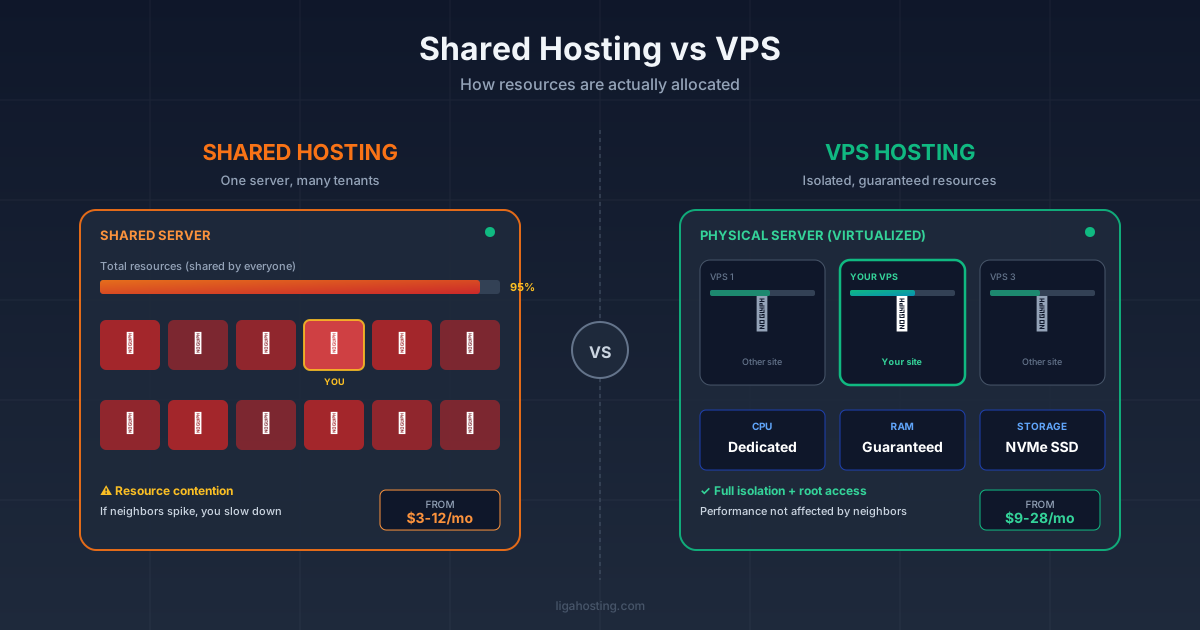
Shared hosting means your site lives on a server alongside dozens or hundreds of other sites. Everyone shares the same resources—CPU, RAM, storage, bandwidth. It's like living in an apartment with five roommates: cheap, but if one of them takes a 40-minute shower in the morning, you're left with cold water.
The main advantage is price—it starts at a few euros per month. The disadvantage? Your performance depends on what your neighbors are doing. If a site on the same server gets a traffic spike or is poorly optimized, your site slows down too.
What is a VPS and why it matters
VPS (Virtual Private Server) means you have your own virtual "apartment," isolated from the rest. The resources allocated to you—CPU, RAM, disk—are guaranteed. You no longer depend on neighbors.
Technically, a physical server is divided through virtualization (typically KVM) into multiple independent virtual servers. Each has its own operating system, its own settings, its own resources. You get near-total control—root access, custom configurations, whatever stack you want.
Direct comparison — the 6 criteria that matter
1. Performance
On shared hosting, page load times can swing from 1 second to 8 seconds, depending on time of day and what the other sites are doing. On a properly configured VPS, you're consistently looking at sub-1-second loads for a WordPress site with caching enabled.
For SEO, this matters enormously. Google uses Core Web Vitals as a ranking factor, and keeping LCP (Largest Contentful Paint) consistently under 2.5 seconds is hard on shared hosting during peak hours.
2. Price
- Shared hosting: $3-12/month
- Entry-level VPS: $9-28/month
- Performance VPS (4-8 GB RAM): $28-70/month
The gap looks significant, but think about it this way: if your site generates revenue (e-commerce, lead generation, subscriptions), one extra customer per month covers the difference.
3. Security
On shared hosting, if another site on the same server gets compromised through a vulnerable plugin, there's a risk of "cross-contamination." Good providers isolate accounts, but the risk exists.
On VPS you're fully isolated. Plus, you control what security tools to install—custom firewall, fail2ban, ModSecurity configured to your needs.
4. Scalability
Shared hosting has hard limits. When you hit them, you get the classic "you've exceeded allocated resources" email and your site stops or slows down. On VPS you can scale vertically (more RAM/CPU) with a click and zero downtime, with most serious providers.
5. Technical control
On shared hosting you get cPanel or Plesk and that's about it. Want a specific PHP version? Depends on the provider. Want Redis for caching? Usually no luck.
On VPS you install what you want—Nginx instead of Apache, Node.js, Docker, custom databases. If you have technical knowledge (or someone who does), the freedom is total.
6. Technical support
There's an important nuance here: on shared hosting, the provider handles absolutely everything. On VPS, it depends whether you choose managed or unmanaged. Unmanaged means you handle everything—updates, security, optimization. Managed means you pay extra and the provider manages the server for you.
How to figure out where you stand
Answer these questions:
How much traffic do you get monthly? Under 10,000 visitors, shared hosting is probably enough. Between 10,000 and 50,000 you're in the gray zone—depends on site type. Above 50,000, VPS becomes nearly mandatory.
What kind of site are you running? A static blog handles shared hosting well. An e-commerce site with 500+ products, or a site with custom functionality (membership, forum, marketplace), needs VPS even at low traffic.
How critical is uptime for your business? If your site is your main revenue source, every hour of downtime costs. VPS offers better SLAs and more control over uptime.
Do you have technical knowledge or someone who does? Without basic Linux skills, unmanaged VPS is a trap. In that case, either go with managed VPS or stay on shared until you have technical support.
Common mistakes you see often
Many people migrate to VPS too early, when good shared hosting would have served them another 6-12 months. They pay more and complicate things unnecessarily. Others, the opposite—they stay on shared way too long, lose customers due to slow speed, and don't realize that's why sales are dropping.
The third trap: picking the cheapest VPS available without looking at real specs (shared vs dedicated CPU, storage type—NVMe vs SATA SSD, bandwidth). A poorly configured VPS can actually be slower than good shared hosting.
The practical conclusion
If your site is growing, generating revenue, or needs specific configurations—VPS is the way. If you have a personal blog, a simple presentation site, or you're just starting out, shared hosting is perfect and don't overthink it now.
Key point: the choice doesn't have to be permanent. Migrating from shared to VPS, when needed, can be done in a day with competent technical help.
Frequently Asked Questions
Can I migrate from shared to VPS without downtime?
Yes, if planned correctly. You set up the VPS, replicate the site, test on a temporary domain, then switch DNS with a low TTL set in advance. Real downtime can be under 5 minutes.
Is managed VPS worth the extra cost?
For someone without Linux experience, yes, always. The cost of a DevOps specialist fixing problems when your server crashes at 3 AM far exceeds the price difference.
How much RAM do I need for a WooCommerce store?
For under 1000 products and moderate traffic, 2-4 GB RAM is enough with proper caching. Above 5000 products or high traffic, start at 8 GB.
What's the difference between KVM VPS and OpenVZ?
KVM is full virtualization—each VPS has its own kernel, more isolation, better performance. OpenVZ is older, container-based, resources can be "oversold" more easily by providers. Clear recommendation: KVM.
At Liga Hosting we offer both optimized shared hosting plans and KVM VPS with NVMe storage. If you'd like to discuss which option fits your project, we're here.