
DDoS Protection — How to Protect Your Server in 2026 (Complete Guide)
If you run a server with public traffic — website, online store, game server, API — the question isn't if you'll be attacked, but when. DDoS attacks have become accessible to anyone: for $20-50 you can buy a 50+ Gbps attack that can knock your server offline for hours.
This guide explains how DDoS works, what "mitigation" really means vs marketing fluff, how to verify if your provider actually protects you, and what you can do additionally at your level.
What is a DDoS attack
DDoS = Distributed Denial of Service. The attacker uses thousands or millions of compromised computers (botnet) to flood your server with traffic until it can no longer respond to legitimate requests.
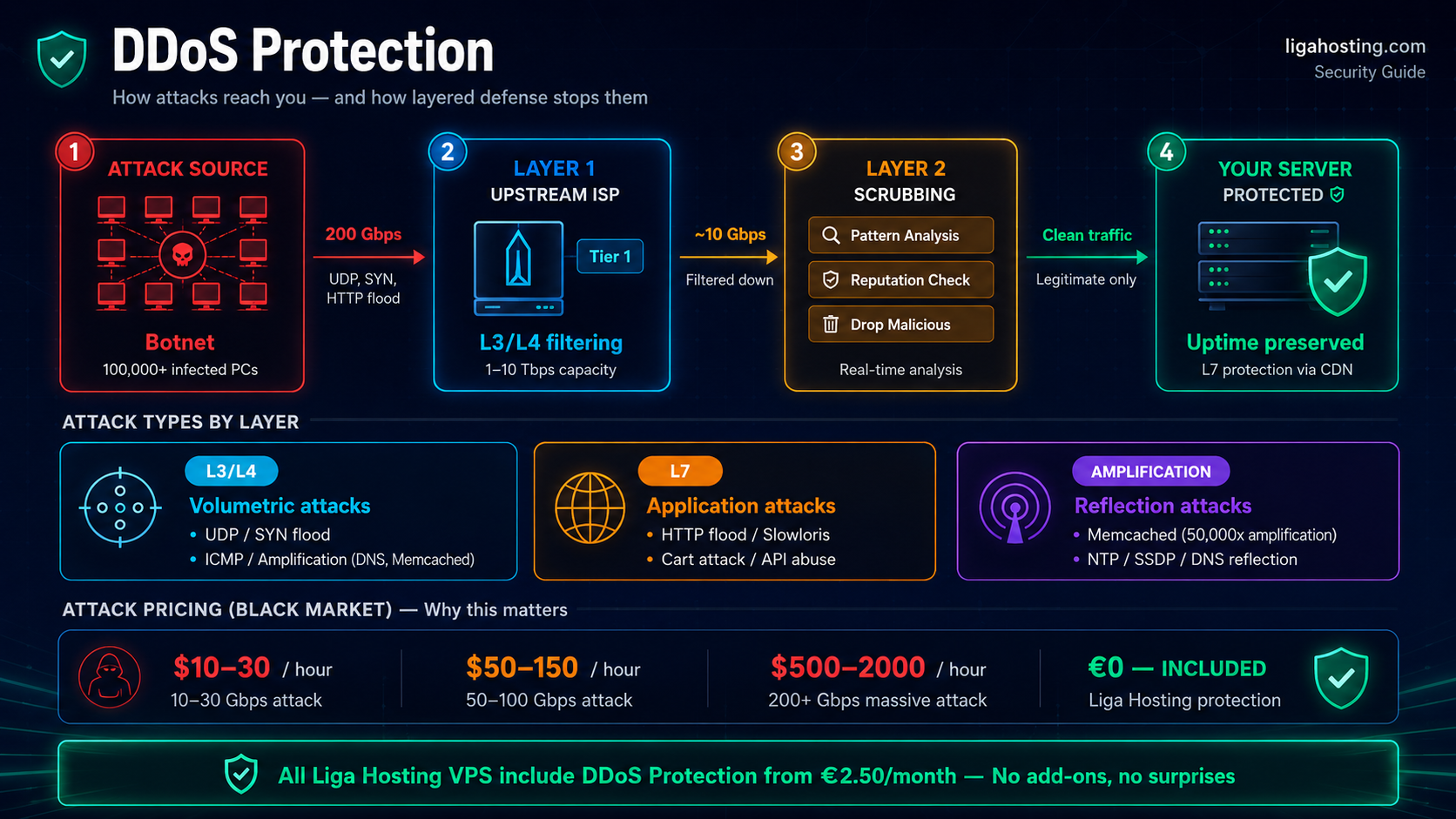
Three main types, by attacked layer:
L3/L4 — Network & Transport Layer
Volumetric attacks that saturate the server's bandwidth or network resources. Examples:
- UDP flood — sends millions of UDP packets to random ports
- SYN flood — initiates thousands of TCP connections it doesn't complete
- ICMP flood — floods with ping packets
- Amplification attacks — uses DNS/NTP/Memcached servers to amplify traffic 50-50,000x
These attacks are the most common and can easily reach hundreds of Gbps. They're mitigated at network level, before reaching your server.
L7 — Application Layer
More sophisticated attacks targeting the application itself:
- HTTP flood — millions of seemingly legitimate HTTP requests
- Slowloris — keeps HTTP connections open at very low speed, consuming server slots
- Cart attacks — repeatedly adds products to cart on online stores
- API abuse — saturates API endpoints with expensive operations
L7 is harder to mitigate — traffic sometimes looks legitimate. Requires intelligent analysis: pattern detection, rate limiting, CAPTCHA, JavaScript challenges.
Reflection & Amplification
Attacker doesn't send traffic directly — uses public servers (DNS, NTP, Memcached, SSDP) that respond with much larger packets. With a 60-byte packet to a vulnerable Memcached server, attacker can generate 50,000-byte response toward target — 800x amplification. Using only a few servers, massive attacks are achieved with zero own effort.
How "mitigation" works
DDoS mitigation is done in multiple layers, in order:
1. Network-level filtering (upstream)
Hosting provider has connections with large ISPs (Tier 1). When detecting an attack, the ISP filters attacking traffic before reaching your datacenter. Typical capacity: 1-10 Tbps total filtering.
2. Scrubbing centers
Dedicated traffic "washing" centers. Traffic enters, is analyzed in real-time, malicious packets are dropped, only legitimate ones reach the server. Technologies used: Arbor Networks, Corero, Radware, custom solutions.
3. Hardware appliances in datacenter
Specialized equipment doing mitigation on remaining traffic. Detects fast patterns and cuts L3/L4 attacks in seconds.
4. Software filtering on server
Final layer — fail2ban, ModSecurity, iptables rules, Nginx rate limiting. Useful for L7 attacks and patterns specific to your application.
Mitigation capacity — numbers that matter
When a provider says "DDoS Protection", ask concretely:
How much does it absorb? Capacity under 100 Gbps is weak in 2026. Large attacks hit 1-3 Tbps. Serious providers have 1-10 Tbps filtering capacity.
What attack types? Only L3/L4 isn't enough. For a WordPress site or online store, L7 protection is critical.
How many "events" included? Some providers limit: "free DDoS protection up to X attacks per month". After, you pay.
How long until mitigation? Automatic mitigation under 10 seconds is good. Some providers have "always-on" — no delay at all.
Is there null-route? Toxic practice: when your server is attacked, provider "kills" it (null-route) to protect the rest of the network. You stay offline. Good providers don't do this — they have enough capacity to mitigate.
What Liga Hosting does about DDoS
All Liga Hosting VPS include native DDoS Protection, at no extra cost. Unlike many providers selling this as add-on ("Anti-DDoS Pro — €15/month"), with us it's included in base price — from VPS XS (€2.50/month).
This means:
- Automatic network-level mitigation, no configuration needed
- L3/L4 protection against most common attacks (UDP flood, SYN flood, amplification)
- Generous absorption capacity, managed at uplink level
- No null-route on first incidents — we try to keep you online
Important: For sophisticated L7 attacks (botnets mimicking real users on HTTP), we recommend CDN with protection (Cloudflare Free is enough for most cases) as additional layer.
What you can do at server level
Even with good provider DDoS Protection, server-level configurations add protection:
Rate limiting in Nginx
# In /etc/nginx/nginx.conf, http section
limit_req_zone $binary_remote_addr zone=general:10m rate=10r/s;
limit_req_zone $binary_remote_addr zone=login:10m rate=5r/m;
limit_conn_zone $binary_remote_addr zone=conn:10m;

# In server block
location / {
    limit_req zone=general burst=20 nodelay;
    limit_conn conn 10;
}

# For sensitive pages (admin, login)
location /wp-login.php {
    limit_req zone=login burst=2 nodelay;
}
This limits 10 requests/second per IP general, 5/minute on login. Small botnets stop, legitimate users aren't affected.
Fail2ban for pattern detection
Fail2ban scans logs and auto-bans suspicious IPs:
# Install
sudo apt install fail2ban -y

# Configure Nginx jail
sudo nano /etc/fail2ban/jail.local
jail.local content:
[nginx-req-limit]
enabled = true
filter = nginx-req-limit
action = iptables-multiport[name=ReqLimit, port="http,https", protocol=tcp]
logpath = /var/log/nginx/error.log
findtime = 600
bantime = 7200
maxretry = 10

[nginx-botsearch]
enabled = true
filter = nginx-botsearch
logpath = /var/log/nginx/access.log
findtime = 86400
bantime = 86400
maxretry = 2

[nginx-noscript]
enabled = true
filter = nginx-noscript
logpath = /var/log/nginx/access.log
findtime = 86400
bantime = 172800
maxretry = 6
Basic iptables rules
# Limit SYN flood
iptables -A INPUT -p tcp --syn -m limit --limit 5/s --limit-burst 10 -j ACCEPT
iptables -A INPUT -p tcp --syn -j DROP

# Block excessive ICMP
iptables -A INPUT -p icmp -m limit --limit 1/s --limit-burst 5 -j ACCEPT
iptables -A INPUT -p icmp -j DROP

# Drop invalid packets
iptables -A INPUT -m conntrack --ctstate INVALID -j DROP

# Save rules
sudo netfilter-persistent save
CDN with DDoS protection
Cloudflare is the gold standard for L7 protection. Free plan offers:
- Unlimited DDoS mitigation (even on free plan)
- Basic WAF (Web Application Firewall)
- Free SSL
- Basic bot management
Setup: change your domain's DNS to Cloudflare's nameservers. All HTTP/HTTPS traffic passes through them before reaching your server. Attacks are absorbed by Cloudflare infrastructure.
Signs you're under attack
How to recognize a DDoS attack in real time:
- Site suddenly slow or totally inaccessible
- Spike in load average (see with
uptimeorhtop) - Abnormally large network traffic (
iftop,vnstat) - Unusually many TCP connections in SYN_RECV state (
ss -s) - Nginx logs full of requests from suspicious country IPs or ASNs
- 502/503 errors or timeouts for legitimate users
Quick diagnostic commands:
# Active connections per IP
netstat -ntu | awk '{print $5}' | cut -d: -f1 | sort | uniq -c | sort -nr | head

# Top IPs in Nginx log
awk '{print $1}' /var/log/nginx/access.log | sort | uniq -c | sort -nr | head -20

# Connection stats
ss -s
What to do during an attack
If you notice an ongoing attack:
1. Don't panic, don't reboot the server. Reboot fixes nothing, attack continues.
2. Contact provider support immediately. They have tools to see what's happening upstream and can activate additional mitigation.
3. Enable "Under Attack Mode" on Cloudflare if you use it. Forces JavaScript challenges on all visitors.
4. Identify attack pattern. Check logs to see which endpoint is attacked, what user-agent used, from which countries.
5. Block in iptables the highest-traffic IPs. Temporary quick fix.
6. After attack, do a post-mortem. What worked, what didn't, what you can do next time.
What a DDoS attack costs
To understand the threat, indicative black market costs:
- Small attack (10-30 Gbps), 1 hour: $10-30
- Medium attack (50-100 Gbps), 1 hour: $50-150
- Large attack (200+ Gbps), 1 hour: $500-2000
- "Stresser" subscription for 1 month: $20-200 (with repeated attacks)
See why DDoS Protection isn't optional in 2026? With $30, anyone can knock you offline for hours.
Frequently Asked Questions
Does Liga Hosting's included DDoS Protection cover any attack?
Automatic L3/L4 protection against most common attacks (volumetric, SYN flood, amplification). For sophisticated L7 attacks or exceptionally large ones, we recommend CDN with WAF (Cloudflare) as additional layer.
How much does Liga Hosting absorb in Gbps?
Mitigation capacity managed at uplink level, more than enough for typical attacks (tens-hundreds Gbps). For specific numbers and very large attacks, contact us.
Do I need to notify the provider when attacked?
Automatic mitigation should activate without your intervention. But if attack continues, notify support immediately — they can adjust filtering and help with diagnosis.
Is free Cloudflare enough for a small online store?
For DDoS protection, yes. Cloudflare Free offers unlimited mitigation for any attack size, even on free plan. For advanced features (custom WAF rules, unlimited page rules), you may need paid plan.
Why are game servers more often attacked?
Several reasons: angry players, competition between servers/communities, hackers blackmailing admins. CS2, Minecraft, Rust servers are popular targets. At Liga Hosting, included DDoS Protection is specifically designed for game servers but protects all services.
At Liga Hosting, all KVM VPS include native DDoS Protection at no extra cost — from VPS XS (€2.50/month) to VPS XXXL. Contact us if you need more advanced protection or have mitigation questions for your project.