
Rust Server Hosting in 2026 — Requirements, Setup, and Optimization
Want to play Rust with friends on your own server, with custom plugins, anti-cheat, and full control? Rust is one of the most demanding games when it comes to server resources — a wrong setup means unavoidable lag. Many popular servers run on hardware that isn't necessarily expensive, but configured correctly.
This guide shows you exactly what you need, how to install a Rust server on a VPS, and how to optimize it so it's playable even with 100+ players.
Why Rust is different from other game servers
Unlike Minecraft or CS2, Rust simulates a huge persistent world, with complex physics, bases built from thousands of blocks, and hundreds of active simultaneous entities (animals, players, items, vehicles). This makes Rust:
- Very RAM-hungry — 8GB is the realistic minimum for a playable server
- Single-thread CPU dependent — the server primarily uses one core for tick rate
- I/O intensive — constant world state saves, plus logs
- Forced weekly updates — every Thursday, Facepunch pushes a new patch (you can't stay on old version)
All this means a "normal" 4GB RAM VPS isn't suitable. You need at least 8GB and a good CPU.
Real hardware requirements
RAM
- Vanilla server, 10-30 players: 8GB RAM
- Vanilla server, 50-100 players: 12-16GB RAM
- Server with Oxide/uMod and 10-20 plugins: 12-16GB RAM
- Heavily modded server (Carbon, heavy plugins): 16-32GB RAM
- "Wipe weekly" server with 150+ players: 32GB+ RAM
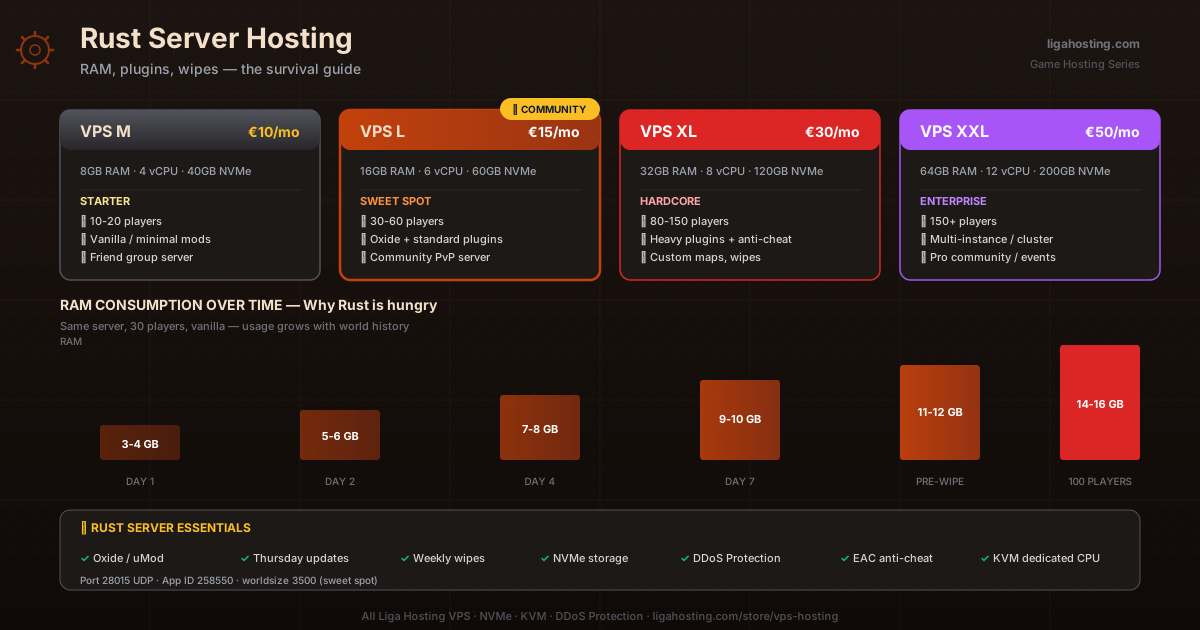
Important: RAM consumption grows over time (more bases, more items on the map, more history). A server starting at 6GB use can hit 12GB before wipe.
CPU
Rust is brutal on single-thread performance. You want a CPU with high per-core frequency, not many slow cores. With 100+ active players, even a good CPU will feel it. A VPS with 4-6 dedicated vCPUs (not shared/oversold) is necessary for serious servers.
Liga Hosting VPS uses KVM with hardware-level allocated vCPUs, not shared. Meaning you won't get TPS spikes because a neighbor is doing heavy workloads.
Storage
A Rust server takes up:
- Server files: ~10-15GB
- Save files (world + entities): 1-5GB per wipe
- Plugins + logs: 1-2GB
- Recommended total: minimum 30GB free
NVMe is essential — Rust saves constantly. On SATA SSD, you'll see micro-lag spikes at every save. On NVMe, they're invisible.
Bandwidth
A Rust player consumes on average 200-400 KB/s (more than CS2 due to complex physics). With 50 active players, ~15-20 MB/s constant. Monthly: 5-8TB at heavy use. For medium servers, 4TB is enough.
Which VPS plan to choose for Rust
- VPS M (8GB RAM, €10/month): Server for a small friend group (10-20 players), vanilla or with minimal plugins — the starting point
- VPS L (16GB RAM, €15/month): Server for medium community (30-60 players), with Oxide/uMod and standard plugins — sweet spot for most communities
- VPS XL (32GB RAM, €30/month): Large server with 80-150 players, heavy plugins, custom maps, anti-cheat
- VPS XXL (64GB RAM, €50/month): Enterprise server, multi-instance, or pro setups for very large communities
Tip: for Rust, don't just look at current RAM, but how much it grows over time. If your server fills up consistently at wipe, the starting RAM will be insufficient after 3-4 days.
Step-by-step setup on a Liga Hosting VPS
Assuming Ubuntu 22.04 or 24.04 installed with SSH access:
1. System preparation
ssh root@your-IP
apt update && apt upgrade -y
apt install software-properties-common dpkg ca-certificates lib32gcc-s1 lib32stdc++6 wget unzip screen curl -y
dpkg --add-architecture i386
apt update
2. Create dedicated user
adduser rustserver
# (set a strong password)
usermod -aG sudo rustserver
su - rustserver
3. Install SteamCMD
mkdir ~/steamcmd && cd ~/steamcmd
wget https://steamcdn-a.akamaihd.net/client/installer/steamcmd_linux.tar.gz
tar -xvzf steamcmd_linux.tar.gz
rm steamcmd_linux.tar.gz
4. Download Rust server
./steamcmd.sh +force_install_dir ../rustserver +login anonymous +app_update 258550 validate +quitApp ID 258550 is for Rust Dedicated Server. Download takes 20-40 minutes (the server is big).
5. Create startup script
cd ~/rustserver
nano start.sh
Script content:
#!/bin/bash
exec ./RustDedicated -batchmode \
  +server.port 28015 \
  +server.queryport 28016 \
  +rcon.port 28017 \
  +rcon.password "change_this_password" \
  +rcon.web true \
  +server.identity "myserver" \
  +server.level "Procedural Map" \
  +server.seed 1337 \
  +server.worldsize 3500 \
  +server.maxplayers 50 \
  +server.hostname "Liga Hosting Rust Server" \
  +server.description "Liga Hosting community server" \
  +server.url "https://ligahosting.com" \
  +server.headerimage "https://ligahosting.com/images/rust-header.jpg" \
  +server.tickrate 30 \
  +server.saveinterval 300 \
  +app.port 28082 \
  -logFile "server-log.txt"
Key parameters:
server.seed— map seed (any number between 1 and 2147483647). Change at each wipe.server.worldsize— map size (1000-6000). 3500 is the sweet spot for most servers.server.tickrate— 30 is default; higher consumes more CPU.server.saveinterval— auto-save every 300 seconds (5 min). More often = safety, rarer = performance.
Make script executable:
chmod +x start.sh6. Configure firewall
sudo ufw allow 22/tcp
sudo ufw allow 28015/udp
sudo ufw allow 28016/udp
sudo ufw allow 28017/tcp
sudo ufw allow 28082/tcp
sudo ufw enable
Important ports:
- 28015 (UDP): main port for players
- 28016 (UDP): Steam query port
- 28017 (TCP): RCON (administration)
- 28082 (TCP): server app (rcon web, statistics)
7. Start the server
screen -S rust
./start.sh
First start takes 5-15 minutes — server generates the map. Detach screen with Ctrl+A then D.
8. Connect to server
In Rust, open console (F1) and type:
client.connect your-IP:28015Oxide/uMod — standard plugin engine
Vanilla Rust is fine for a few friends, but for community you need plugins. Oxide (now renamed uMod) is the plugin framework that 90%+ of Rust servers run on.
Install Oxide
cd ~/rustserver
wget https://umod.org/games/rust/download/development -O Oxide.Rust-linux.zip
unzip -o Oxide.Rust-linux.zip
rm Oxide.Rust-linux.zip
After server restart, plugins will be loaded from ~/rustserver/oxide/plugins/.
Popular plugins
- NoEscape — prevents teleport abuse during raid
- BetterChat — rank system in chat
- Kits — kit system for VIP players
- BackpacksPlus — custom backpacks for players
- RestrictedSpawn — blocks spawn in problematic zones
- RaidableBases — AI bases for raid (PvE content)
- Server Rewards — points system and shop
- AdminRadar — radar for moderators (sees all players)
Alternative: Carbon
In the past year, Carbon has become a popular alternative to Oxide — better performance, but incompatibilities with some older plugins. See carbonmod.gg for details.
Critical performance optimizations
Server settings
In server.cfg (created in ~/rustserver/server/myserver/cfg/):
// Performance
fps.limit 256
server.maxplayers 50
server.tickrate 30
server.saveinterval 300

// Anti-cheat & smoothness
antihack.enforcementlevel 2
antihack.terrain_kill false
server.entityrate 30
server.networkupdate 50

// Decay (for wipe management)
decay.scale 0.5  // bases decay slower

// Natural events
event.airdrop.enabled true
event.cargoship.enabled true
event.helicopter.enabled true
event.heli.lifetimeMinutes 15
System optimizations
Apply the kernel optimizations from the previous day (see the VPS optimization article). Rust-specific:
# Increase file descriptors (Rust opens many)
echo '* soft nofile 65535' | sudo tee -a /etc/security/limits.conf
echo '* hard nofile 65535' | sudo tee -a /etc/security/limits.conf

# CPU governor for maximum performance
echo 'GOVERNOR="performance"' | sudo tee /etc/default/cpufrequtils
sudo systemctl restart cpufrequtils
Save management
Rust saves often — that consumes CPU and disk I/O. Good compromise:
- Casual server:
saveinterval 600(10 minutes) - High-traffic server:
saveinterval 300(5 minutes) - Critical server (high stakes):
saveinterval 120(2 minutes)
Wipe management — the critical part
All Rust servers must do periodic "wipe" (world reset) — weekly, bi-weekly, or monthly. This keeps the game interesting and performance good.
Automated wipe script
Create ~/rustserver/wipe.sh:
#!/bin/bash
cd /home/rustserver/rustserver/server/myserver

# Backup old save
mkdir -p ~/rust-backups
DATE=$(date +%Y-%m-%d)
tar -czf ~/rust-backups/wipe-$DATE.tar.gz save/

# Delete map data and player data
rm -rf save/
rm -f map.*
rm -f playerdata/*

# Update server
cd ~/steamcmd
./steamcmd.sh +force_install_dir ../rustserver +login anonymous +app_update 258550 validate +quit

# Change seed in start.sh (random 1-2147483647)
NEW_SEED=$((RANDOM * 32768 + RANDOM))
sed -i "s/+server.seed [0-9]*/+server.seed $NEW_SEED/" ~/rustserver/start.sh

# Restart server
screen -S rust -X quit
cd ~/rustserver
screen -dmS rust ./start.sh
Run at each wipe with bash ~/rustserver/wipe.sh or set cron for automatic wipe on first day of week.
DDoS Protection — essential for Rust
Popular Rust servers are frequent targets for DDoS attacks — from competition or banned players. A 20-50 Gbps attack can make the server unplayable for hours.
All Liga Hosting VPS include native DDoS Protection — no extra cost. For a serious Rust server, this means stable uptime and players who don't lose progress due to attacks.
Anti-cheat — a must
Rust has official anti-cheat (EAC — Easy Anti-Cheat), but on serious servers you need additional layers:
- BattleMetrics RCON — server monitoring + ban management
- Aurora Anti-Cheat — Oxide plugin with heuristic detection
- VAC + EAC enforcement — auto-bans accounts with recent VAC bans
In server.cfg:
antihack.enforcementlevel 2
antihack.flyhack_protection 2
antihack.noclip_protection 1
antihack.projectile_protection 4
antihack.melee_protection 3
antihack.eye_protection 3
Common mistakes to avoid
RAM undersizing. A 4GB VPS S for Rust is a trap — server will crash in hours. Minimum VPS M.
Maps too large. worldsize 6000 consumes enormously. For most servers, 3000-3500 is optimal. Large maps = more RAM, more save time, more lag.
Too many active plugins. 30+ active plugins reduce TPS. Use only what you need.
Ignoring wipe. Servers that don't wipe lose players quickly. Weekly wipe is the standard for serious communities.
Weak RCON password. Attackers constantly scan for Rust servers with default passwords. Use minimum 20 random characters.
Frequently Asked Questions
How many players does a VPS M (8GB RAM) support?
For a well-optimized vanilla server, 20-30 simultaneous active players. With standard Oxide plugins, 15-20. For more, upgrade to VPS L.
How much does a Rust server actually consume?
At start, ~3-4GB RAM. After a few days with 30 players, climbs to 6-8GB. With 100 players and many bases, can hit 12-16GB. RAM grows with world history.
Can I run 2 Rust servers on the same VPS?
Yes, with enough RAM and different ports (28015 vs 28025, etc.). For 2 small servers (20 players each), you need minimum VPS L (16GB).
Why do I need weekly updates?
Facepunch (Rust devs) does "forced updates" every Thursday. Servers with old versions don't allow client connections. Update is mandatory.
What's the difference between Oxide and Carbon?
Oxide/uMod is older, more stable, big plugin ecosystem. Carbon is newer, better performance, but fewer compatible plugins. For beginners, Oxide is the safe choice.
At Liga Hosting we offer KVM VPS with NVMe and DDoS Protection — the ideal combination for serious Rust servers. For a simpler experience with control panel, see our dedicated Game Hosting solutions. Contact us for specific recommendations.