
PHP-FPM Tuning for a Small VPS — pm.max_children Done Right
Your PHP site on a VPS feels slow at busy times, and the PHP-FPM log keeps saying "server reached pm.max_children setting (5), consider raising it". The obvious reaction is to set pm.max_children = 100 and move on. On a server with 2 or 4 GB of RAM that is how you swap your problem for a worse one: the server runs out of memory and the kernel starts killing MySQL.
The right number is not a guess. It comes from two measurements: how much RAM your server can give to PHP, and how much one PHP worker really uses. This guide shows how to measure both, turn them into settings, pick the right process manager mode, and use the status page and slow log to check the result.
How PHP-FPM handles requests
PHP-FPM runs a master process and a pool of worker processes (the "children"). Nginx or Apache passes each PHP request to the pool, and one free worker handles it from start to finish. A worker serves exactly one request at a time.
- If a free worker exists, the request starts immediately.
- If all workers are busy, the request waits in the listen queue. The visitor sees a slow page.
- If the queue keeps growing, Nginx eventually gives up and returns 502 or 504.
pm.max_children is the hard limit on how many workers can exist at once. Too low and requests queue up while the CPU is idle. Too high and, at the next traffic peak, the workers together need more RAM than the server has. The goal is the highest value that still fits in memory.
Find your pool file first. The paths differ between distributions:
| Ubuntu / Debian | AlmaLinux | |
|---|---|---|
| Pool config | /etc/php/8.x/fpm/pool.d/www.conf | /etc/php-fpm.d/www.conf |
| Service | php8.x-fpm | php-fpm |
| Process name | php-fpm8.x | php-fpm |
| Main log | /var/log/php8.x-fpm.log | /var/log/php-fpm/error.log |
# Which PHP version is installed (Ubuntu/Debian)?
ls /etc/php/
systemctl list-units --type=service | grep fpm

# Current pool settings, without comments
grep -Ev '^\s*(;|$)' /etc/php/8.3/fpm/pool.d/www.conf
In the rest of this guide, replace 8.3 with your version. On AlmaLinux use the paths from the table.
Step 1 — Measure how much RAM one worker uses
Let the site run under normal traffic for a while (workers grow as they handle real pages), then measure the average resident memory of the workers:
# Ubuntu/Debian (process name php-fpm8.3); on AlmaLinux use -C php-fpm
ps --no-headers -o rss,cmd -C php-fpm8.3 | grep 'pool' | \
  awk '{sum+=$1; n++; if ($1>max) max=$1}
       END {printf "workers: %d  average: %.0f MB  largest: %.0f MB\n", n, sum/n/1024, max/1024}'
Typical output looks like workers: 5 average: 72 MB largest: 118 MB. A few notes on reading it:
- Use the largest value, or something between average and largest. A worker that just rendered a heavy admin page or a big export can be much larger than one that served the home page.
- RSS counts shared memory (OPcache, libraries) in every worker, so the real total is lower than workers × RSS.
smemshows the more accurate PSS value, but RSS gives you a safety margin, which is not a bad thing on a small server. - Measure after real traffic. Freshly started workers are small; the number that matters is after they have handled your heaviest pages.
Step 2 — Calculate pm.max_children from RAM
The formula is simple:
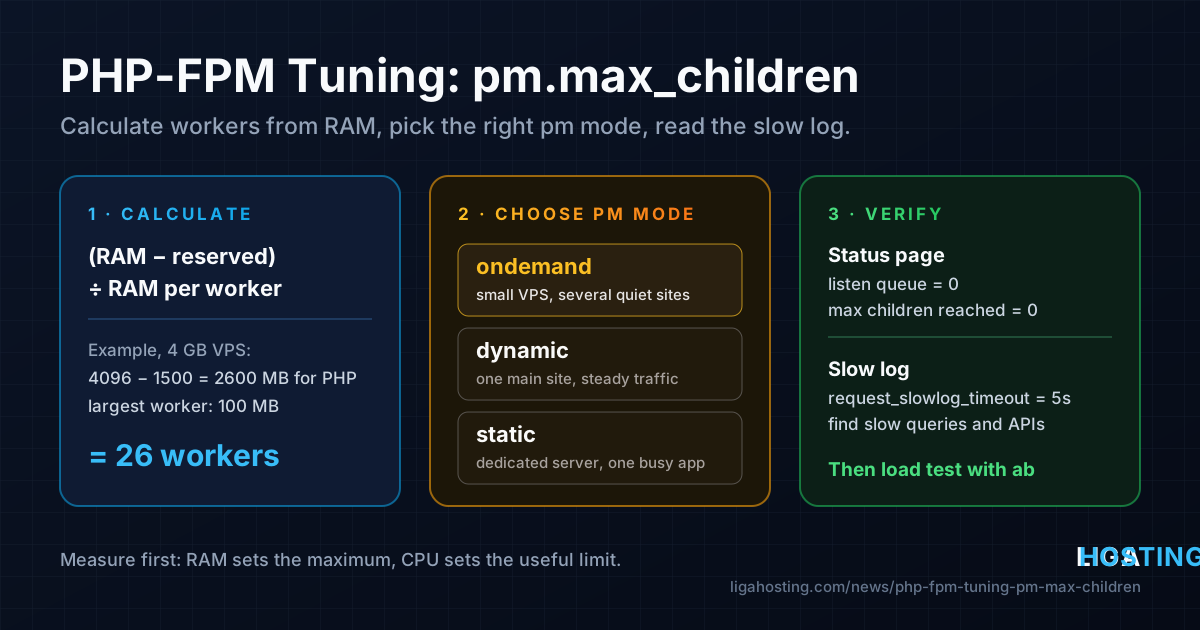
pm.max_children = (total RAM − RAM reserved for everything else) ÷ RAM per worker"Everything else" means the operating system, Nginx or Apache, MySQL/MariaDB, Redis, cron jobs and some free memory for the file cache. See what those use today:
free -m
ps -eo rss,comm --sort=-rss | head -n 15
A worked example on a VPS with 4 GB RAM running Nginx, MariaDB and WordPress:
- Total RAM: 4096 MB
- OS, Nginx, cron, small reserve: about 500 MB
- MariaDB (buffer pool plus overhead): about 1000 MB
- Left for PHP: 4096 − 1500 = about 2600 MB
- Largest worker measured: 100 MB
- pm.max_children = 2600 ÷ 100 = 26
The same arithmetic for other sizes, with illustrative worker sizes (always plug in your own numbers):
| VPS RAM | Reserved (OS, web server, DB) | Left for PHP | Workers at 60 MB | Workers at 100 MB |
|---|---|---|---|---|
| 2 GB | ~900 MB | ~1100 MB | 18 | 11 |
| 4 GB | ~1500 MB | ~2600 MB | 43 | 26 |
| 8 GB | ~2500 MB | ~5600 MB | 93 | 56 |
Two corrections to the pure memory formula:
- CPU is the second limit. RAM gives you the maximum, not the target. If your PHP code mostly computes (no waiting on the database or external APIs), more workers than about 2–4 per vCPU will not serve more requests; they only share the same CPU and make every request slower. If your code spends most of its time waiting on MySQL or HTTP calls, a higher number is fine.
- Every pool counts. If you run several sites, each with its own pool, the sum of all
pm.max_childrenvalues must fit in the memory left for PHP, not each one separately.
Swap is not part of the calculation. If PHP workers regularly end up in swap, every request slows down dramatically. If you have already seen the OOM killer at work, read why a VPS runs out of memory first.
Step 3 — Choose ondemand, dynamic or static
The pm directive decides how the pool starts and stops workers. All three modes respect pm.max_children; they differ in what happens below that limit.
| Mode | How it works | Good for |
|---|---|---|
ondemand | No idle workers. A worker is started when a request arrives and stopped after pm.process_idle_timeout without work. | Small VPS, several low-traffic sites, memory more important than the last few milliseconds |
dynamic | Keeps between pm.min_spare_servers and pm.max_spare_servers idle workers ready, up to pm.max_children. | One main site with steady traffic; the default on Debian, Ubuntu and AlmaLinux |
static | Always runs exactly pm.max_children workers. | A server dedicated to one busy application where the memory is reserved for PHP anyway |
On a 1–4 GB VPS with one or a few sites, ondemand is usually the best choice: memory goes back to MySQL and the file cache when the site is quiet, and starting a worker costs only a few milliseconds. With dynamic, keep the spare values small; the Debian default of max_children = 5 is the part that is too low, not the spare settings.
Step 4 — Apply the settings
Edit the pool file (sudo nano /etc/php/8.3/fpm/pool.d/www.conf) and set the process manager section. For the 4 GB example with ondemand:
pm = ondemand
pm.max_children = 26
pm.process_idle_timeout = 10s
pm.max_requests = 500
Or, with dynamic:
pm = dynamic
pm.max_children = 26
pm.start_servers = 4
pm.min_spare_servers = 2
pm.max_spare_servers = 6
pm.max_requests = 500
pm.max_requests = 500restarts each worker after 500 requests. This keeps slow memory leaks in plugins or extensions from growing workers forever. The default0means never.pm.process_idle_timeoutonly applies to ondemand.10sis the default; raise it to30sif workers are started and stopped constantly.- For dynamic,
start_serversmust be betweenmin_spare_serversandmax_spare_servers, or PHP-FPM refuses to start.
Always test the configuration before reloading. A reload is graceful: running requests finish first.
# Ubuntu/Debian
sudo php-fpm8.3 -t
sudo systemctl reload php8.3-fpm

# AlmaLinux
sudo php-fpm -t
sudo systemctl reload php-fpm
Raising memory_limit in php.ini does not make PHP faster. It is the maximum a single request may use, so a high value only allows one bad request to grow a worker larger than your calculation assumed. Keep it as low as your application allows (128M or 256M is common).
Step 5 — Turn on the status page
The status page shows, live, whether your pool is big enough. Enable it in the pool file:
pm.status_path = /fpm-statusThen expose it in Nginx only to the server itself. Add this inside the server block of your site, and adjust the socket path to the listen value from your pool file:
location = /fpm-status {
    allow 127.0.0.1;
    deny all;
    include fastcgi_params;
    fastcgi_param SCRIPT_FILENAME $fastcgi_script_name;
    fastcgi_pass unix:/run/php/php8.3-fpm.sock;   # AlmaLinux: unix:/run/php-fpm/www.sock
}
sudo nginx -t && sudo systemctl reload nginx
sudo systemctl reload php8.3-fpm
curl -s -H 'Host: example.com' http://127.0.0.1/fpm-statusIf your site redirects all HTTP traffic to HTTPS, put the location in a separate small server block that listens only on 127.0.0.1:80. The fields to watch:
- listen queue — requests waiting right now. It should be 0 almost all the time.
- max listen queue — the highest queue since start. Above 0 means visitors have waited for a free worker.
- max active processes — the most workers busy at the same moment. If it equals
pm.max_children, you hit the limit. - max children reached — how many times the limit was hit. It should stay at 0 or grow very slowly.
Step 6 — Use the slow log to find what is slow
If the pool is full but the server has plenty of free memory and CPU, more workers are not the answer: something makes requests slow, and each slow request holds a worker. The slow log tells you exactly where PHP was waiting. Add to the pool file:
slowlog = /var/log/php8.3-fpm-slow.log      ; AlmaLinux: /var/log/php-fpm/www-slow.log
request_slowlog_timeout = 5s
request_terminate_timeout = 60srequest_slowlog_timeout— any request running longer than this gets a PHP stack trace written to the slow log. Start with 5s, lower to 2s once the obvious cases are fixed.request_terminate_timeout— kills a request that runs longer than this, so one stuck script cannot hold a worker forever. Keep it at or below Nginx'sfastcgi_read_timeout(60s by default).
Reload PHP-FPM, wait for traffic, then read the log:
sudo tail -n 40 /var/log/php8.3-fpm-slow.log

# Which functions appear most often at the top of the traces?
sudo grep -A1 'script_filename' /var/log/php8.3-fpm-slow.log | grep '^\[0x' | \
  awk '{print $2}' | sort | uniq -c | sort -rn | head
Each entry shows the script and the call stack at the moment the timeout was reached. The top line is where PHP was stuck. Common patterns:
mysqli_queryorPDOStatement->execute— a slow database query. Enable MySQL's slow query log and add the missing index.curl_execorfile_get_contentson a URL — waiting for an external API. Add a timeout, cache the response or move the call to a background job.sleep, session locks (session_start) — requests from the same user waiting on each other.
Step 7 — Verify under load
Do not wait for the next traffic peak to find out whether the numbers are right. From another machine (not the VPS itself), send concurrent requests to a typical PHP page while you watch the server:
# On your computer: 1000 requests, 30 at a time (apache2-utils / httpd-tools)
ab -n 1000 -c 30 https://example.com/

# On the VPS, in a second terminal
watch -n1 "free -m; curl -s -H 'Host: example.com' http://127.0.0.1/fpm-status | grep -E 'active|queue|reached'"
What to look for:
- Available memory stays well above zero and swap does not grow:
pm.max_childrenfits in RAM. - The listen queue stays at 0 or near it: the pool is big enough for this concurrency.
- The queue grows while CPU is at 100%: the CPU is the limit, not the worker count. Caching (OPcache, a page cache) or more vCPU will help; more workers will not.
Frequently Asked Questions
What is a good pm.max_children for a 2 GB VPS?
There is no universal number; it depends on how much RAM your database uses and how big your workers are. With about 1100 MB left for PHP, that is roughly 11 workers at 100 MB each or 18 at 60 MB each. Measure your workers and use the formula from step 2.
Is ondemand slower than dynamic?
Slightly, for the first request after a quiet period, because a worker has to be started. That costs milliseconds, not seconds. On a small VPS the memory it frees for MySQL and the file cache usually matters more.
Why do I still get 502 errors after raising pm.max_children?
Check the PHP-FPM log and dmesg. If workers were killed for lack of memory, the value is now too high. If the slow log is full, requests are slow and hold workers; fix the slow queries or API calls instead of adding workers.
Should each website have its own PHP-FPM pool?
For separate sites, yes: each pool can run as its own user, which isolates the sites from each other, and a busy site cannot use up the workers of the others. Remember that the sum of all pools' pm.max_children must fit in RAM.
When is it time for a bigger VPS?
When the slow log is clean, OPcache and page caching are on, and the pool still fills up while memory or CPU is at its limit. Upgrades within the same VPS line can be done from the client area.
At Liga Hosting, our Standard VPS plans give you up to twice the RAM for the price — useful for PHP pools and databases — and Performance VPS plans on AMD Ryzen 9 9950X serve CPU-heavy PHP faster per request. Every VPS has NVMe storage, DDoS protection and full root access, so you control PHP-FPM, Nginx and every setting in this guide. If you would rather not run a server at all, our cPanel web hosting takes care of PHP for you.