
NVMe SSD vs SATA SSD in 2026 — The Real Difference for Hosting
When comparing hosting plans, you constantly see mentions of "SSD storage" or "NVMe storage" — but the difference isn't just technical, it's the concrete impact on your site's speed. An identical site, moved from SATA to NVMe, can see 3-5x improvements in database response times.
This guide explains exactly how the two technologies work, when the difference matters, and why NVMe became the standard for serious hosting.
How SSDs work, briefly
An SSD (Solid State Drive) stores data on NAND flash memory chips, with no moving parts — unlike old HDDs with spinning disks. Main advantage: access time thousands of times lower than an HDD.
But not all SSDs are equal. The key difference isn't in the flash memory — it's in how the SSD talks to the rest of the computer. This is where the two protocols come in: SATA and NVMe.
SATA SSD — the legacy interface
SATA (Serial ATA) is a protocol created in 2003, designed for HDDs. When SSDs appeared, they used the same interface for compatibility with existing hardware.
SATA-3 limit (the version used today): maximum 600 MB/s theoretical speed, in practice ~550 MB/s. For an HDD, that's more than enough — an HDD can't even hit 200 MB/s. But for a modern SSD, SATA is the bottleneck — the SSD could go much faster, but the protocol holds it back.
Plus, SATA uses a protocol called AHCI, designed for a single read/write head (like an HDD has). This means it can't efficiently parallelize operations.
NVMe — protocol built for modern SSDs
NVMe (Non-Volatile Memory Express) is a protocol built from scratch for flash-based SSDs. It communicates directly through PCIe (the high-speed interface also used by graphics cards), not through SATA.
Fundamental technical differences:
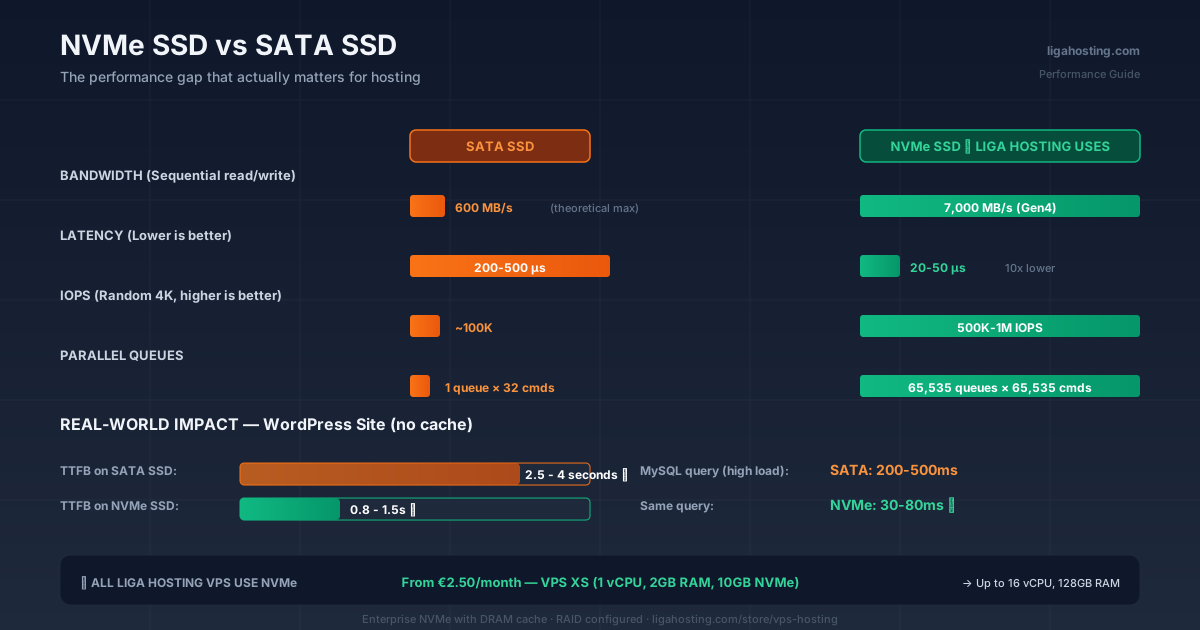
- Bandwidth: NVMe Gen3 offers up to 3.5 GB/s, Gen4 up to 7 GB/s, Gen5 up to 14 GB/s
- Parallel queues: NVMe supports 65,535 simultaneous queues × 65,535 commands per queue; SATA AHCI supports 1 queue × 32 commands
- Latency: NVMe ~20-50 microseconds, SATA SSD ~200-500 microseconds
- IOPS (operations per second): NVMe Gen3: 500,000-1,000,000 IOPS, SATA SSD: 75,000-100,000 IOPS
In clear numbers, a modern NVMe is between 5x and 15x faster than an equivalently-priced SATA SSD.
What this concretely means for your site
The numbers above can seem abstract. Let's see the real impact:
Database — the most affected area
A database does thousands of small read/write operations per second, with random data access. This is where NVMe shines: lower latency means queries run faster, and parallelization means it can process more queries simultaneously.
Practically, a WordPress site with many simultaneous visitors sees:
- On SATA SSD: MySQL queries taking 200-500ms under high traffic
- On NVMe: same queries, 30-80ms
The difference translates directly to Time To First Byte (TTFB) and visitor experience.
Page loading — the visible difference
For an average WordPress site, without caching:
- On SATA SSD: 2.5-4 seconds TTFB
- On NVMe: 0.8-1.5 seconds TTFB
With caching configured, the difference shrinks but remains visible (~30-40% faster on NVMe). For SEO, that's huge — Google penalizes slow sites.
Intensive operations — backups, imports, exports
Backing up a 5GB database or importing a large file? On SATA SSD it takes minutes. On NVMe, seconds or tens of seconds.
Game servers — chunk loading and saves
For Minecraft, Rust, ARK, and other games with large worlds, NVMe dramatically reduces chunk loading lag. Players no longer see "loading terrain" on every move.
When NVMe matters and when it doesn't
Honestly, there are situations where the SATA vs NVMe difference is insignificant:
Static site with CDN: If your server serves almost exclusively cached content, disk speed barely matters. The CDN (Cloudflare, etc.) serves 90% of requests.
Applications with minimal I/O: A Discord bot, an automation script, or a simple API doing few disk operations won't feel the difference.
Minimal disk usage: If you use 1-2GB of space and don't do intensive operations, any disk is sufficient.
For all other cases — active WordPress sites, online stores, intensive databases, game servers, applications with real traffic — NVMe is the difference between "works" and "works fast".
Common myths about SSD storage
Myth: "All SSDs are the same." Wrong. The difference between an entry-level SATA SSD and a modern NVMe Gen4 is nearly 20x in sequential throughput and 100x in IOPS for small random operations.
Myth: "NVMe wears out faster." Wrong. Endurance depends on the NAND chip used (TLC, QLC, MLC), not on the communication protocol. An enterprise NVMe can have better endurance than a consumer SATA SSD.
Myth: "NVMe consumes more power." Partially true — under load, NVMe consumes more. At idle, the difference is negligible. For hosting (24/7 active server), it doesn't matter.
Myth: "Over the network you don't notice the difference anyway." Wrong. Network latency is separate from disk latency. A slow disk means more processing time on the server, regardless of network speed.
How to check what SSD your VPS has
Curious what type of storage your current provider uses? Connect via SSH and run:
# Check disk type
lsblk -d -o name,rota
# rota = 0 means SSD/NVMe; rota = 1 means HDD

# Check if it's NVMe
ls /dev/nvme* 2>/dev/null
# If you see /dev/nvme0n1 etc., it's NVMe

# Quick speed test (requires fio installed)
apt install fio -y
fio --name=test --filename=/tmp/testfile --size=1G --bs=4k --rw=randread --runtime=10 --time_based --iodepth=64 --ioengine=libaio --direct=1
On the fio test, IOPS under 100,000 suggests SATA SSD. Above 200,000 indicates NVMe. Above 500,000 is modern NVMe Gen3+ on good hardware.
Why Liga Hosting uses NVMe across all VPS plans
All Liga Hosting VPS — from VPS XS at €2.50/month up to VPS XXXL — use NVMe storage. That means regardless of your plan, you get the same storage quality.
Why we chose this:
- It's no longer a reasonable commercial decision in 2026 to ship SATA — the cost difference is minimal, but the experience difference is enormous
- For unmanaged VPS, where the client configures their own applications, baseline performance must be excellent
- The combination of KVM + NVMe + DDoS Protection gives a solid foundation for any project type
Frequently Asked Questions
Can I upgrade a VPS from SATA to NVMe?
Depends on the provider. With most, you can't change the storage type on an existing VPS — you have to order a new VPS with NVMe and migrate. The process takes 1-3 hours for a standard site.
NVMe Gen3 vs Gen4 — does it make a difference for hosting?
For normal use (websites, databases, web applications), Gen3 is more than enough. Gen4 matters for very intensive workloads (machine learning, video processing, large enterprise databases). For 99% of hosting use cases, Gen3 offers practically the same benefits.
Why do I see "NVMe" at very low prices from some providers?
There's consumer-grade NVMe (TLC or QLC without DRAM cache) which is cheaper but has weaker performance under sustained load. Serious providers use enterprise NVMe (with DRAM cache, TLC or MLC), which is more expensive but performant and durable long-term.
How much NVMe speed do I see on a VPS compared to a dedicated server?
On a VPS, disk speed is shared between multiple instances on the same physical hardware. On a good VPS, you see 80-90% of native disk speed. On a dedicated server, you see 100% — but the cost is 5-10x higher.
NVMe on Liga Hosting VPS — what specs?
We use enterprise NVMe with DRAM cache, configured in RAID for redundancy. Effective speed on VPS varies based on physical hardware load, but is consistently in fast NVMe territory (hundreds of thousands of IOPS).
At Liga Hosting, all KVM VPS include NVMe storage. That means real performance for databases, web apps, and game servers — no hidden upgrades or "premium" options. Contact us if you have technical questions about configuring storage for your project.