
MTU and VXLAN — Why You Must Set 1450 in Pterodactyl Wings
If you run Pterodactyl nodes over a VXLAN network and get players complaining about intermittent lag, dropped packets, or connections that "freeze" for no apparent reason — 90% of the time it's a misconfigured MTU. It's one of the most underestimated sources of network issues, precisely because the symptoms look random and are hard to reproduce.
This article explains what MTU is, why VXLAN reduces it, and why you absolutely must set it correctly in Wings' config.yml.
What is MTU, briefly
MTU (Maximum Transmission Unit) is the maximum size of a packet that can pass through a network interface without fragmentation. The Ethernet standard is 1500 bytes. Any packet larger than that must be fragmented — or, in worse cases, simply dropped if the "Don't Fragment" flag is set.
The problem arises when you have tunnels — VPNs, VXLAN, GRE, WireGuard — which encapsulate the original packets inside another packet, adding extra headers. These headers "eat into" the 1500 bytes available.
Why VXLAN reduces MTU to 1450
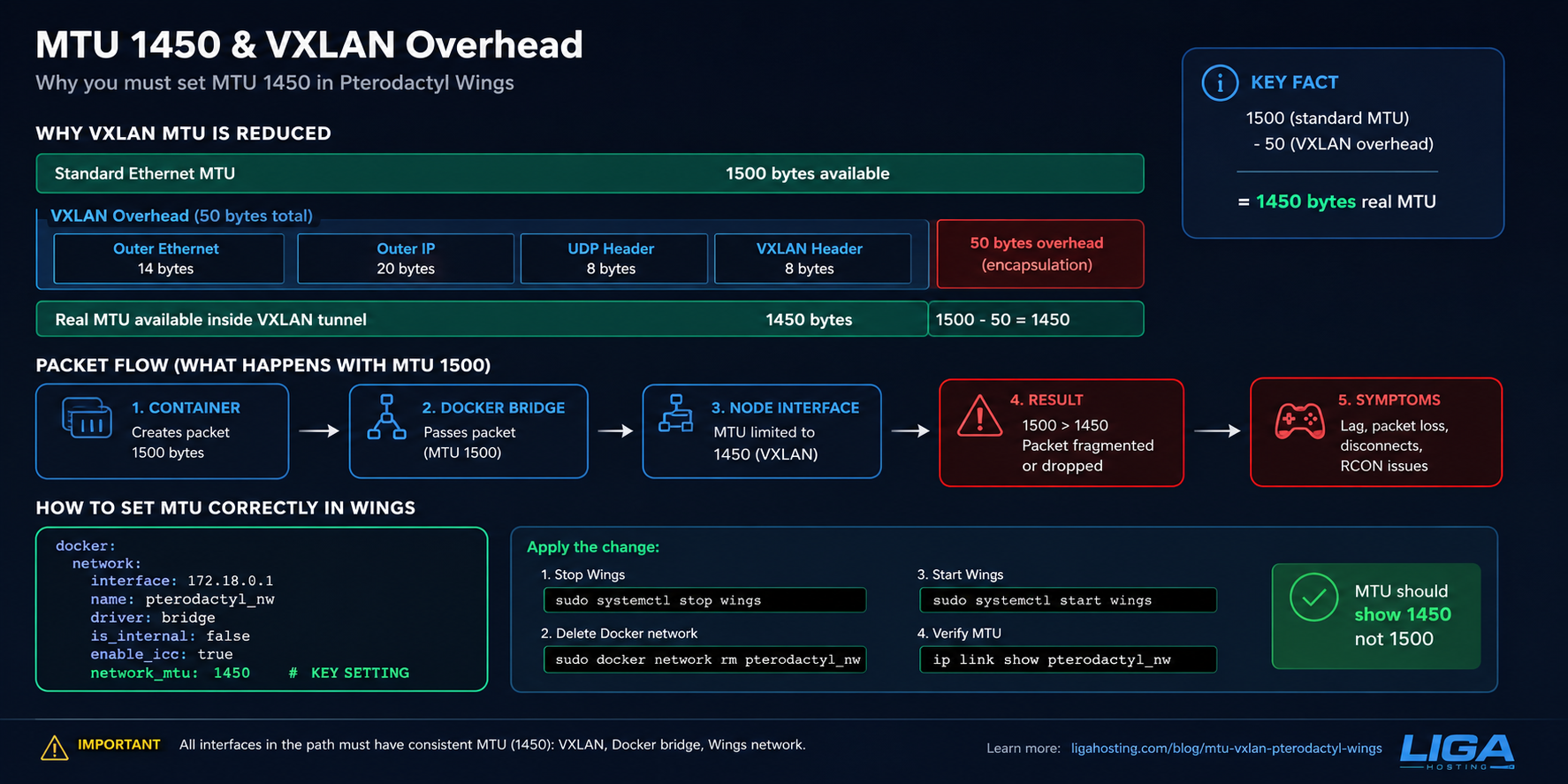
VXLAN (Virtual Extensible LAN) encapsulates complete Ethernet frames inside UDP packets, to create L2 networks over L3 infrastructure. Standard VXLAN overhead:
- Outer Ethernet header: 14 bytes
- Outer IP header: 20 bytes
- UDP header: 8 bytes
- VXLAN header: 8 bytes
- Total overhead: 50 bytes
Simple math: 1500 (standard MTU) - 50 (VXLAN overhead) = 1450 bytes real available MTU for traffic "inside" the tunnel.
This explains exactly why, in an infrastructure with VXLAN between nodes, an MTU of 1450 isn't an arbitrarily chosen number — it's the direct result of encapsulation overhead. If you set 1500 "as usual" on an interface passing through a VXLAN tunnel, any packet larger than 1450 bytes either gets fragmented (with performance penalty) or lost entirely if fragmentation is blocked somewhere along the path.
Why the problem is "invisible" at first glance
Here's the frustrating part: MTU problems don't show up immediately or obviously. They usually manifest as:
- SSH connections that hang on commands with large output (e.g.,
caton large files), but work perfectly on short commands - Websites that load partially — HTML comes through, but large images or CSS fail
- Players on game servers with intermittent lag, especially during data "bursts" (large loot, chunk loading, sync events)
- Downloads stopping at a consistent percentage
- Random "connection reset" errors with no clear pattern
The reason symptoms are so unclear: small packets (handshake, ping, short commands) pass through the tunnel without issues — they're under the 1450 byte limit anyway. Only large packets, exceeding the new effective MTU, are affected. This makes a simple "ping" test show the network as perfectly healthy, while large transfers fail constantly.
Why Pterodactyl Wings is directly affected
Wings (the Pterodactyl daemon that runs Docker containers for game servers) creates its own virtual network interfaces for each container — usually through Docker bridge networks. If the physical node's base interface passes through VXLAN with MTU 1450, but the internal Docker interface defaults to 1500 (Docker's default), a mismatch appears.
Practically:
- The container thinks it can send 1500-byte packets
- The packet leaves the container, passes through the Docker bridge (fine so far)
- It reaches the node's physical interface, limited to 1450 due to VXLAN
- The 1500-byte packet doesn't fit — it gets fragmented or lost
For players, this translates to exactly the symptoms above: RCON connections dropping, slow/failed data sync in games with heavy traffic (Rust, ARK, or any game with lots of entities), or even complete disconnects when large packets (loot data, chunk data) fail to arrive.
How to correctly set MTU in Wings
The relevant config file is config.yml, used by Wings to define the Docker network for game server containers.
File location
/etc/pterodactyl/config.ymlRelevant section
Look for (or add) the docker.network section:
docker:
  network:
    interface: 172.18.0.1
    dns:
      - 1.1.1.1
      - 1.0.0.1
    name: pterodactyl_nw
    ispn: false
    driver: bridge
    network_mode: pterodactyl_nw
    is_internal: false
    enable_icc: true
    network_mtu: 1450
The key parameter is network_mtu: 1450. Without it, Wings uses Docker's default (1500), which doesn't match the real MTU available over VXLAN.
Applying the change
The change in config.yml doesn't apply live — you need to recreate the Docker network and restart Wings:
# Stop Wings
sudo systemctl stop wings

# Delete the existing Docker network (Wings recreates it on startup)
sudo docker network rm pterodactyl_nw

# Start Wings again — recreates the network with the new MTU
sudo systemctl start wings

# Verify the new interface's MTU
ip link show pterodactyl_nw
In the output of ip link show, check the mtu value — it should show 1450, not 1500.
How to verify if MTU is your problem
Before assuming MTU is the cause, quickly check with ping using the "don't fragment" flag:
# Linux/Mac
ping -M do -s 1422 destination-IP

# 1422 = 1450 (VXLAN MTU) - 28 (ICMP + IP header)
# If this ping passes but one with -s 1450 fails, you've confirmed the problem
On Windows:
ping -f -l 1422 destination-IPIf you see "Packet needs to be fragmented but DF set" or timeouts at sizes above 1422-1450, MTU is the cause.
Direct MTU verification on interfaces
# See all interfaces and their MTU
ip link show

# See specifically the VXLAN interface
ip -d link show vxlan0

# See the Docker/Pterodactyl interface
ip link show pterodactyl_nw
All interfaces in the traffic path should have consistent MTU — 1450 across all relevant layers (VXLAN, Docker bridge, container interfaces).
Setting MTU at system level (beyond Wings)
If you also manage VXLAN configuration directly (not just Wings), MTU needs to be set consistently along the whole path:
On the VXLAN interface (example with ip/iproute2)
ip link add vxlan0 type vxlan id 42 dstport 4789 dev eth0
ip link set vxlan0 mtu 1450
ip link set vxlan0 up
On the BIRD/BGP interface (if routing over VXLAN)
In routing configs (BIRD, FRR), the interface MTU must be consistent, otherwise PMTU discovery issues and routing blackholes for large packets can occur.
Global Docker daemon (optional, if you want a default for all networks)
# In /etc/docker/daemon.json
{
  "mtu": 1450
}
sudo systemctl restart dockerCaution: changing the global Docker MTU affects all containers on the node, not just Pterodactyl. I recommend the specific setting in Wings' config.yml if you want to limit the impact to just game servers.
Common mistakes to avoid
Setting MTU on only one side of the tunnel. If you have VXLAN between NODE1 and NODE2, both ends need MTU 1450, not just one. Inconsistency leads to exactly the "works sometimes" problems described above.
Ignoring PMTU discovery. Some firewalls block ICMP "Fragmentation Needed" packets, which completely breaks Path MTU Discovery. If you have a strict firewall, make sure ICMP type 3 code 4 gets through.
Assuming 1500 is always correct. Standard MTU of 1500 is only valid on "native" networks, without tunneling. Any VXLAN, GRE, IPsec, WireGuard reduces the effective available MTU — and each technology has different overhead (WireGuard, for example, has ~60-80 bytes overhead, not 50 like standard VXLAN).
Forgetting to recreate the Docker network after changing config.yml. Modifying the file without restart + network recreation has no effect — existing containers keep the old MTU.
Why it matters especially for game servers
Games with heavy UDP traffic (Minecraft with lots of chunks, Rust with entity syncing, ARK) frequently send packets close to the MTU limit. If MTU is misconfigured, these exact games are the first to show symptoms — while a simple web server with small pages might look completely healthy for a long time before anyone notices the problem.
For Pterodactyl administrators with multiple nodes connected via VXLAN (as in a failover setup between nodes), checking MTU should be the first diagnostic step whenever "weird" or intermittent lag reports come from players — before investigating CPU, RAM, or other more complex causes.
Frequently Asked Questions
Why don't I just set MTU 1500 everywhere and be done with it?
Because VXLAN encapsulation overhead (50 bytes) exists physically — no matter what you set, packets larger than 1450 bytes will still need to be fragmented when passing through the tunnel. Correctly setting MTU to 1450 avoids unnecessary fragmentation and packets lost due to "Don't Fragment" flags.
What happens if I have inconsistent MTU between nodes?
You practically guarantee intermittent problems. Packets passing through the correctly-MTU'd part work fine; those hitting the wrongly-configured segment get lost or poorly fragmented. Classic symptom: "it works, but sometimes it doesn't."
Do I need to change the MTU on clients (players) too?
No. The end client's (player's PC) MTU has nothing to do with your internal VXLAN — that's completely transparent to external traffic. Only interfaces in your infrastructure (VXLAN, Docker bridge, Wings config) need adjustment.
Can I check MTU without root access to the server?
Yes, the ping -M do -s [size] test works as a normal user on most systems. To see and modify interface MTU, you need root or sudo access.
What other tunneling technologies have similar overhead?
WireGuard: ~60-80 bytes overhead (effective MTU ~1420-1440). OpenVPN: ~40-60 bytes overhead, depends on configuration. GRE: ~24 bytes overhead (effective MTU ~1476). Each technology has its own calculation — don't assume 1450 is universal for any tunnel.
At Liga Hosting we manage infrastructure with VXLAN between nodes for DDoS protection and failover, with MTU correctly configured across all layers — including Wings for our Game Hosting servers. If you run your own Pterodactyl node on a Liga Hosting VPS and need help with network configuration, contact us.