
Minecraft Server Hosting — Complete Beginner's Guide for 2026
Want to play Minecraft with friends on your own server, without lag, without Realms limitations, and without keeping your laptop on 24/7? A Minecraft server hosted on a VPS is the answer — but before you buy the first plan you see, let's clarify exactly what you need.
This guide shows you which specs actually matter for Minecraft, how to pick the right VPS, and what setup pitfalls to avoid.
Why a VPS, not a personal PC or Realms
There are three ways to play Minecraft with friends: server on your own PC, Minecraft Realms, or a dedicated VPS. Each has advantages, but for a serious experience, VPS wins.
On your own PC: free, but you have to keep it on non-stop, it eats system resources, you have port forwarding issues, and friends depend on your internet connection. Plus, if you close the laptop, the server dies.
On Minecraft Realms: simple to set up, but limited to 10 players, no mods, no plugins, reduced control. For casual play with 2-3 friends, fine. For anything else, restrictive.
On a VPS: total control, mods and plugins supported, scalable performance, server running 24/7, dedicated IP. Cost starts at €5/month — less than Realms and without limitations.
Real hardware requirements for Minecraft
This is where most guides give numbers that are too low or too optimistic. The reality in 2026:
RAM — the most important resource
Minecraft Java Edition is notorious for RAM consumption. Version, mods, and player count quickly increase requirements:
- Vanilla, 2-5 players: 2GB RAM minimum, 3GB recommended
- Vanilla, 5-15 players: 4GB RAM
- Plugin server (Spigot/Paper), 10-20 players: 4-6GB RAM
- Modded server (Forge/Fabric), 5-10 players: 6-8GB RAM
- Large modpack (FTB, ATM, Create), 5-15 players: 8-12GB RAM
- Large server with many players + plugins: 16GB+ RAM
Classic mistake: running an "All The Mods" type modpack on a 2GB RAM VPS. The server will start, but it will lag constantly and crash on the first heavily loaded chunks.
CPU — single-core speed matters more than core count
Minecraft Java runs predominantly on a single main thread. That means a CPU with 8 slow cores is worse than one with 4 fast cores. For Minecraft, the priority is per-core frequency, not total count.
Liga Hosting VPS uses KVM virtualization with allocated vCPUs (not shared with other users), meaning you won't have the surprise of TPS lag because a neighbor is doing video encoding.
Storage — NVMe is the difference between fast and slow chunk loading
Minecraft constantly reads and writes chunks to disk. On NVMe, chunk loading is fluid. On older SATA SSDs or HDDs, players see "loading terrain" for 3-5 seconds during fast travel.
Space: a vanilla server with a small world takes 1-2GB. A server with an old world, lots of explored regions, and backups can reach 10-30GB. For modpacks, calculate 5-15GB just for the server itself.
Bandwidth — calculate by player count
A Minecraft player consumes on average 50-150 KB/s. With 10 active simultaneous players, that's ~1-1.5 MB/s constant. Per month: ~3-4TB at heavy use. For small servers, 1TB is sufficient.
Which VPS plan to choose for Minecraft
Concrete recommendations based on your server type:
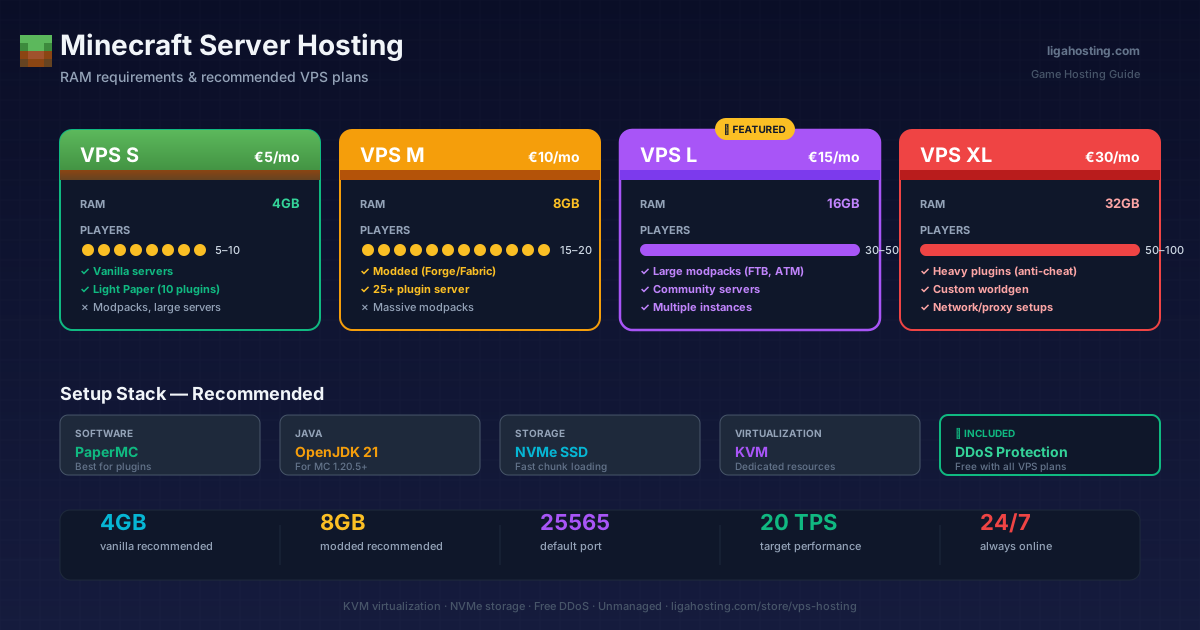
- VPS S (4GB RAM, €5/month): Vanilla server for 5-10 friends or light Spigot/Paper server with max 10 plugins
- VPS M (8GB RAM, €10/month): Moderate modded server or Spigot/Paper server with 15-25 plugins and 15-20 active players
- VPS L (16GB RAM, €15/month): Large modpacks, server with 30-50 players, or community server with custom plugins
- VPS XL (32GB RAM, €30/month): Large server with heavy plugins (anti-cheat, economy, custom world generation) and 50-100 players
Practical tip: start with a plan slightly larger than you think you need. Minecraft tends to consume more over time (growing world, more entities, added plugins). It's easier to have margin than to downgrade after problems.
Server software — what to choose
Several Minecraft server software options exist, each with trade-offs:
- Vanilla: Official Mojang, no plugins, just pure gameplay. Average performance.
- Paper: Best choice for most servers. Heavily optimized over vanilla, supports all Spigot plugins, excellent performance. Main recommendation.
- Purpur: Paper fork with additional configuration options. Good for servers wanting specific tweaks.
- Forge: For modpacks (FTB, ATM, Create, Tinkers). Consumes more resources but necessary for mods.
- Fabric: Modern alternative to Forge, faster and lighter. Compatible mods list growing rapidly.
- Quilt: Fabric fork with extended functionality. Niche but interesting.
For 90% of cases: Paper if you want plugins, Forge or Fabric if you want mods.
Step-by-step setup on a Liga Hosting VPS
Assuming you've ordered a VPS from Liga Hosting and received your SSH credentials:
1. Connect and prepare server
ssh root@your-IP
apt update && apt upgrade -y
apt install openjdk-21-jre-headless screen wget -y
Java 21 is required for Minecraft 1.20.5+. For older versions, use Java 17 (`openjdk-17-jre-headless`).
2. Create dedicated user (for security)
adduser minecraft
su - minecraft
mkdir server && cd server
3. Download Paper
wget https://api.papermc.io/v2/projects/paper/versions/1.21.1/builds/latest/downloads/paper-1.21.1-latest.jar -O paper.jarCheck current version on papermc.io — link above may be outdated.
4. Accept EULA and first start
echo "eula=true" > eula.txt
java -Xms2G -Xmx4G -jar paper.jar nogui
The `-Xms` and `-Xmx` parameters set minimum and maximum allocated RAM. For VPS S (4GB total), use `-Xmx3G` (leave 1GB for the OS).
5. Run in background with screen
screen -S minecraft
java -Xms2G -Xmx3G -jar paper.jar nogui
# Press Ctrl+A then D to detach screen
To return to server console: `screen -r minecraft`.
6. Configure firewall
ufw allow 22
ufw allow 25565
ufw enable
Port 25565 is default for Minecraft. Change it in `server.properties` if you want.
Critical performance optimizations
After the server is running, these optimizations make the difference between a lagging server and a fluid one:
In `server.properties`:
view-distance=8(instead of default 10) — drastic load reductionsimulation-distance=6— same, lowers consumptionspawn-protection=0if you don't need itmax-tick-time=60000to avoid restarts on lag spikes
In `paper-world-defaults.yml`:
entities.spawning.per-player-mob-spawns: trueentities.spawning.spawn-limits— reduce monster spawn ratechunks.delay-chunk-unloads-by: 10s
Mandatory plugins for performance:
- Spark — profiler for identifying bottlenecks
- FastAsyncWorldEdit — if you do large builds
- Chunky — pre-generate chunks to avoid lag during exploration
DDoS Protection — a major Liga Hosting advantage
Minecraft servers are frequent DDoS targets, especially if your server becomes popular or you have a conflict with another player. Attacks can last hours and make the server unplayable.
All Liga Hosting VPS include free DDoS protection — a concrete advantage over many providers who sell DDoS protection as paid extra. For a public Minecraft server, this is the difference between consistent uptime and player frustration.
Backups — don't skip this
Minecraft worlds are valuable. Builds taking months can disappear in a crash or wrong action. Three levels of backup:
- Automatic backup plugin (CoreProtect, AutoSave) — modification log for rollback
- Daily VPS-level snapshot — complete server copy, restorable in minutes
- Weekly off-site backup — with rsync to external storage or S3
Setup takes 30 minutes but saves you when things go wrong.
Frequently Asked Questions
How many players can play on a 4GB RAM VPS?
For a well-optimized Paper server, 8-12 simultaneous active players without issues. With heavy plugins or in busy areas, fewer. For a comfortable experience for a friends group, 4GB RAM is sufficient.
Can I run a modpack on VPS S (4GB)?
Small and middle modpacks (e.g., SkyFactory, Stoneblock) can run with 4GB for 2-3 players. Large modpacks (All The Mods, FTB) need at least 8GB. Check the modpack's official recommendation.
What's the difference between Bedrock and Java for hosting?
Java Edition is the standard for PC servers, supporting plugins and mods (Paper, Forge, Fabric). Bedrock Edition is for cross-play between PC, console, and mobile, but has a more limited plugin ecosystem (Geyser allows Bedrock players to connect to Java servers).
Can I have multiple Minecraft servers on the same VPS?
Yes, if you have enough RAM. Use different ports (25565, 25566, 25567...) for each instance. On a VPS L (16GB), you can comfortably run 3-4 small servers simultaneously.
Which Java version do I use?
For Minecraft 1.20.5 and newer: Java 21. For 1.17-1.20.4: Java 17. For 1.16 and older: Java 8 or 11. Always use OpenJDK headless (no GUI) on server.
At Liga Hosting we offer KVM VPS with NVMe, included DDoS Protection, and support in 3 languages — ideal for Minecraft servers. Our VPS are unmanaged (full control for you), perfect if you want to configure your server exactly how you want. We also have dedicated Game Hosting solutions if you prefer a simple control panel. Contact us if you need specific recommendations.