
KVM vs OpenVZ — Which Virtualization Technology Is Better in 2026
When comparing VPS plans, you'll very likely see the terms "KVM" and "OpenVZ." Many providers use one or the other — and the difference isn't just technical. It directly affects you: server performance, what you can install, how isolated you are from other clients, and even whether your RAM is truly yours.
This guide explains exactly how the two technologies work, when the difference matters, and why KVM has become the de facto standard for serious VPS hosting.
How virtualization works, briefly
A physical server has CPU, RAM, disk, and network interface. Virtualization splits these resources between multiple clients, each getting their own "virtual server." The key question is how deep the separation goes: are we just sharing resources, or creating truly independent systems?
Here come the two fundamentally different approaches — and each has concrete consequences for you as a user.
OpenVZ — container-level virtualization
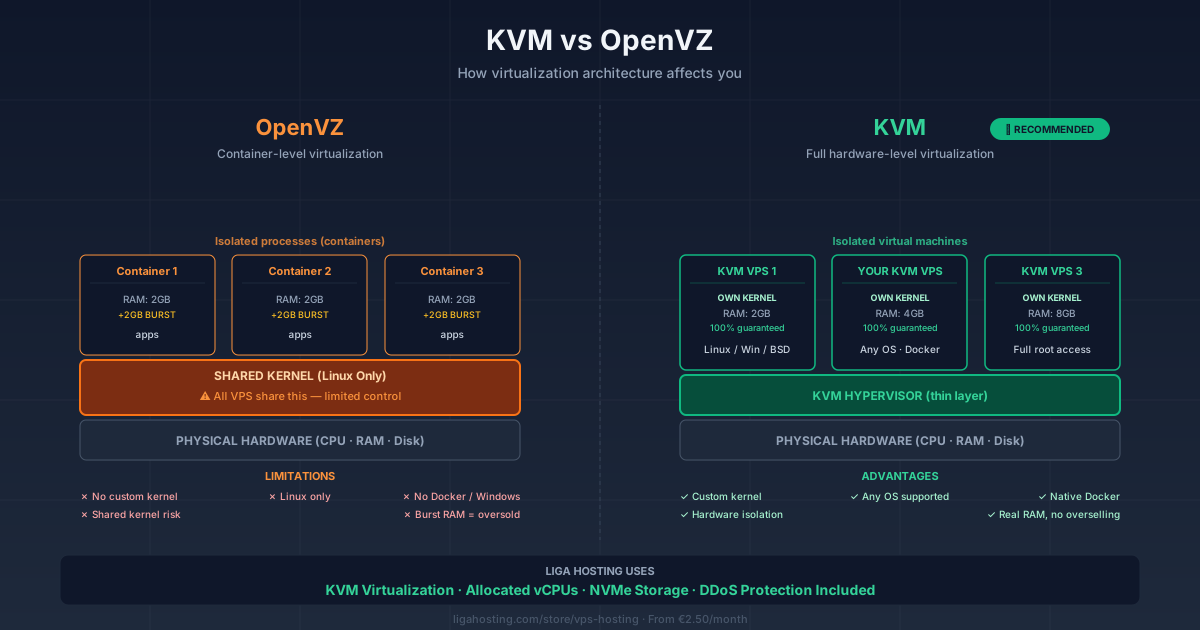
OpenVZ uses a technique called "containerization" at the operating system level. All OpenVZ VPSes on the same physical server share the same Linux kernel — the host's kernel. What you get is more of an isolated environment (similar to a Docker container), not a complete operating system of your own.
This means:
- You can't choose your own kernel — you use what the provider chooses
- You can't install custom kernel modules (e.g., custom VPN drivers, certain firewalls)
- You can't run Docker efficiently (serious limitations)
- You can't install any OS other than Linux — Windows is out
- Resources can be "burst" or "shared" — sold RAM isn't always available
OpenVZ's advantage is lower overhead — an OpenVZ VPS boots faster and consumes less memory for the system. Providers prefer OpenVZ because it lets them sell more VPSes on the same physical server.
KVM — full hardware-level virtualization
KVM (Kernel-based Virtual Machine) is a full virtualization technology. Each KVM VPS is a truly independent system — own kernel, separate operating system, hardware-level isolated memory. In practice, each KVM VPS behaves like a separate physical server.
What you get:
- Own kernel — you choose it, customize it however you want
- You can install any operating system — Linux (any distribution), Windows, BSD
- Custom kernel modules — no restrictions
- Docker, nested virtualization, containers — work natively
- Allocated resources are truly yours, hardware-level guaranteed
- Isolation is complete — other VPSes can't "see" or affect your resources
At Liga Hosting VPS we use KVM for exactly these reasons — we want to give you a VPS that behaves like a physical server, not a limited container.
Direct comparison on real criteria
1. Performance
On paper, OpenVZ has lower overhead. In practice, the difference is insignificant on modern hardware and is offset by OpenVZ's unpredictability: when other users on the same server "burst," your performance drops.
KVM offers predictable, stable performance. Allocated resources are always available, no surprises.
2. Isolation and security
OpenVZ has process-level isolation. A bug in the shared kernel affects all VPSes on the server. If another client runs malicious code that exploits the kernel, there's escape risk.
KVM offers hardware-level isolation. Each VPS runs in its own virtual machine with its own kernel — an "escape" attack is much more difficult. For any purpose involving sensitive data, KVM is the only reasonable choice.
3. Resources — what you see is what you get?
This is the most important hidden difference for you as a user. On OpenVZ, RAM has two values:
- Guaranteed RAM — minimum guaranteed (usually half of what's advertised)
- Burst RAM — maximum, available ONLY if the physical server has enough
Many OpenVZ providers sell "4GB RAM" when actually 2GB are guaranteed and 2GB are "burst." If the physical server is busy, you only get 2GB. It's the practice called "overselling" — the provider promises more than they can deliver simultaneously to all clients.
On KVM, if you pay for 4GB RAM, you get 4GB RAM. Guaranteed, hardware-level allocated, regardless of what other clients do.
4. Flexibility
OpenVZ limits you to Linux, the host's kernel, and applications that don't require specific kernel features. Many modern things (Docker swarm, Kubernetes, certain VPNs, ZFS filesystems, certain monitoring technologies) don't work or work poorly.
KVM doesn't have these restrictions. What would work on a physical server, works on KVM.
5. Operating system support
OpenVZ: only Linux, and only the distributions the provider supports.
KVM: anything — Ubuntu, Debian, CentOS, AlmaLinux, Rocky, Fedora, Arch, Windows Server, FreeBSD, OpenBSD. You can even install a custom OS from an ISO.
How to identify what a provider uses
Many providers clearly display the technology in product description. If you don't see the mention, signs that indicate OpenVZ:
- Suspiciously low prices ($1-2/month for "high RAM" VPSes)
- Mentions of "burst RAM" or "guaranteed RAM"
- Lack of Windows option in OS list
- Explicit mentions that Docker is "limited" or "not officially supported"
Signs that indicate KVM:
- Single RAM value, no "burst"
- Ability to choose Windows as OS
- Explicit support for Docker, custom kernel, or ISO upload
- Realistic prices ($3+ for VPSes with real RAM)
Are there cases where OpenVZ is okay?
Honestly? Very few in 2026. Possibly:
- You want an extremely cheap VPS for testing or learning
- You run simple Linux applications without special requirements
- You don't care about predictable performance
For any serious purpose — business sites, online stores, game servers, applications with real traffic — OpenVZ is a poor choice. The lower cost turns into bigger problems in the medium term.
Why this matters in choosing your VPS
Concretely, choosing a KVM VPS avoids the following frustrating scenarios:
"Why is my site sometimes slow?" — On OpenVZ, when other clients are "bursting" or the physical server is loaded, your performance drops without warning. On KVM, this doesn't happen.
"I want to install Docker for my app." — On OpenVZ, you fight with limitations and special configs. On KVM, you install Docker and it works.
"I need to run Windows Server." — On OpenVZ, impossible. On KVM, just select the Windows image at deployment.
"I want to set up my own VPN with OpenVPN/WireGuard." — On OpenVZ, certain kernel modules may be missing. On KVM, you have complete control.
"My application needs specific kernel features." — On OpenVZ, you depend on the provider. On KVM, you recompile the kernel with whatever you want.
The practical conclusion
In 2026, KVM is the de facto standard for professional VPS hosting. The price difference compared to OpenVZ has dropped dramatically, and KVM's advantages (predictable performance, real isolation, complete flexibility) are incomparable.
All Liga Hosting VPS are on KVM, with allocated vCPUs (not shared), NVMe storage, and included DDoS Protection. Starting from €2.50/month — prices competitive with OpenVZ, but with the quality and control of a real VPS.
Frequently Asked Questions
Can I migrate from OpenVZ to KVM easily?
Migration isn't automatic — you have to reinstall your system on KVM and copy your data. For a simple application (a WordPress site, for example), it takes 1-2 hours. For complex configurations, longer. Worth the effort, however, if you're on OpenVZ and have problems.
Can I run Docker on OpenVZ?
Technically yes, but with significant limitations. Many Docker images don't work correctly, layering has issues, and performance is degraded. For any serious Docker usage, KVM is required.
What's KVM's overhead compared to OpenVZ?
On modern hardware, KVM's overhead is 1-3% for CPU and almost nonexistent for I/O with virtio drivers. The practical difference is insignificant, especially relative to KVM's benefits.
Can I install Windows Server on a KVM VPS?
Yes, KVM natively supports Windows Server. At Liga Hosting you can select Windows as the operating system when ordering the VPS (separate Windows license required).
Are there newer technologies than KVM?
There are alternatives like Xen, VMware ESXi, Hyper-V — all being full virtualizations similar to KVM. There are also new technologies (Firecracker, Kata Containers) optimized for specific workloads. For standard VPS, KVM remains the best combination of performance, stability, and flexibility.
At Liga Hosting we exclusively offer KVM VPS with allocated resources, NVMe storage, and DDoS Protection. All VPS are unmanaged — full control for you. Contact us if you have technical questions about migration or setup.