
What 99.9% Uptime Really Means and Why It Matters for Your Business
You see it everywhere on hosting websites: "99.9% guaranteed uptime" or even "99.99%". Sounds impressive — but what does it concretely mean? The difference between 99.9% and 99.99% isn't an extra decimal — it's hours of yearly downtime that can mean hundreds or thousands of euros lost.
This guide explains exactly what each percentage means, how it translates to real downtime, what an SLA is, and how to verify if your provider actually delivers what they promise.
What "uptime" really means
Uptime is the percentage of time a server (or service) is functional and accessible. The opposite is downtime — the period when it's unavailable. It's usually calculated monthly or yearly.
The simple formula:
Uptime % = (Total time - Downtime) / Total time × 100Sounds simple, but the devil is in the details: what counts as "downtime"? Scheduled maintenance? Upstream network issues? DDoS attacks? This varies by provider — and that's exactly what makes the difference.
Translating percentages to real downtime
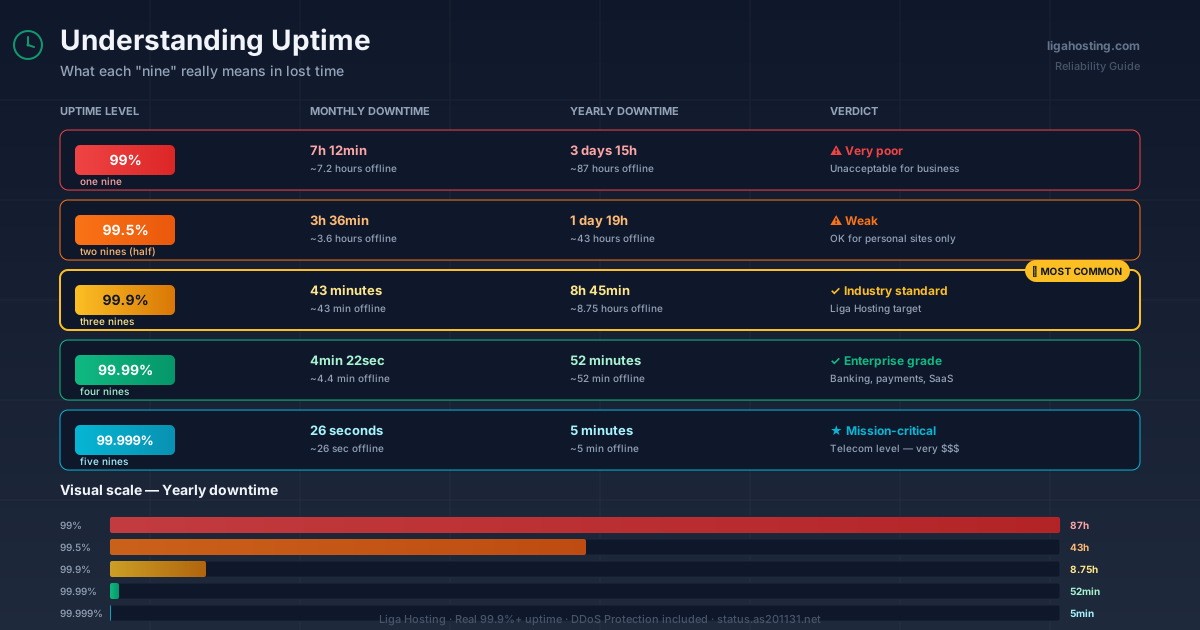
Here's how each percentage translates to lost time:
99% uptime
- Monthly downtime: ~7 hours 12 minutes
- Yearly downtime: ~3 days 15 hours
- Verdict: very poor. Unacceptable for any commercial site.
99.5% uptime
- Monthly downtime: ~3 hours 36 minutes
- Yearly downtime: ~1 day 19 hours
- Verdict: okay for personal sites, too weak for businesses.
99.9% uptime ("three nines")
- Monthly downtime: ~43 minutes
- Yearly downtime: ~8 hours 45 minutes
- Verdict: industry standard for quality hosting. Acceptable for most businesses.
99.99% uptime ("four nines")
- Monthly downtime: ~4 minutes 22 seconds
- Yearly downtime: ~52 minutes
- Verdict: enterprise level. Required for critical applications (banking, payments, SaaS).
99.999% uptime ("five nines")
- Monthly downtime: ~26 seconds
- Yearly downtime: ~5 minutes
- Verdict: telecom / mission-critical level. Rarely offered in general hosting, costs a lot.
See the difference? Between 99.9% and 99.99% is the difference from 8 hours of yearly downtime to under one hour. For an active online store, every hour of downtime can mean thousands of euros lost.
What is an SLA and why it matters
SLA (Service Level Agreement) is the formal contract between you and the hosting provider that defines:
- The guaranteed uptime level (e.g., 99.9%)
- What counts and what doesn't count as downtime
- What you get as compensation if uptime drops below the limit
- Incident reporting procedures
The most important questions to ask about an SLA:
1. Is "scheduled maintenance" excluded? Many SLAs exclude maintenance from the calculation. If the provider schedules 8 hours of monthly maintenance, real 99.9% becomes much less.
2. Are "DDoS attacks" excluded? Some providers wash their hands of DDoS, which is problematic. At Liga Hosting, DDoS Protection is included precisely to avoid this.
3. How is compensation calculated? Usually it's a percentage of the monthly invoice, calculated by hours of downtime. Typical amounts: 5-50% credit for downtime between 1-24 hours.
4. Is a formal claim required for compensation? Yes, almost always. SLAs don't apply automatically — you have to report the incident and request credit.
Why it's hard to achieve 99.99% uptime
A few reasons providers hesitate to promise more than 99.9%:
Hardware failures. Disks, RAM, PSUs fail. Even with redundancy, sometimes human intervention is needed.
Network issues. Problems at upstream ISP level, routing, peering — all can affect your server without being the provider's direct fault.
Critical security updates. Sometimes kernel patches or hypervisor updates require reboots.
Human errors. Inevitable. A wrong script, a problematic new config — it happens.
Providers promising 99.99% usually have redundant infrastructure (multiple datacenters, automatic failover) and cost significantly more.
How to verify a provider's real uptime
Promises are one thing, reality another. How to verify real uptime:
1. Status page
Serious providers have a public status page showing incident history and measured uptime. At Liga Hosting, that's status.as201131.net — transparent.
2. External monitoring services
Before ordering, monitor the provider's demo server (or someone using them) yourself with:
- UptimeRobot — free for 50 monitors, checks every 5 minutes
- StatusCake — richer features on free plan
- HetrixTools — blacklist + uptime monitoring
After 30-60 days you have real data, not just promises.
3. Reviews on technical forums
Lowendtalk, WebHostingTalk, ServerHub — technical communities where users report real experiences. Search the provider's name and read 10-15 reviews.
4. Ask for references
For serious projects, ask the provider for 2-3 similar clients to confirm their experience. Good providers don't shy from this.
What uptime to expect in practice
In 2026 reality, for a professional provider with decent infrastructure, you can expect:
- 99.9-99.95% for standard shared hosting and VPS — with 30-90 minutes monthly downtime (maintenance included)
- 99.95-99.99% for premium VPS with redundancy and DDoS protection
- 99.99%+ for high-availability setups with multiple nodes and load balancers
At Liga Hosting we consistently target 99.9%+, with DDoS Protection included on all VPS and full transparency on our status page. For projects requiring higher uptime, high-availability configurations are possible with multiple VPS and external load balancer.
What you can do to increase uptime
Uptime doesn't depend only on the provider. You can also do things to improve it:
External monitoring. Set up UptimeRobot from day 1 — you find out immediately when something's wrong.
Automated backups. If your server goes down permanently, you want to migrate fast. Daily backup to external storage is mandatory.
CDN. Cloudflare or alternatives — even if your origin crashes, the CDN can serve cached content for a few minutes, giving you time to fix things.
Failover DNS. With a service like DNSimple or ClouDNS, you can set health checks that automatically switch traffic to a backup server if the main one crashes.
Robust code. An application that crashes on first error reduces uptime worse than hardware does.
The real cost of downtime
To understand how much better uptime is worth, calculate what you lose in downtime:
- Online store with $10,000/month: ~$14 per hour of downtime in lost sales
- SaaS site with 500 subscribers: lost trust + potential churn = much more than immediate losses
- Corporate site: reputation damage + potential new customer loss
- Personal presentation site: minimal — a few extra hours of downtime won't kill you
If hourly downtime loss exceeds the monthly cost of a better plan, the upgrade pays for itself.
Frequently Asked Questions
What's better: real 99.9% or promised 99.99% that's not respected?
Always real 99.9%. An SLA on paper doesn't help if the service is down. Verify the provider's real uptime history before ordering, not just promises.
Does scheduled maintenance count as downtime?
Depends on the SLA. With most professional providers, scheduled maintenance (announced at least 48h in advance) doesn't count in SLA calculation. Still, downtime is downtime from your user's perspective.
How do I get credit if uptime drops below SLA limits?
Usually you formally report the incident through the provider's ticket system, attach evidence (logs, screenshots, monitoring data), and request compensation. Exact procedure varies — check the SLA.
What does Liga Hosting do when there's downtime?
We transparently publish incidents on our status page, communicate on Discord and via email, actively work on resolution. For significantly affected clients, we process credits according to SLA — no hidden tricks.
Can I have 100% uptime?
On paper, no. In practice, yes — with multi-region infrastructure, multiple cloud providers, and stateless application. But the cost is enormous (thousands EUR/month). For 99% of projects, real 99.9% is enough.
At Liga Hosting we consistently target 99.9%+ uptime, with full status page transparency and DDoS Protection included on all KVM VPS. Contact us to discuss high-availability configurations for your project.