
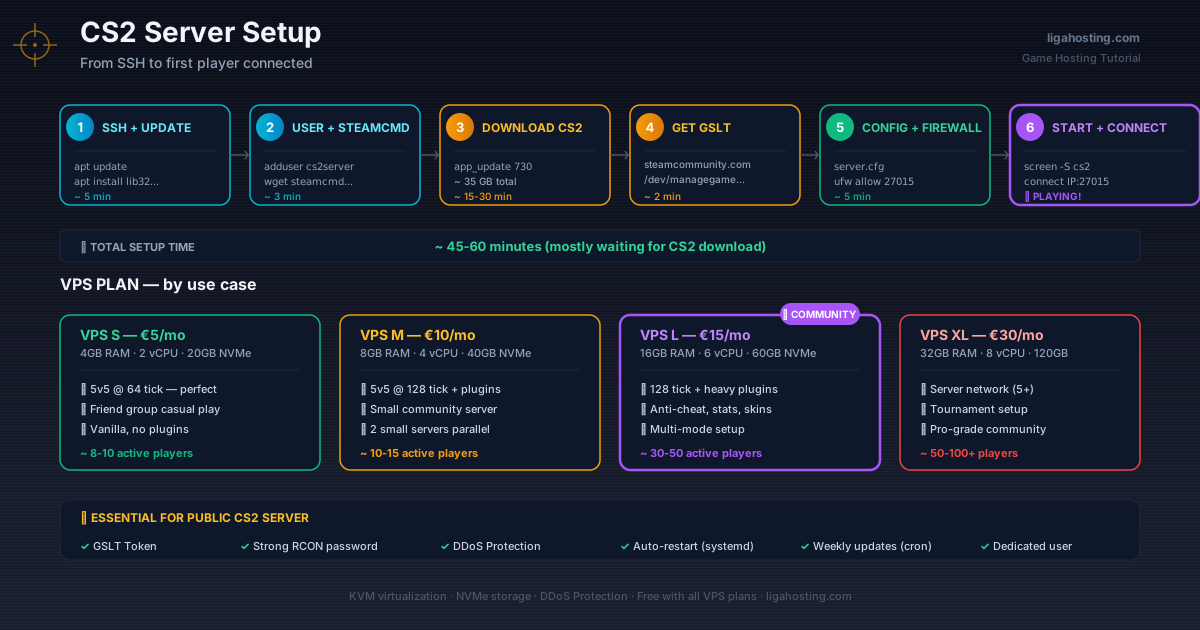
How to Set Up a CS2 Server — Step-by-Step Tutorial for 2026
Want to play Counter-Strike 2 with friends on your own server, without depending on Valve's matchmaking, with custom maps, mods, and full control? A dedicated CS2 server on a VPS gives you exactly that — and it's not as complicated as it seems.
This tutorial walks you step by step through configuring a working CS2 server on a Linux VPS, from zero to first players connected.
Why your own CS2 server
Counter-Strike 2 offers official matchmaking, but with frustrating limitations: queue times, no custom maps, smurfs, occasional cheaters, and zero control over settings. Your own server fixes nearly all of that:
- Play only with who you want (server password or whitelist)
- Access to all modes — Surf, KZ, Retake, Bhop, 1v1, FFA, Gungame
- Full control over settings (tickrate, gravity, weapon restrictions)
- Custom maps from Workshop installed in seconds
- Server running 24/7 — play whenever, no waiting for five friends
- Cost split between 5-10 friends is ridiculously low per person
Real hardware requirements for CS2
CS2 is more demanding on server resources than CS:GO was. The Source 2 engine consumes more CPU and RAM, especially at 128 tick.
RAM
- Classic 5v5 server, 64 tick: 2GB RAM
- Classic 5v5 server, 128 tick: 3-4GB RAM
- Server with plugins (CS# / Metamod), 128 tick: 4-6GB RAM
- Multi-mode server (multiple instances): 8GB+ RAM
CPU — single-thread performance is critical
CS2 (like all FPS games) runs intensively on a single main thread. For 128 tick without lag, you need a CPU with high frequency per core. A VPS with 2 fast vCPUs beats one with 4 slow vCPUs.
Liga Hosting VPS uses KVM with allocated vCPUs (not shared with other users), meaning you won't get TPS spikes because a neighbor is doing video encoding.
Storage
CS2 takes around 35-40GB for a complete server install. NVMe helps load maps fast — a custom Workshop map downloads and loads in seconds, not minutes.
Bandwidth
One CS2 slot at 128 tick consumes around 80-150 KB/s. For a 10v10 server, that's ~3 MB/s constant upload. Per month: ~7-8TB at heavy use. For a normal-activity server (3-4 hours daily), 1-2TB is enough.
Which VPS plan to choose for CS2
- VPS S (4GB RAM, €5/month): 5v5 or 10v10 server at 64 tick — perfect for a friend group wanting to play without pro pretensions
- VPS M (8GB RAM, €10/month): 5v5 server at 128 tick with plugins or two small servers simultaneously — recommended for small-medium community
- VPS L (16GB RAM, €15/month): Multiple CS2 servers simultaneously, 128 tick server with heavy plugins (anti-cheat, stats, skinchanger), larger community
- VPS XL (32GB RAM, €30/month): CS2 server network (5+ instances), tournament setup, or very active community
Step-by-step setup on a Liga Hosting VPS
Assuming you've ordered the VPS (Ubuntu 22.04 or 24.04 recommended) and received SSH credentials, let's go:
1. Connect and update system
ssh root@your-IP
apt update && apt upgrade -y
apt install software-properties-common dpkg ca-certificates lib32gcc-s1 lib32stdc++6 wget unzip screen -y
2. Create a dedicated user
For security, never run game servers as root:
adduser cs2server
# (set a password)
usermod -aG sudo cs2server
su - cs2server
3. Install SteamCMD
SteamCMD is Valve's official tool for downloading server files:
mkdir ~/steamcmd && cd ~/steamcmd
wget https://steamcdn-a.akamaihd.net/client/installer/steamcmd_linux.tar.gz
tar -xvzf steamcmd_linux.tar.gz
rm steamcmd_linux.tar.gz
4. Download CS2 server
./steamcmd.sh +force_install_dir ../cs2server +login anonymous +app_update 730 validate +quitApp ID 730 is for CS2 (same as CS:GO initially, but now serves CS2). Download takes 15-30 minutes, depending on server speed. Time for coffee.
5. Prepare Steam Game Server Token (GSLT)
For your server to be public and players to connect normally, you need a GSLT (Game Server Login Token):
- Go to
steamcommunity.com/dev/managegameservers - Sign in with a Steam account that doesn't have VAC ban
- Enter App ID 730 and a description
- Copy the generated token (16 characters)
Caveat: the Steam account used must not be limited (must have at least one $5+ purchase).
6. Configure server files
Create the main config file:
cd ~/cs2server/game/csgo/cfg
nano server.cfg
Minimum content for server.cfg:
// Hostname and password
hostname "Liga Hosting CS2 Server"
sv_password ""
rcon_password "change_this_password_now"

// Game settings
mp_friendlyfire 0
mp_autokick 0
mp_autoteambalance 1
mp_limitteams 1

// Tick rate
sv_minrate 786432
sv_maxrate 786432
sv_mincmdrate 128
sv_maxcmdrate 128

// Round timings
mp_roundtime 1.92
mp_freezetime 5
mp_warmuptime 30

// Rules
mp_buy_anywhere 0
mp_startmoney 800
mp_maxmoney 16000

// Logging
log on
sv_logfile 1
7. Create startup script
cd ~/cs2server
nano start.sh
Script content:
#!/bin/bash
./game/bin/linuxsteamrt64/cs2 -dedicated +map de_dust2 \
  +game_type 0 +game_mode 1 \
  +sv_setsteamaccount YOUR_GSLT_TOKEN_HERE \
  +ip 0.0.0.0 -port 27015 \
  -tickrate 128 \
  +rcon_password "change_this_password" \
  +sv_lan 0 \
  +maxplayers 10
Replace YOUR_GSLT_TOKEN_HERE with the token obtained earlier. Then make the script executable:
chmod +x start.sh8. Configure firewall
sudo ufw allow 22/tcp
sudo ufw allow 27015
sudo ufw allow 27015/udp
sudo ufw allow 27020/udp
sudo ufw enable
Port 27015 is default for CS2. If running multiple servers, change the port (27016, 27017 etc.) in start.sh and open it accordingly.
9. Start the server
Use screen to run the server in background:
screen -S cs2
./start.sh
To detach screen (without stopping server): Ctrl+A then D. To return: screen -r cs2.
10. Connect to server
In CS2, open console (~) and type:
connect your-IP:27015Or with password: connect your-IP:27015; password your_password.
Essential plugins — Metamod and CS#
Vanilla CS2 server is functional, but for extended features (anti-cheat, stats, VIP commands, custom mods) you need plugins. The standard stack in 2026:
- Metamod:Source — the plugin engine, foundation for any extension
- CounterStrikeSharp (CS#) — modern framework for plugins written in C#, the alternative to SourceMod (still in development for CS2)
Metamod installation (CS2 version):
cd ~/cs2server/game/csgo
wget https://mms.alliedmods.net/mmsdrop/2.0/mmsource-2.0.0-linux.tar.gz
tar -xzf mmsource-2.0.0-linux.tar.gz
rm mmsource-2.0.0-linux.tar.gz
Then edit ~/cs2server/game/csgo/gameinfo.gi to load Metamod at startup (find SearchPaths and add the line Game csgo/addons/metamod before Game csgo).
For CS#, follow the official guide on github.com/roflmuffin/CounterStrikeSharp — the project evolves rapidly, so exact commands may change.
Popular CS# plugins for CS2
- cs2-WeaponPaints — custom weapon skins (cosmetic only)
- cs2-rangranks — rank system for server
- cs2-Match — automate match flow (warmup → knife → main → end)
- cs2-anticheat — basic anti-cheat protection
- cs2-retakes — fully implemented retake mode
- cs2-stats — detailed per-player statistics
Critical performance optimizations
In server.cfg
sv_clockcorrection_msecs 15— reduces micro-stutteringfps_max 0— don't limit server FPSsv_parallel_packentities 1— use multiple cores for entity packing
At OS level
For serious servers, kernel adjustments:
# In /etc/sysctl.conf
net.core.rmem_max=2500000
net.core.wmem_max=2500000
net.ipv4.tcp_rmem=4096 87380 2500000
net.ipv4.tcp_wmem=4096 87380 2500000

# Apply
sudo sysctl -p
Use systemd instead of screen
For production-grade setup, replace screen with a systemd service that auto-starts on reboot. Create /etc/systemd/system/cs2.service:
[Unit]
Description=CS2 Dedicated Server
After=network.target

[Service]
Type=simple
User=cs2server
WorkingDirectory=/home/cs2server/cs2server
ExecStart=/home/cs2server/cs2server/start.sh
Restart=on-failure
RestartSec=30

[Install]
WantedBy=multi-user.target
Activate:
sudo systemctl daemon-reload
sudo systemctl enable cs2
sudo systemctl start cs2
sudo systemctl status cs2
DDoS Protection — a must for CS2
CS2 servers are popular DDoS targets — either from server rivalries or angry players. A 10-30 Gbps attack can make the server unplayable for hours.
All Liga Hosting VPS include native DDoS Protection — no extra charge. For a public CS2 server, that's the difference between stable uptime and player frustration.
Common mistakes to avoid
Using a too-weak VPS. A 128 tick CS2 server with plugins on a VPS XS (2GB RAM) will lag constantly. Go minimum VPS S, ideally VPS M if you want plugins.
Missing GSLT. Without token, your server appears as "insecure" and players get warnings. Plus you don't appear in the official server browser.
Weak rcon password. Change immediately the RCON password to something strong (minimum 16 random characters). Attackers constantly scan for CS2 servers with default passwords.
Missing updates. Valve makes frequent updates to CS2. An outdated server doesn't allow players to connect. Set up a cron job that runs SteamCMD update weekly.
Running server as root. Major security risk. An exploit in CS2 or a plugin can compromise the entire VPS. Always use a dedicated user.
Frequently Asked Questions
Can I run a CS2 server free on my own PC?
Technically yes, but you have to keep it running 24/7, eats system resources, port forwarding issues, and your ISP's upload bandwidth is limited. For a real server with 5+ players, VPS is necessary.
How many players does a VPS S (4GB RAM) support?
A 5v5 CS2 server at 64 tick runs comfortably. For 128 tick with plugins, go VPS M. For 10v10 at 128 tick with active mods, you need VPS L.
What is tickrate and which should I choose?
Tickrate is how many "updates" per second the server processes. 64 tick is default, 128 tick means faster feedback and more precise hit-registration. 128 tick consumes roughly double CPU and RAM. For competitive, 128 tick is recommended.
Can I run CSGO and CS2 on the same VPS?
Yes, they're separate applications with different ports (27015 vs 27017, for example). You'll need double RAM and stronger CPU though — minimum VPS M.
How do I install custom Workshop maps?
Add to server.cfg host_workshop_collection collection-ID and workshop_start_map map-ID. The server auto-downloads maps at startup. IDs are taken from the Workshop URL on Steam.
At Liga Hosting we offer KVM VPS with NVMe and DDoS Protection — perfect for CS2 servers. For a simpler setup without technical configuration, we also have dedicated Game Hosting solutions with control panel. Contact us if you need help with setup.